---
## Learning Objectives
*After this lesson, you will be able to:*
- Handle timeseries data in Pandas
- Convert dates and times into a Timestamp object using `to_datetime`
- Specify input and output format arguments
- Extract components, such as year and day, from a `Timestamp` object
- Create `DatetimeIndex` objects, and understand their advantages
- Implement `groupby` statements for specific segmented analysis
- Use apply functions to clean data with Pandas
---
## To the Notebook!
We will actually commence this lesson directly in the Jupyter Notebook, `pandas-datetime.ipynb`, to walk through the what, why, and how all at once.
Here we have slides reviewing the key concepts.
---
## How Do We Handle Timeseries Data (Dates and Times)?
To handle timeseries data, we must:
- Import the data (usually as a string)
- Convert the data into a `Timestamp` object
- Handle missing values (sometimes)
- Understand how to slice and handle this `Timestamp` object
**Pro tip:** Timeseries information is very common in the financial industry (fintech/trading, etc).
---
## A Note on Delivery
- This unit's lessons will occur in [jupyter notebooks](http://jupyter.org/)
- The slides will be an introduction to the lesson (no code, just overview)
- Then, we'll open a notebook and start coding!
---
## Why use Timeseries Data?
**Timestamp** objects in pandas allow us to conduct analysis on _chronological data_.
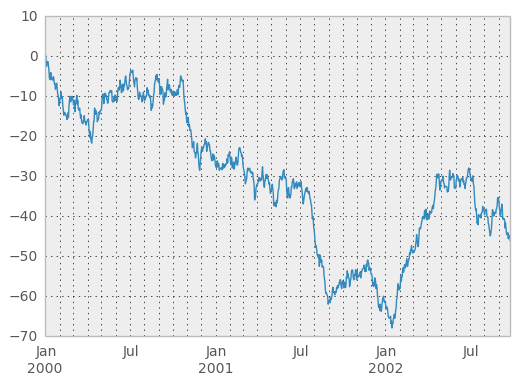
- What's the X axis unit of this chart?
- What's the ordering of the data?
---
## Key Pandas Function for Converting to Timestamp Objects:
```python
Signature: pd.to_datetime(arg, errors='raise', dayfirst=False, yearfirst=False, utc=None, box=True, format=None, exact=True, unit=None, infer_datetime_format=False, origin='unix', cache=False)
Docstring:
Convert argument to datetime.
```
1. Read in the dataset using `pd.read_csv()`
2. Use `pd.to_datetime(df['myColumn'])`
3. The returned `pd.Series` object will be converted to a Timestamp object!
---
## Things to Look Out For
**`to_datetime`** allows us to convert from string values to datetime values.
- Most of the time, it works very nicely
- At the end of the day, it's just a string parser
- Keep this in mind - always check the output column for `NaT` values
- These are values that `pd.to_datetime` isn't able to convert
- Make sure you have elegant, automated ways of handling/flagging these scenarios
- One example may be a separate column flag, and a backfill/forwardfill strategy
---
## Why Does This Matter?

- Storing datetime information in a database (dataframe) as a string:
- is very space inefficient
- doesn't allow us to easily _extract_ information from it (see 3NF image above)
- doesn't allow us to use linear algebra library (numpy!) advantages
- _Note_: Timestamp (datetime) pandas objects are numpy objects!
---
## Additional Resources
- Pandas [documentation](https://pandas.pydata.org/pandas-docs/stable/)
- DataSchool [30-video series](http://www.dataschool.io/easier-data-analysis-with-pandas/) (by a former GA instructor!)