---
## Learning Objectives
*After this lesson, you will be able to:*
- Use comparison and equality operators to evaluate and compare statements.
- Use `if`/`elif`/`else` conditionals to control program flow.
---
## Discussion: What Do You Notice?
Consider the following pseudocode for "French toast à la GA."
```
1) Dip the bread in eggs.
2) Cook the bread for 3 minutes on each side.
```
Now, consider this:
```
1) Dip the bread in eggs.
2) If the bread is thicker, dip the bread again until it's soaked through.
3) Cook the bread for 3 minutes.
4) Check if the bread is brown on the bottom. If not, keep cooking the bread.
5) Flip the bread, and repeat steps 3 and 4.
```
What do you notice?
---
## Saying "Yes" or "No"
```
- **If** the bread is thicker…
- **If** the bread is brown…
```
Goal: Programs need to make choices.
To do that, programs need to be able to say, "Is this bread thick? Yes or no?"
Question: How does a computer say "yes" or "no"?
---
## Boolean Values: The Foundation of Programming
"Yes" in computer is `True`.
"No" in computer is `False`.
This is the case in every programming language — it's specific to computers themselves.
These are called **Boolean values**.
- Is the bread sliced?
- `True`.
- Is the bread brown?
- `False`.
- Is 2 larger than 6?
- `False`.
- Is 6 larger than 2?
- `True`.
---
## Comparison and Logic in Programming
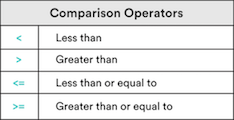
Now we can say "yes" or "no," but how do we ask the question?
The first way is with comparison operators.
How does a computer decide `True` or `False`?
---
## Comparison Types Practice
Check out these comparison operators. Why do you think the last one is `False`?
---
## Equality Operators: Equality (`==`)
- Accept any two types of data as inputs.
- Will only evaluate to `True` if both sides are completely identical in *data type and value*.
---
## Equality Operators: Inequality (`!=`):
- Will accept any two types of data as inputs.
- The reverse of the equality operator.
---
## Comparison Operators: Knowledge Check
What do you think the following will equal?
- `8 > 8`
- `8 >= 8`
- `8 <= 15`
- `7 != "7"`
- `6 == 7`
- `6 != 7`
---
## "Truthy" and "Falsey"
Something that's `True` is always **true**… right?
```
Yes, I totally cleaned my room. Just don't look under the bed…
```
Sometimes, we need "truthy" and "falsey." They're not explicitly `True` or `False`, but implicitly behave in the same way.
- Sometimes, `True` and `False` really mean, "Is there anything there?"
```python
"Hello, World!" # A non-empty string: Truthy / True.
13 # A non-zero number: Truthy / True.
"" # An empty string: Falsey / False.
0 # The number 0: Falsey / False.
```
---
## The Logical Operators: `or` and `and`
What if we need to check multiple things that must all be `True`?
```
To make a peanut butter and jelly sandwich, we need peanut butter, and jelly, and bread.
```
Or check multiple things and only one needs to be `True`?
```
To make a fruit salad, we only need oranges, or apples, or strawberries.
```
---
## The Logical Operators: `or`
"`or` checks if **either** comparison is `True`.
---
## The Logical Operators: `or` Truth Table
The `or` truth table:
```python
True or True
# => True
True or False
# => True
False or True
# => True
False or False
# => False
```
---
## The Logical Operators: `and`
`and` checks if **both** comparisons are `True`.
---
## The Logical Operators: `and` Truth Table
The `and` truth table:
```python
True and True
# => True
True and False
# => False
False and True
# => False
False and False
# => False
```
---
## Quick Review: Comparing Variables Using Operators
- When comparing, a computer always returns a Boolean value: `True` or `False`.
- We compare with operators like `<`, `<=`, `>`, `>=`, `==`, and `!=`.
- We can also use the logical operators `and` and `or`.
*Pro tip: Using only one equal (`=`) always assigns the variable!*
Up next: Conditionals.
---
## Conditionals: `if`
Do you remember this?
```
- **If** the bread is thicker…
- **If** the bread is brown…
```
How can we put that in a program?
```python
if the bread is thick
# print("Dunk the bread longer!")
# No matter what:
print("Finished dunking the bread")
```
---
## `if` Syntax
```python
if condition:
# Run these lines if condition is True.
# These lines are indented.
# Unindented things always happen.
```
---
## We Do: It's Too Hot In Here
Remember, in a We Do, you follow along!
Our goal: A temperature program that lets us know when it is too hot. We'll be using the Kelvin scale for our temperature.
- On your computer, open Atom and create a new file; save it as `control_flow.md`.
- Set up a temperature variable.
- **Type this; don't just copy!** The more practice you have typing it, the easier it will be to remember.
```python
temperature = 285
print("It's too hot!")
```
---
## We Do: Add an `if` Statement
That's not hot! Let's add an `if` statement:
```python
temperature = 285
if temperature > 299:
print("It's too hot!")
```
What about a higher temperature? Like `308`?
---
## We Do: The `else` Statement
What about printing a message for when it isn't too hot?
```python
if condition:
# Do something
else:
# Do something else
```
The `else` block is executed **only** if the `if` condition evaluates to `False`.
Let's try it:
```python
temperature = 308
if temperature > 299:
# If true, run this code block.
print("It's too hot!")
else:
# Otherwise, run this code block.
print("It's just right!")
```
---
## Discussion: Other Cases
What if it's too cold? We need more conditions.
```python
if temperature > 299:
# If it is too hot, run this code block.
print("It's too hot!")
# We want: Else if temperature < 40.
# We want: Print that it's too cold .
else:
# Otherwise, run this code block.
print("It's just right!")
```
What do you think we need?
---
## We Do: The `elif` Statement
That's where the `elif` ("else if") statement works its magic.
```python
temperature = 288
if temperature > 299:
print("It's too hot!")
elif temperature < 277:
print("It's too cold!")
else:
print("It's just right!")
```
---
## We Do: Adding More `elif`
We can have as many `elif` as we'd like, but only one `else`.
Let's change this up — remember, type this out for practice.
```python
temperature = 308
if temperature > 299:
print("It's too hot!")
elif temperature <= 299 and temperature > 288:
print("It's just right!")
elif temperature <= 288 and temperature > 277:
print("It's pretty cold!")
else:
print("It's freezing!")
```
---
## Thought Exercise
What do you think the following code will print? Why?
```python
foo = 5
bar = 1
if foo > 13:
print("Flip")
elif bar:
print("Flop")
else:
print("Fly")
```
---
## Partner Exercise: Even or Odd
Pair with a new partner. Decide who will drive and who will navigate.
Open a new file in Atom; save it as `check_even.py`.
In it, write a program that prints whether a number is even or odd.
Do you remember how to determine that?
- We can use the modulus operator (`%`) to check the remainder.
Here is some code to get you started:
```python
number = 10
remainder = number % 2
# For an even number, print "It's even!"
# For an odd number, print "It's odd!"
```
---
## Partner Exercise: `and` and `or`
Switch driver and navigator.
In a file (it can be the same one), write a program that compares two variables and prints out statements accordingly. Start here and follow this:
```python
x = 8
y = 0
a = "Hello!"
b = ""
# Check if x and b are both True. If they are, print "Both of these are true."
# Check if y or a is False. If one is, print "One of these is false."
# Check if either x or y is False. If one is, print out "One is false."
# Then, only if either x or y is False, check if x is greater than y. If it is, print out "x is greater than y."
```
---
## Summary: Boolean Values and Operators
We've started control flow — changing what our program does based on a decision. We used:
**Boolean values**
- `True` and `False`.
- The corresponding "truthy" and "falsey".
**Conditional operators**
- Comparison: `<`, `>`, `<=`, and `>=`.
- Equality: `==` and `!=`.
**Logical operators**: `all` and `or`
* `or` evaluates to `True` if **any** of the comparisons are `True`.
* `and` evaluates to `True` only if **all** of the comparisons are `True.`
---
## Summary and Q&A
Then, we went into `if` and `else`:
"**If** your toast is thick, dip the bread for longer, **else** do not."
* `if`: Use only as the first conditional operator.
* `elif`: Adds multiple comparisons to your `if` blocks.
* `else`: Use only at the end of your code block, for if the previous conditional tests are `False`.