---
## Lesson Objectives
*After this lesson, you will be able to...*
* Troubleshoot common types of errors.
* Implement basic exception mitigation.
* Troubleshoot logic errors.
---
## Discussion: Error Messages
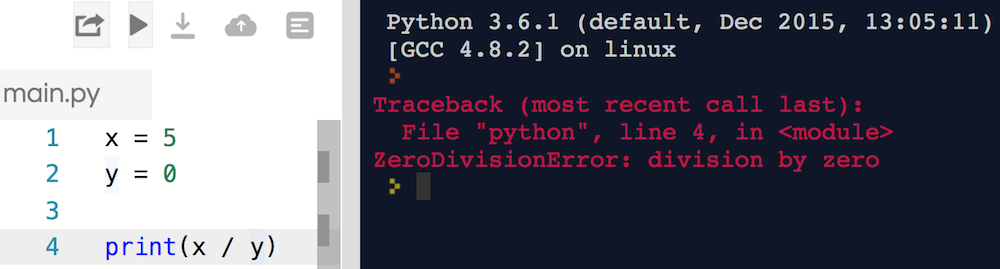
Have you found a shiny red error message before? What do you think has happened here?
---
## Making Errors Into Friends
On the surface, errors are frustrating! However, we'll walk through some common ones. You'll see:
- Errors sometimes say exactly what's wrong.
- Some errors have very common causes.
- Errors may say exactly how to fix the issue.
- Python errors are very helpful and have clear messages.
With that in mind - what's the problem with this code?

---
## We Do: IndexError
Let's debug this code together.
**Protip**: Index errors typically happen when you attempt to access a list index that doesn't exist.
---
## You Do: Fix a NameError
Directions: Fix it!
*Hints*:
- Run the code to get the error.
- What kind of error is it? What is the error message?
---
## KeyError
Accessing a key in a dictionary that doesn't exist.
Commonly caused by:
- A misspelling.
- Mixing uppercase and lowercase.
The error message tells you exactly what key is missing!
---
## AttributeError
* More general than `KeyError`, but the same idea.
* Accessing an attribute (e.g., function or property) that doesn't exist
---
## Discussion: SyntaxError
Let's run the code together. What happens? How can we fix it?
---
## Discussion: TypeError
`TypeError` and its message tell us:
```python
my_num = 5 + "10"
print(my_num)
# TypeError: unsupported operand type(s) for +: 'int' and 'str'
```
What do we learn from this error message? Have you learned a way to fix this?
**Fun Fact**: Some languages, like JavaScript, let this code run (breaking something!).
---
## IndentationError
May be caused by:
* Notenoughindentation
* Mismatched indentation
* Mixing tabs and spaces!
---
## ValueError
Most commonly caused by trying to convert a bad string into a number.
```python
# This is okay!
my_num = int("10")
# This throws a ValueError
my_num = int("Moose")
```
---
## RuntimeError
The worst error to see!
* When no other error type fits.
* You need to rely on the error message content.
* May be used for custom errors.
**Example**: `RuntimeError` is like if I said to you:
```
Please eat the piano
```
You can understand what's being asked, but can't actually do that!
---
## Quick Review
There are many types of errors in Python!
Usually, the error has a name or description that says exactly what's wrong.
Think about `IndentationError` or `IndexError` - what went wrong?
Sometimes, you'll see `RuntimeError`. Python throws us this if something is broken but it can't say specifically what - like `Please eat the piano`. Revisit your code and see what might have happened.
**Next Up:** A list of common errors, then ways to prevent errors.
---
## List of Common Errors
This chart's for you to refer to later - don't memorize it now!
| Error Type | Most Common Cause |
| --- | ---|
| `AttributeError` | Attempting to access a non-existent attribute |
| `KeyError` | Attempting to access a non-existent key in a dict |
| `ImportError` | A module you tried to import doesn't exist |
| `IndexError` | You attempted to access a list element that doesn't exist |
| `IndentationError` | Indenting code in an invalid way |
| `IOError` | Accessing a file that doesn't exist |
| `NameError` | Attempting to use a module you haven't imported/installed |
| `OverflowError` | You made a number larger than the maximum size |
| `RuntimeError` | The error doesn't fit into any other category |
| `SyntaxError` | A typo, such as forgetting a colon |
| `TypeError` | Using two different types in an incompatible way |
| `ValueError` | When you are trying to convert bad keyboard input to a number |
| `ZeroDivisionError` | Dividing By Zero |
---
## Discussion: Throwing Errors
Sometimes, we might have code that we expect to throw an error.
```python
# The user might not give us a number!
my_num = int(input("Please give me a number:"))
```
What if the user types a string like "Moose"?
- This causes a `ValueError` - we'll be trying to make an int out of a string "Moose".
- We can anticipate and prepare for it!
---
## Try-Except
A `Try`-`Except` block is the way we can catch errors in Python. We can catch:
- One error (`except ValueError:`)
- Multiple errors (`except (ValueError, KeyError):`)
- Any/every error (`except:`)
Always try to specify the error, if possible!
---
## Discussion: Switching Gears
Not every programming error is caught by an error message!
* Can anyone say what is wrong with this code?
* What might happen if you run it?
**Do not try to run the below code**.
```python
my_num = 1
while my_num < 10:
print(my_num)
my_num + 1
```
---
## Discussion: Another Infinite Loop
It's easy to accidentally make an infinite loop. What's the problem here?
```python
am_hungry = True
fridge_has_food = True
while am_hungry or fridge_has_food:
print("Opening the fridge!")
am_hungry = False
```
---
## Infinite Infinite Loops!
Most common infinite loops are a result of:
* A `while` loop's condition never becomes `False`.
* Forgetting to increment a counter variable.
* Logic inside the loop that restarts the loop.
* Bad logic in a `while` loop's condition (e.g., putting `or` instead of `and`)
Be careful to check your end conditions!
If you find your program running endlessly, hit `control-c` in the terminal window to stop it!
---
## Discussion: Logic Error
Here, we want to find the average of `8` and `10`. The answer should be `9`, because `8 + 10 == 18`, then `18 / 2 == 9`
What happened and why?
---
## Quick Review: Common Errors
- If you expect an error, use a try/except block:
```python
my_num = None
while my_num is None:
try:
my_num = int(input("Please give me a number:"))
except ValueError as err:
print("That was not good input, please try again!")
print("Error was", err)
print("Thanks for typing the number", my_num)
```
- Logic problems are common but won't throw a helpful error. Always check end conditions on your `while` loops!
---
## Print Statements for Sanity Checks
**Pro Tip**: If something is wonky and you don't know why, starting `print`ing.
* Use `print` statements on each line to peek at the values.
* Remember to remove debugging statements once the problem is solved!
```python
x = 8
y = 10
get_average = x + y / 2
print("get_average is", get_average) # Print out what this equals (it's wrong!)
testing_sum = x + y # To figure out why, break it down.
print("testing_sum is", testing_sum) # Print out each step.
testing_average = testing_average / 2
print("testing_average is", testing_average) # The individual math test works
# We know there must be a problem with the logic in "average"
```
When your programs become very complex, adding `print` statements will be a great help.
---
## You Do: Wrapping it Up
Can you fix the code below?
---
## Summary and Q&A
* Python has many common built-in errors.
* Use `try`-`except` syntax to catch an expected error.
* Logic issues don't throw errors, so be careful!
* Use `print` statements to walk through your code line-by-line.
---
## Additional Resources
* [List of Built-In Errors](https://www.tutorialspoint.com/python/standard_exceptions.htm)
* [Error Flowchart PDF](https://www.dropbox.com/s/cqsxfws52gulkyx/drawing.pdf)
* [Try-Except Documentation](http://www.pythonforbeginners.com/error-handling/python-try-and-except)
- [A deep dive into try/except clauses](https://jeffknupp.com/blog/2013/02/06/write-cleaner-python-use-exceptions/)
- To get advanced, add [logging](https://fangpenlin.com/posts/2012/08/26/good-logging-practice-in-python/) to your code.
- To get very advanced, include [unit tests](http://www.diveintopython.net/unit_testing/index.html); the [pytest module](http://pythontesting.net/framework/pytest/pytest-introduction/) is great.