
You can not select more than 25 topics
Topics must start with a letter or number, can include dashes ('-') and can be up to 35 characters long.
475 lines
13 KiB
475 lines
13 KiB
|
|
# coding: utf-8
|
|
|
|
# # Pandas for Exploratory Data Analysis I
|
|
#
|
|
# Pandas is the most prominent Python library for exploratory data analysis (EDA). The functions Pandas supports are integral to understanding, formatting, and preparing our data. Formally, we use Pandas to investigate, wrangle, munge, and clean our data. Pandas is the Swiss Army Knife of data manipulation!
|
|
#
|
|
#
|
|
# We'll have two coding-heavy sessions on Pandas. In this one, we'll use Pandas to:
|
|
# - Read in a dataset
|
|
# - Investigate a dataset's integrity
|
|
# - Filter, sort, and manipulate a DataFrame's series
|
|
|
|
# *An important message from our sponsor before going further:*
|
|
|
|
# 
|
|
|
|
# ## About the Dataset: Iowa Liquor
|
|
#
|
|
# For today's Pandas exercises, we will be using a real dataset from the state of Iowa government on liquor sales. Due to state licensing laws, stores must report daily transactions of all alcohol they sell to the Iowa Department of Commerce's Alcoholic Beverages Division. The state of Iowa makes this data available for analysis -- and it is an excellent, structured dataset for our use!
|
|
#
|
|
# Take a look at the data source [page](https://data.iowa.gov/Economy/Iowa-Liquor-Sales/m3tr-qhgy).
|
|
#
|
|
|
|
# Let's take a closer look at the data dictionary, or what is included:
|
|
# - **Invoice/Item Number** - Concatenated invoice and line number associated with the liquor order. This provides a unique identifier for the individual liquor products included in the store order
|
|
# - **Date** - Date of order
|
|
# - **Store Number** - Unique number assigned to the store who ordered the liquor.
|
|
# - **Store Name** - Name of store who ordered the liquor.
|
|
# - **Address** - Address of the store that ordered the liquor
|
|
# - **City** - City where the store who ordered the liquor is located
|
|
# - **Zip Code** - Zip Code of where the store that ordered is located
|
|
# - **Store Location** - Location of store who ordered the liquor. The Address, City, State and Zip Code are geocoded to provide geographic coordinates. Accuracy of geocoding is dependent on how well the address is interpreted and the completeness of the reference data used.
|
|
# - **County Number** - Iowa county number for the county where store who ordered the liquor is located
|
|
# - **County** - County where the store who ordered the liquor is located
|
|
# - **Category** - Category code associated with the liquor ordered
|
|
# - **Category Names** - Category of the liquor ordered.
|
|
# - **Vendor Number** - The vendor number of the company for the brand of liquor ordered
|
|
# - **Vendor Name** - The vendor name of the company for the brand of liquor ordered
|
|
# - **Item Name** - Item number for the individual liquor product ordered.
|
|
# - **Item Description** - Description of the individual liquor product ordered.
|
|
# - **Pack** - The number of bottles in a case for the liquor ordered
|
|
# - **Bottle Volume (mL)** - Volume of each liquor bottle ordered in milliliters.
|
|
# - **State Bottle Cost** - The amount that Alcoholic Beverages Division paid for each bottle of liquor ordered
|
|
# - **State Bottle Retail** - The amount the store paid for each bottle of liquor ordered
|
|
# - **Bottles Solde** - The number of bottles of liquor ordered by the store
|
|
# - **Sale (Dollars)** - Total cost of liquor order (number of bottles multiplied by the state bottle retail)
|
|
# - **Volume Sold (Liters)** - Total volume of liquor ordered in liters. (i.e. (Bottle Volume (ml) x Bottles Sold)/1,000)
|
|
# - **Volume Sold (Gallons)** - Total volume of liquor ordered in gallons. (i.e. (Bottle Volume (ml) x Bottles Sold)/3785.411784)
|
|
#
|
|
|
|
# ### Our Modified Iowa Liquor Dataset
|
|
#
|
|
# Because the full dataset (of all liquor sales from 2012 to present) is greater than 13 million rows (13,948,103+ at the time of writing), **we will work with a modified dataset.**
|
|
#
|
|
# Our modified dataset has a few key changes:
|
|
# - Only sales from May 2017 and May 2018 are present
|
|
# - A number of values have been deliberately deleted (to practice working with missing data!)
|
|
#
|
|
|
|
# ## Importing Pandas
|
|
#
|
|
# To import a library, we simply say `import` and the library name. For Pandas, is it common to name the library `pd` so that when we reference a function from the Pandas library, we only write `pd` -- not `pandas`.
|
|
|
|
# In[1]:
|
|
|
|
|
|
import pandas as pd
|
|
|
|
|
|
# ## Reading in Data
|
|
#
|
|
# Pandas dramatically simplifies the process of reading in data. When we say "reading in data," we mean loading a file into our machine's memory.
|
|
#
|
|
# When you have a CSV, for example, and then you double-click to open it in Microsoft Excel, the open file is "read into memory." You can now manipulate the CSV.
|
|
#
|
|
# When we read data into memory in Python, we are creating an object. We will soon explore this object. _(And, as an aside, when we have a file that is greater than the size of our computer's memory, this is approaching "Big Data.")_
|
|
|
|
# Because we are working with a CSV, we will use the [read CSV](https://pandas.pydata.org/pandas-docs/stable/generated/pandas.read_csv.html) method. (Note: reading other formats are supported)
|
|
|
|
# In[2]:
|
|
|
|
|
|
# pd refers to "Pandas" (specific encoding for this file -- non-essential for others)
|
|
liq = pd.read_csv("../data/iowa_liquor_may_17_18.csv", encoding='cp1252')
|
|
|
|
|
|
# *Documentation Pause*
|
|
#
|
|
# How did we know how to use `pd.read_csv`? Let's take a look at the [documentation](https://pandas.pydata.org/pandas-docs/stable/generated/pandas.read_csv.html). Note the first argument required (`filepath`).
|
|
# > Take a moment to dissect other arguments and options when reading in data.
|
|
|
|
# We have just created a data structure called a `DataFrame`. See?
|
|
|
|
# In[3]:
|
|
|
|
|
|
type(liq)
|
|
|
|
|
|
# ## Inspecting our DataFrame: The basics
|
|
#
|
|
# We'll now perform basic operations on the DataFrame, denoted with comments.
|
|
|
|
# In[4]:
|
|
|
|
|
|
# print the first and last 30 rows
|
|
liq
|
|
|
|
|
|
# In[5]:
|
|
|
|
|
|
# print the first five rows
|
|
liq.head()
|
|
|
|
|
|
# Notice that `.head()` is a method (denoted by parantheses), so it takes arguments.
|
|
|
|
# **Class Question:** What do you think changes if we pass a different number `head()` argument?
|
|
|
|
# In[6]:
|
|
|
|
|
|
# try 10 as an argument
|
|
liq.head(10)
|
|
|
|
|
|
# In[7]:
|
|
|
|
|
|
# print the last five rows
|
|
liq.tail()
|
|
|
|
|
|
# In[8]:
|
|
|
|
|
|
# identify the shape (rows by columns)
|
|
liq.shape
|
|
|
|
|
|
# Wow! hundreds of thousands of rows rows and tens of columns!
|
|
|
|
# In[9]:
|
|
|
|
|
|
# display the index
|
|
liq.index
|
|
|
|
|
|
# In[10]:
|
|
|
|
|
|
# print the columns
|
|
liq.columns
|
|
|
|
|
|
# In[11]:
|
|
|
|
|
|
# examine the datatypes of the columns
|
|
liq.dtypes
|
|
|
|
|
|
# **Class Question:** Why do datatypes matter? What operations could we perform on some datatypes that we could not on others? Note the importance of this in checking dataset integrity.
|
|
|
|
# ## Selecting a Columns
|
|
#
|
|
# We can select columns in two ways. Either we treat the column as an attribute of the DataFrame or we index the DataFrame for a specific element (in this case, the element is a column name).
|
|
|
|
# In[12]:
|
|
|
|
|
|
# select the county column
|
|
liq['County']
|
|
|
|
|
|
# In[13]:
|
|
|
|
|
|
# this is equivalent
|
|
liq.County
|
|
|
|
|
|
# **Class Question:** What if we wanted to select a column that has a space in it? Which method from the above two would we use? Why?
|
|
|
|
# ## Renaming Columns
|
|
#
|
|
# Perhaps we want to rename our columns, like replacing spaces with underscores. There's a few options for doing this.
|
|
|
|
# In[14]:
|
|
|
|
|
|
# rename one or more columns with a dictionary. Note: inplace = True
|
|
liq.rename(columns={'Store Number': 'Store_Number', 'Store Name':'Store_Name'}, inplace=True)
|
|
|
|
|
|
# In[15]:
|
|
|
|
|
|
# check the result
|
|
liq.head()
|
|
|
|
|
|
# Bulk rename columns with a list of new column names.
|
|
|
|
# In[16]:
|
|
|
|
|
|
liq.columns
|
|
|
|
|
|
# In[17]:
|
|
|
|
|
|
# declare a list of strings - these strings will become the new column names
|
|
cols = ['date', 'store_number', 'store_name', 'city',
|
|
'zip_code', 'location', 'county', 'category_name',
|
|
'vendor_name', 'item_number', 'item_description', 'pack',
|
|
'bottle_vol_ml', 'state_bottle_cost', 'state_bottle_retail', 'bottles_sold',
|
|
'sale', 'volumne_sold_l', 'volume_sold_gal', 'is_may_2017', 'is_may_2018']
|
|
|
|
|
|
# In[18]:
|
|
|
|
|
|
# use that list to rename our columns - inplace by default
|
|
liq.columns = cols
|
|
|
|
|
|
# In[19]:
|
|
|
|
|
|
# check out the result!
|
|
liq.head()
|
|
|
|
|
|
# ## Notable Column Operations
|
|
#
|
|
# While this is non-comprehensive, these are a few key column-specific data checks.
|
|
#
|
|
|
|
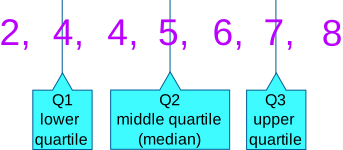
# **Five-number summary:** the minimum, first quartile, median, third quartile, and maximum.
|
|
#
|
|
# (And more! The mean too.)
|
|
|
|
# Five Number Summary (all assumes numeric data):
|
|
# - **Min:** The smallest value in the column
|
|
# - **Max:** The largest value in the column
|
|
# - **Quartile:** A quartile is one fourth of our data
|
|
# - **First quartile:** This is the bottom most 25 percent
|
|
# - **Median:** The middle value. (Line all values biggest to smallest - median is the middle!) Also the 50th percentile
|
|
# - **Third quartile:** This the the top 75 percentile of our data
|
|
#
|
|
|
|
# 
|
|
|
|
# In[20]:
|
|
|
|
|
|
# note - describe *default* only checks numeric datatypes
|
|
liq.describe()
|
|
|
|
|
|
# > To yourself: consider the **skew** of your series. When does the mean differ significantly from the median? Why does this matter?
|
|
|
|
# In[21]:
|
|
|
|
|
|
# enrichment
|
|
# liq.describe(include='all')
|
|
|
|
|
|
# **Value Counts:** count the occurrence of each value within our series.
|
|
|
|
# In[22]:
|
|
|
|
|
|
liq.columns
|
|
|
|
|
|
# In[23]:
|
|
|
|
|
|
# show the most frequent store purchasers
|
|
liq.store_name.value_counts()
|
|
|
|
|
|
# In[24]:
|
|
|
|
|
|
# same thing - but only top 10 using splicing we learned in days 1-3
|
|
liq.store_name.value_counts()[:10]
|
|
|
|
|
|
# **Unique values:** Determine the number of distinct values within a given series.
|
|
|
|
# In[25]:
|
|
|
|
|
|
# how many distinct stores are there in Iowa?
|
|
liq.store_name.nunique()
|
|
|
|
|
|
# In[26]:
|
|
|
|
|
|
# what are those stores called? (notice: too many to print them all!)
|
|
liq.store_name.unique()
|
|
|
|
|
|
# ## Filtering
|
|
#
|
|
# Filtering and sorting are key processes that allow us to drill into the 'nitty gritty' and cross sections of our dataset.
|
|
#
|
|
# To filter, we use a process called **Boolean Filtering**, wherein we define a Boolean condition, and use that Boolean condition to filer on our DataFrame.
|
|
|
|
# Recall: our given dataset has a column `is_may_2017` when a given sale occurred in the month of May 2017. The column is equal to 1 when the sale did occur in May 2017, and zero otherwise (which means it occurred in May 2018 as those are the only two months in our dataset).
|
|
|
|
# Let's calculate the **average pack size** for sales in May 2017.
|
|
|
|
# > Think: What are the component parts of this problem?
|
|
|
|
# In[27]:
|
|
|
|
|
|
# First, create a Boolean filter for is_may_2017
|
|
liq.is_may_2017 == 1
|
|
|
|
|
|
# In[28]:
|
|
|
|
|
|
# use that Boolean filter to index the DataFrame, only printing rows where True
|
|
liq[liq.is_may_2017 == 1]
|
|
|
|
|
|
# Great! This DataFrame is only sales in May 2017!
|
|
#
|
|
# Now, we need to calculate the average pack size of this DataFrame.
|
|
|
|
# In[29]:
|
|
|
|
|
|
# get the pack column data...
|
|
liq[liq.is_may_2017 == 1].pack
|
|
|
|
|
|
# In[30]:
|
|
|
|
|
|
# now calculate the average!
|
|
liq[liq.is_may_2017 == 1].pack.describe()
|
|
|
|
|
|
# **The average pack size for sales in May 2017 is 12.41!**
|
|
|
|
# ## Sorting
|
|
#
|
|
# We can sort one column of our DataFrame as well.
|
|
|
|
# In[31]:
|
|
|
|
|
|
# let's sort by largest bottles in a single day
|
|
liq.sort_values(by='bottles_sold', ascending = False)
|
|
|
|
|
|
# In[32]:
|
|
|
|
|
|
# let's sort by largest bottles in a single day - but just the top 10
|
|
liq.sort_values(by='bottles_sold', ascending = False).head(10)
|
|
|
|
|
|
# ## Independent Exercises
|
|
#
|
|
# Do your best to complete the following prompts. Don't hesitate to look at code we wrote together!
|
|
|
|
# Print the first 15 rows of the whole DataFrame.
|
|
|
|
# In[33]:
|
|
|
|
|
|
# your answer here
|
|
liq.head(15)
|
|
|
|
|
|
# Identify the average number of bottles sold.
|
|
|
|
# In[34]:
|
|
|
|
|
|
# your answer here
|
|
liq.bottles_sold.describe()
|
|
|
|
|
|
# In[35]:
|
|
|
|
|
|
# option 2
|
|
liq.bottles_sold.mean()
|
|
|
|
|
|
# Identify unique number of pack sizes.
|
|
|
|
# In[36]:
|
|
|
|
|
|
# your answer here
|
|
liq.pack.nunique()
|
|
|
|
|
|
# Determine the average volume sold (in gallons) in May 2018.
|
|
|
|
# In[37]:
|
|
|
|
|
|
# your answer here
|
|
liq[liq.is_may_2018 == 1].volume_sold_gal.describe()
|
|
|
|
|
|
# **Challenge:** Identify the top store (as measured by `bottles_sold`) in Johnson County.
|
|
|
|
# In[38]:
|
|
|
|
|
|
# your answer here
|
|
liq[liq.county == 'JOHNSON'].sort_values(by='bottles_sold', ascending = False).head(1)
|
|
|
|
|
|
# ## Recap
|
|
#
|
|
# We covered a lot of ground! It's ok if this takes a while to gel.
|
|
#
|
|
# ```python
|
|
#
|
|
# # basic DataFrame operations
|
|
# df.head()
|
|
# df.tail()
|
|
# df.shape
|
|
# df.columns
|
|
# df.Index
|
|
#
|
|
# # selecting columns
|
|
# df.column_name
|
|
# df['column_name']
|
|
#
|
|
# # renaming columns
|
|
# df.rename({'old_name':'new_name'}, inplace=True)
|
|
# df.columns = ['new_column_a', 'new_column_b']
|
|
#
|
|
# # notable columns operations
|
|
# df.describe() # five number summary
|
|
# df.column_name.nunique() # number of unique values
|
|
# df.column_name.value_counts() # number of occurrences of each value in column
|
|
#
|
|
# # filtering
|
|
# df[df.column_name < 50] # filter column to be less than 50
|
|
#
|
|
# # sorting
|
|
# df.sort_values(by='column_name', ascending = False) # sort biggest to smallest
|
|
#
|
|
# ```
|
|
#
|
|
#
|
|
# It's common to refer back to your own code *all the time.* Don't hesistate to reference this guide!
|
|
#
|
|
#
|
|
#
|
|
#
|
|
#
|