
# WDI-PANTHALASSA
---
Title: Cyper & Shuffler
Type: Homework
Duration: "4:00"
Creator:
Original creator: Thom Page for WDI-Meeseeks
Modified by: Kristyn Bryan
Course: WDIr Panthalassa
Competencies: Basic Angular
Prerequisites: Angular, Javascript, HTML, CSS
---
## Part 1
## CAESAR CIPHER
### Angular js basics
## APP
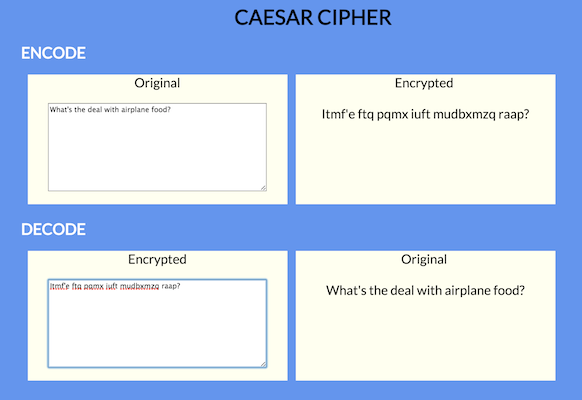
Make a Caesar Cipher page that takes an input and encodes it with a Caesar Cipher and and displays the encoded input while the user is typing. (no submit button).
Also make it so the user can decode an encoded message.
### ANGULAR DIRECTIVES
- `ng-keyup`
- `ng-model`
### CAESAR CIPHER
https://en.wikipedia.org/wiki/Caesar_cipher
You can put this Caesar Cipher code in a separate js file (before your main `app.js`), and then reference the `caesarShift` function in your angular controller.
In the example in the above image, the `amount` is set to `12` for encoding, and `-12` for decoding.
```
var caesarShift = function(str, amount) {
// Wrap the amount
if (amount < 0)
return caesarShift(str, amount + 26);
// Make an output variable
var output = '';
// Go through each character
for (var i = 0; i < str.length; i ++) {
// Get the character we'll be appending
var c = str[i];
// If it's a letter...
if (c.match(/[a-z]/i)) {
// Get its code
var code = str.charCodeAt(i);
// Uppercase letters
if ((code >= 65) && (code <= 90))
c = String.fromCharCode(((code - 65 + amount) % 26) + 65);
// Lowercase letters
else if ((code >= 97) && (code <= 122))
c = String.fromCharCode(((code - 97 + amount) % 26) + 97);
}
// Append
output += c;
}
// All done!
return output;
};
```
## Part 2
##SONG LYRICS SHUFFLER
### INTRO TO ANGULARJS BASICS
#### App
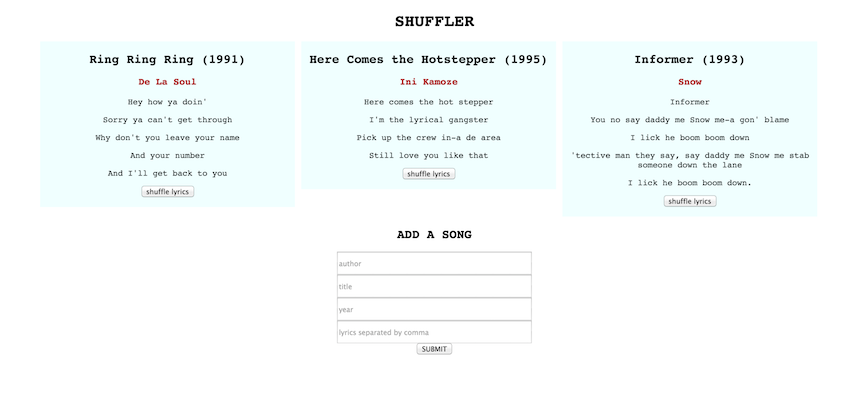
You will make a static page that displays songs with the song title, author, year, and lyrics. For no really good reason other than to practise `ng-click` and execute controller functions, you will be able to shuffle the order of the lyrics by clicking a shuffle button, as well as hide/show the song by clicking on the title.
Ultimately, you can add new songs to the page.
Sample screenshot:
#### The app should:
- Display song titles, authors, years, and lyrics line by line
- Hide / show the song by clicking on the title (the title does not get hidden 'cos you still have to click on it to show the song again)
- Shuffle the lyrics by pressing a shuffle button
- Add a new song
- When entering lyrics, the user should separate the lines of lyrics with a comma. **HINT FOR LATER** when the form is submitted, the app could `split` the lines by comma for use in an array
#### Set up - you will need:
- `index.html`
- `app.js`
- `style.css` if you want to add some style
Server and database will be introduced tomorrow
#### Angular stuff you will probably want:
#####Display songs
- A link to Angular 1.5 from https://angularjs.org/
- module / `ng-app`
- controller / `ng-controller`
- `ng-repeat` ( you might want to include a `track by $index` in the directive params, but if you don't need to, then don't)
- `ng-click` (hint: you can pass in $index as a param)
- `ng-if` or alternatively, `ng-hide` and/or `ng-show`
- curlies `{{ }}`
#####Add a song
- a form with an `ng-submit`
- inputs that rout to `ng-model`s which could be inside a formdata object in the controller maybe.
Overall, you will need data and functions in your controller.
#####Sample data
```
this.songs = [
{
author: "De La Soul",
title: "Ring Ring Ring",
lyrics: [
"Hey how ya doin'",
"Sorry ya can't get through",
"Why don't you leave your name",
"And your number",
"And I'll get back to you"
],
year: 1991,
hidden: false
}, {
author: "Ini Kamoze",
title: "Here Comes the Hotstepper",
lyrics: [
"Here comes the hot stepper",
"I'm the lyrical gangster",
"Pick up the crew in-a de area",
"Still love you like that"
],
year: 1995,
hidden: false
}, {
author: "Snow",
title: "Informer",
lyrics: [
"Informer",
"You no say daddy me Snow me-a gon' blame",
"I lick he boom boom down",
"'tective man they say, say daddy me Snow me stab someone down the lane",
"I lick he boom boom down."
],
year: 1993,
hidden: false
}
];
```
#####Shuffle function
Pass in an array and the shuffle function will randomize the order of the elements
```
function shuffle(a) {
var j, x, i;
for (i = a.length; i; i -= 1) {
j = Math.floor(Math.random() * i);
x = a[i - 1];
a[i - 1] = a[j];
a[j] = x;
}
return a;
}
```