
 Kristyn Bryan
972931fa7b
Kristyn Bryan
972931fa7b
|
10 years ago | |
|---|---|---|
| .. | ||
| cipher_solution | 10 years ago | |
| songs_solution | 10 years ago | |
| .gitkeep | 11 years ago | |
| README.md | 10 years ago | |
| caesar_cipher_angular.md | 10 years ago | |
| cipherpage.png | 10 years ago | |
| screenshot.png | 10 years ago | |
| songs_shuffler_angular.md | 10 years ago | |


README.md

WDI-PANTHALASSA
Title: Cyper & Shuffler
Type: Homework
Duration: "4:00"
Creator:
Original creator: Thom Page for WDI-Meeseeks
Modified by: Kristyn Bryan
Course: WDIr Panthalassa
Competencies: Basic Angular
Prerequisites: Angular, Javascript, HTML, CSS
Part 1
CAESAR CIPHER
Angular js basics
APP
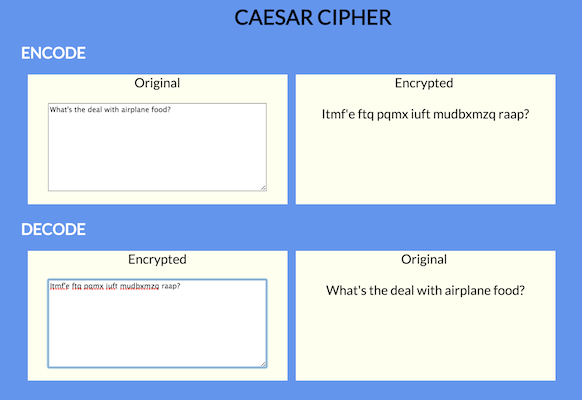
Make a Caesar Cipher page that takes an input and encodes it with a Caesar Cipher and and displays the encoded input while the user is typing. (no submit button).
Also make it so the user can decode an encoded message.
ANGULAR DIRECTIVES
ng-keyupng-model
CAESAR CIPHER
https://en.wikipedia.org/wiki/Caesar_cipher
You can put this Caesar Cipher code in a separate js file (before your main app.js), and then reference the caesarShift function in your angular controller.
In the example in the above image, the amount is set to 12 for encoding, and -12 for decoding.
var caesarShift = function(str, amount) {

	// Wrap the amount
	if (amount < 0)
		return caesarShift(str, amount + 26);

	// Make an output variable
	var output = '';

	// Go through each character
	for (var i = 0; i < str.length; i ++) {

		// Get the character we'll be appending
		var c = str[i];

		// If it's a letter...
		if (c.match(/[a-z]/i)) {

			// Get its code
			var code = str.charCodeAt(i);

			// Uppercase letters
			if ((code >= 65) && (code <= 90))
				c = String.fromCharCode(((code - 65 + amount) % 26) + 65);

			// Lowercase letters
			else if ((code >= 97) && (code <= 122))
				c = String.fromCharCode(((code - 97 + amount) % 26) + 97);

		}

		// Append
		output += c;

	}

	// All done!
	return output;

};
Part 2
##SONG LYRICS SHUFFLER
INTRO TO ANGULARJS BASICS
App
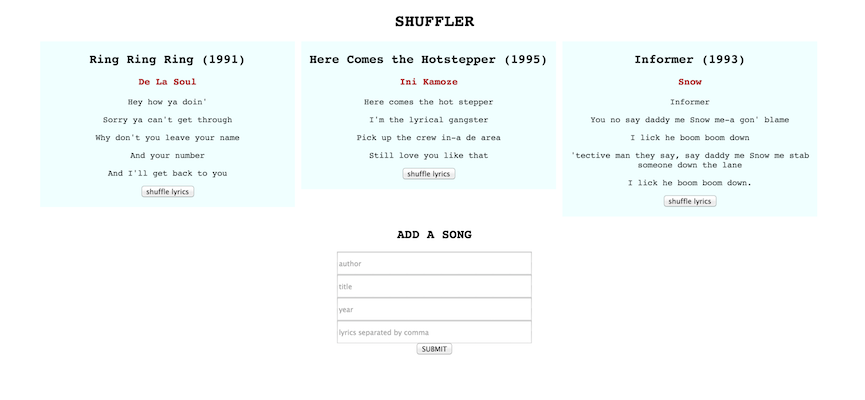
You will make a static page that displays songs with the song title, author, year, and lyrics. For no really good reason other than to practise ng-click and execute controller functions, you will be able to shuffle the order of the lyrics by clicking a shuffle button, as well as hide/show the song by clicking on the title.
Ultimately, you can add new songs to the page.
Sample screenshot:
The app should:
- Display song titles, authors, years, and lyrics line by line
- Hide / show the song by clicking on the title (the title does not get hidden 'cos you still have to click on it to show the song again)
- Shuffle the lyrics by pressing a shuffle button
- Add a new song
- When entering lyrics, the user should separate the lines of lyrics with a comma. HINT FOR LATER when the form is submitted, the app could
splitthe lines by comma for use in an array
- When entering lyrics, the user should separate the lines of lyrics with a comma. HINT FOR LATER when the form is submitted, the app could
Set up - you will need:
index.htmlapp.jsstyle.cssif you want to add some style
Server and database will be introduced tomorrow
Angular stuff you will probably want:
#####Display songs
- A link to Angular 1.5 from https://angularjs.org/
- module /
ng-app - controller /
ng-controller ng-repeat( you might want to include atrack by $indexin the directive params, but if you don't need to, then don't)ng-click(hint: you can pass in $index as a param)ng-ifor alternatively,ng-hideand/orng-show- curlies
{{ }}
#####Add a song
- a form with an
ng-submit - inputs that rout to
ng-models which could be inside a formdata object in the controller maybe.
Overall, you will need data and functions in your controller.
#####Sample data
this.songs = [
  {
	author: "De La Soul",
    title: "Ring Ring Ring",
	lyrics: [
		      "Hey how ya doin'",
	          "Sorry ya can't get through",
			  "Why don't you leave your name",
			  "And your number",
			  "And I'll get back to you"
			],
	year: 1991,
	hidden: false
  }, {
	author: "Ini Kamoze",
	title: "Here Comes the Hotstepper",
	lyrics: [
			  "Here comes the hot stepper",
			  "I'm the lyrical gangster",
			  "Pick up the crew in-a de area",
			  "Still love you like that"
	        ],
	year: 1995,
	hidden: false
   }, {
		author: "Snow",
		title: "Informer",
		lyrics: [
				  "Informer",
				  "You no say daddy me Snow me-a gon' blame",
				  "I lick he boom boom down",
				  "'tective man they say, say daddy me Snow me stab someone down the lane",
			      "I lick he boom boom down."
			    ],
				  year: 1993,
				  hidden: false
   }
];
#####Shuffle function Pass in an array and the shuffle function will randomize the order of the elements
	  function shuffle(a) {
	    var j, x, i;
	    for (i = a.length; i; i -= 1) {
	        j = Math.floor(Math.random() * i);
	        x = a[i - 1];
	        a[i - 1] = a[j];
	        a[j] = x;
	    }
    	return a;
	  }