
You can not select more than 25 topics
Topics must start with a letter or number, can include dashes ('-') and can be up to 35 characters long.
7.6 KiB
7.6 KiB

Pandas Joining
Learning Objectives
After this lesson, you will be able to:
- Concatenate objects with
.append()and.concat(). - Combine objects with
.join()and.merge(). - Combine timeseries objects with
.merge_ordered(). - Traditionally, this functionality is performed in a relational database, such as SQL.
- With Pandas, you'll be able to perform the same operations in Python! The backend is numpy, a powerful linear algebra library which helps keep things speedy.
To the Notebook!
We actually will commence this lesson directly in the Jupyter Notebook, pandas-join.ipynb, to walk through the what, why, and how all at once.
Here we have slides reviewing the key concepts.
What is Joining?
- Joining is the process of taking a single dataframe and combining it with another dataframe.
- Traditionally, this would be done with SQL.
- SQL is database designed and optimized to distribute data across many tables.
Why Join?
- Joining is important because:
- It allows us to reduce the size of a database.
- It allows us to increase the speed at which data is queried and returned.
- It allows us to reduce the redundancy of the data stored in the database.
- Joining is fundamental to proper data architecture, and we'll get to do it in Pandas!
Why Use Pandas for Joining Then?

- Pandas is based upon numpy, a linear algebra library.
- Using it for joins makes sense - the algorithms are optimized and fast.
- This allows allows us to use 'python only' - avoiding integrations to SQL.
- This makes data analysis faster as we don't need to switch tools.
- Longer term, code may be delegated to more specific tools (SQL, Spark, etc.).
What Does a SQL Join Look Like?
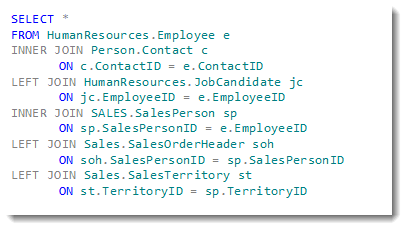
- A SQL join looks like the above.
- We can specify:
- The tables (dataframes) to be joined to each other.
- How the columns (keys) are related to each other in the join.
- We can use this logic (referred to as relational algebra) to:
- Filter out information.
- Make one-to-many or even many-to-many joins.
- We'll be using Pandas, so our syntax will look different than above.
What Does a Pandas Join Look Like?
pd.merge(df1, df2, how='left', left_index=True, right_index=True, suffixes=('_df1', '_df2'))
| index | letter_df1 | number_df1 | letter_df2 | number_df2 |
|---|---|---|---|---|
| 0 | a | 1 | e | 5.0 |
| 1 | b | 2 | f | 6.0 |
| 2 | c | 3 | NaN | NaN |
| 3 | d | 4 | NaN | NaN |
Notes on Differences
- SQL uses
JOIN. Pandas has two semi-equivalent functions:pd.join- used for joining dataframes on their indices onlypd.merge- used for joining dataframes on any column you want
- Since
pd.mergeis more powerful and generalizes better, we'll focus onpd.merge - SQL uses
UNION. Pandas, again, has two semi-equivalent functions:pd.append- stacks dataframes on top of each otherpd.concat- stacks dataframes on top of or next to each other
- Since
pd.concatis more powerful and generalizes better, we'll focus onpd.concat
Additional Resources
- Pandas documentation
- DataSchool 30-video series (by a former GA instructor!)