
You can not select more than 25 topics
Topics must start with a letter or number, can include dashes ('-') and can be up to 35 characters long.
508 lines
15 KiB
508 lines
15 KiB
<!--
|
|
title: Python Programming: Dictionaries
|
|
type: lesson
|
|
duration: 00:30
|
|
creator: Susi Remondi
|
|
Private gist location: xxxxxx
|
|
Presentation URL: xxxxx
|
|
-->
|
|
|
|
##  {.separator}
|
|
|
|
|
|
|
|
<h1>Python Programming: Dictionaries</h1>
|
|
|
|
|
|
<!--
|
|
|
|
|
|
## Overview
|
|
This lesson introduces students to the concept of dictionaries. It begins with simple creation, printing, and changing values. It ends with a series of You Do exercises to build students' confidence.
|
|
|
|
## Important Notes or Prerequisites
|
|
This is the beginning of the object-oriented programming unit. Take a few minutes before starting this lesson to recap the idea of lists and storing elements in objects.
|
|
|
|
## Learning Objectives
|
|
In this lesson, students will:
|
|
- Perform common dictionary actions.
|
|
- Build more complex dictionaries.
|
|
|
|
## Duration
|
|
30 minutes
|
|
|
|
### Timing note:
|
|
- If there's time remaining at the end, it'd be great to give exercises involving multiple types of values in dictionaries.
|
|
- There is, in the `xx-additional-exercises` folder in the parent folder, a reverse lookup challenge that you should assign in class if there's time. If not, assign it as homework.
|
|
|
|
## Suggested Agenda
|
|
|
|
| Time | Activity |
|
|
| --- | --- |
|
|
| 0:00 - 0:03 | Welcome |
|
|
| 0:03 - 0:12 | Introducing Dictionaries |
|
|
| 0:12 - 0:27 | Complex Thoughts |
|
|
| 0:27 - 0:30 | Summary |
|
|
|
|
## In Class: Materials
|
|
- Projector
|
|
- Internet connection
|
|
- Python 3
|
|
|
|
-->
|
|
|
|
---
|
|
|
|
## Learning Objectives
|
|
|
|
*After this lesson, you will be able to:*
|
|
|
|
- Perform common dictionary actions.
|
|
- Build more complex dictionaries.
|
|
|
|
<aside class="notes">
|
|
|
|
**Teaching Tips:**
|
|
|
|
- Quickly go over these learning objectives.
|
|
|
|
</aside>
|
|
|
|
---
|
|
|
|
## Kicking Off Unit 3
|
|
|
|
In Unit 2, we ended by changing what our movie app printed depending on the value of a variable.
|
|
|
|
Unit 3 is about **objects** in programming.
|
|
|
|
- Objects are different kinds of things variables can hold.
|
|
- Objects help give our programs more structure and functionality.
|
|
- You already have one object down! Lists are an object with built-in functionality like `append()` and `pop()`.
|
|
|
|
In Unit 3, we're going to add many more objects. By the end, your movie app will have the same functionality, but it will be structured in a totally different way.
|
|
|
|
Ready? Let's go!
|
|
|
|
<aside class="notes">
|
|
|
|
**Teaching Tips:**
|
|
|
|
- Recap what students learned in Unit 2. Give a quick overview of what they'll learn in Unit 3.
|
|
- Feel free to speak about your own definition of "object-oriented programming" here.
|
|
|
|
**Talking Points:**
|
|
|
|
- Now that you have a feel for control flow, let's talk about objects.
|
|
|
|
</aside>
|
|
|
|
---
|
|
|
|
## Introducing Dictionaries
|
|
|
|
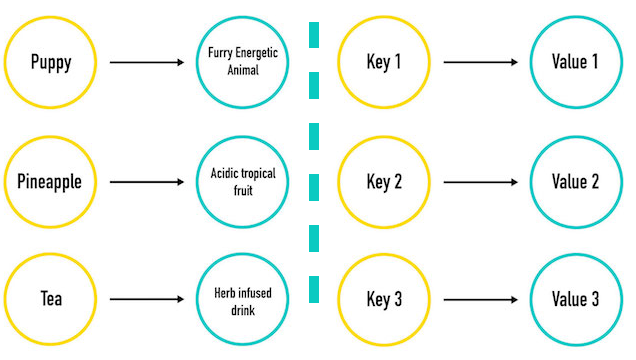
Think about dictionaries — they're filled with words and definitions that are paired together.
|
|
|
|
Programming has a dictionary object just like this!
|
|
|
|
- Dictionaries hold keys (words) and values (the definitions).
|
|
- In a real dictionary, you can look up a word and find the definition. In a Python dictionary, you can look up a key and find the value.
|
|
|
|
|
|
---
|
|
|
|
## Introducing Dictionaries
|
|
|
|
|
|
|
|
<aside class="notes">
|
|
|
|
**Teaching Tips:**
|
|
|
|
- This is a pretty quick slide. Make sure everyone has the idea of looking up a word in a dictionary in their head.
|
|
|
|
**Talking Points:**
|
|
|
|
- We can have an object that holds keys (`'puppy'`, `'pineapple'`, `'tea'`) and their values (`'furry, energetic animal'`, etc.).
|
|
- Just like you can look up a word and find the definition in a real dictionary, in a Python dictionary you can look up a key and find the value.
|
|
|
|
</aside>
|
|
|
|
---
|
|
|
|
## Declaring a Dictionary
|
|
|
|
Dictionaries in programming are made of **key-value pairs**.
|
|
|
|
```python
|
|
# Here's the syntax:
|
|
name_of_dictionary = {"Key1": "Value", "Key2": "Value", "Key3": "Value"}
|
|
print(name_of_dictionary[key_to_look_up])
|
|
# Prints the value
|
|
|
|
# And in action...
|
|
my_dictionary = {"Puppy": "Furry, energetic animal", "Pineapple": "Acidic tropical fruit", "Tea": "Herb-infused drink"}
|
|
|
|
print(my_dictionary)
|
|
# Prints the whole dictionary
|
|
print(my_dictionary["Puppy"])
|
|
# => Prints Puppy's value: "Furry, energetic animal"
|
|
```
|
|
|
|
|
|
<aside class="notes">
|
|
|
|
**Teaching Tips:**
|
|
|
|
- Walk through the syntax:
|
|
- Curly braces.
|
|
- Colons between keys and values.
|
|
- Commas between entries. The commas can be hard to see.
|
|
- Stress that this is basically just like a real dictionary.
|
|
|
|
**Talking Points:**
|
|
|
|
- Just like you can look up any word in the dictionary to get the definition, you can just use a key in a dictionary to find the value. This is known as a key-value pair, hence the definition of a dictionary: a set of key-value pairs.
|
|
|
|
</aside>
|
|
|
|
---
|
|
|
|
## We Do: Dictionaries and Quick Tips
|
|
|
|
The order of keys you see printed may differ from how you entered them. That's fine!
|
|
|
|
You can't have the same key twice. Imagine having two "puppies" in a real dictionary! If you try, the last value will be the one that's kept.
|
|
|
|
What's more, printing a key that doesn't exist gives an error.
|
|
|
|
Let's create a dictionary together.
|
|
|
|
<iframe height="300px" width="100%" src="https://repl.it/@GAcoding/blank-repl?lite=true" scrolling="no" frameborder="no" allowtransparency="true" allowfullscreen="true" sandbox="allow-forms allow-pointer-lock allow-popups allow-same-origin allow-scripts allow-modals"></iframe>
|
|
|
|
<aside class="notes">
|
|
|
|
**Teaching Tips:**
|
|
|
|
- Create a dictionary; print it out; print out a few keys.
|
|
- Make your dictionary anything you'd like! Get input from the students on what it should be.
|
|
- Dictionaries can be tough, especially with all the syntax. The more practice, the better! Make sure they follow along.
|
|
- Try other cases: Use an integer for a key. Try printing a value and show that it fails — just like a real dictionary.
|
|
|
|
**Talking Points:**
|
|
|
|
- Keys can be a string or integer. (Show this.)
|
|
- You can look up any key — but not the value (just like a real dictionary!).
|
|
- Use meaningful keys: `my_zip_code` is better than `some_numbers`.
|
|
- The items that are returned when you access a dictionary come in any order they please.
|
|
- This doesn't really matter that much, however, because the typical use case for a dictionary is when you know the exact key for the value you're looking for.
|
|
- But, you should never count on the contents of a dictionary being in any order at all.
|
|
|
|
</aside>
|
|
|
|
---
|
|
|
|
## We Do: Dictionary Syntax
|
|
|
|
|
|
What if a value changes? We can reassign a key's value: `my_dictionary["Puppy"] = "Cheerful"`.
|
|
|
|
What if we have new things to add? It's the same syntax as changing the value, just with a new key:
|
|
`my_dictionary["Yoga"] = "Peaceful"`.
|
|
|
|
- Changing values is case sensitive — be careful not to add a new key!
|
|
|
|
<iframe height="300px" width="100%" src="https://repl.it/@GAcoding/python-programming-dictionary-change-key?lite=true" scrolling="no" frameborder="no" allowtransparency="true" allowfullscreen="true" sandbox="allow-forms allow-pointer-lock allow-popups allow-same-origin allow-scripts allow-modals"></iframe>
|
|
|
|
|
|
<aside class="notes">
|
|
|
|
**Teaching Tips:**
|
|
|
|
- Be sure students are doing this with you. The more practice, the better.
|
|
- Demonstrate how to change and add new keys. Print out the dictionary after each one.
|
|
- Show that capitalization matters!
|
|
|
|
**Repl.it note**: This repl.it has:
|
|
|
|
```python
|
|
my_dictionary = {"Puppy": "Furry, energetic animal", "Pineapple": "Acidic tropical fruit", "Tea": "Herb-infused drink"}
|
|
|
|
print(my_dictionary)
|
|
```
|
|
|
|
</aside>
|
|
|
|
|
|
---
|
|
|
|
## Quick Review: Dictionaries
|
|
|
|
We can:
|
|
|
|
- Make a dictionary.
|
|
- Print a dictionary.
|
|
- Print one key's value.
|
|
- Change a key's value.
|
|
|
|
Here's a best practice: Declare your dictionary across multiple lines for readability. Which is better?
|
|
|
|
```python
|
|
# This works but is not proper style.
|
|
my_dictionary = {"Puppy": "Furry, energetic animal", "Pineapple": "Acidic tropical fruit", "Tea": "Herb-infused drink"}
|
|
|
|
# Do this instead!
|
|
my_dictionary = {
|
|
"Puppy": "Furry, energetic animal",
|
|
"Pineapple": "Acidic tropical fruit",
|
|
"Tea": "Herb-infused drink"
|
|
}
|
|
```
|
|
|
|
<aside class="notes">
|
|
|
|
2 MINUTES
|
|
|
|
**Teaching Tips:**
|
|
|
|
- Do a quick check for understanding, then mention the line breaks. Make sure it's clear that the breaks are the only change.
|
|
- Make sure that students can do this thus far. Perhaps open an interpreter.
|
|
|
|
**Talking Points:**
|
|
|
|
- We still have our **key-value** pair format separated by commas, however, making it easily readable to a human, which is a good thing.
|
|
- Each item is on one line ending with a comma.
|
|
- We can do this with any dictionary, regardless of its contents.
|
|
- The syntax will remain the same.
|
|
|
|
</aside>
|
|
|
|
|
|
---
|
|
|
|
## Discussion: Collection Identification Practice
|
|
|
|
What are `a` and `b` below?:
|
|
|
|
```python
|
|
# What object is this?
|
|
|
|
collection_1 = [3, 5, 7, "nine"]
|
|
|
|
# What object is this?
|
|
collection_2 = {"three": 3, "five": 5, 9: "nine"}
|
|
```
|
|
|
|
<aside class="notes">
|
|
|
|
1 MINUTE
|
|
|
|
**Teaching Tips:**
|
|
|
|
- This is to quickly see if students can identify lists versus dictionaries.
|
|
- Talk about the difference between an "object" and a "collection" at a high level.
|
|
|
|
</aside>
|
|
|
|
---
|
|
|
|
## Looping Through Dictionaries
|
|
|
|
|
|
We can print a dictionary with `print(my_dictionary)`, but, like a list, we can also loop through the items with a `for` loop:
|
|
|
|
<iframe height="400px" width="100%" src="https://repl.it/@GAcoding/python-programming-dictionary-for-loop?lite=true" scrolling="no" frameborder="no" allowtransparency="true" allowfullscreen="true" sandbox="allow-forms allow-pointer-lock allow-popups allow-same-origin allow-scripts allow-modals"></iframe>
|
|
|
|
<aside class="notes">
|
|
|
|
**Teaching Tips:**
|
|
|
|
- This is just a quick demo, not an exercise. Walk through this to show it working; describe what each line does.
|
|
|
|
**Talking Points:**
|
|
|
|
- Now, how do we loop through a dictionary? We can use the same `for` loop structure, but, instead of it iterating over each element in the collection, it will iterate over each key. We can then use the key to access the value.
|
|
- The lines in our `for` loop work like this:
|
|
- The first line says, "For every key in the `friendzips` dictionary..."
|
|
- The second line says, "… print the value in `friendzips` associated with the provided key."
|
|
|
|
**Repl.it note:** This repl.it has:
|
|
```python
|
|
my_dictionary = {
|
|
"Puppy": "Furry, energetic animal",
|
|
"Pineapple": "Acidic tropical fruit",
|
|
"Tea": "Herb-infused drink"
|
|
}
|
|
|
|
for key in my_dictionary:
|
|
print(my_dictionary[key])
|
|
|
|
for key in my_dictionary:
|
|
print(key, ":", my_dictionary[key])
|
|
```
|
|
</aside>
|
|
|
|
---
|
|
|
|
## Partner Exercise: Dictionary Practice
|
|
|
|
You know the drill: Grab a partner and pick a driver!
|
|
|
|
Create a new local file, `dictionary_practice.py`. Write a script that declares a dictionary called `my_name`.
|
|
|
|
- Add a key for each letter in your name with a value of how many times that letter appears.
|
|
|
|
As an example, here is the dictionary you'd make for `"Callee"`:
|
|
|
|
```python
|
|
my_name = {"c": 1, "a": 1, "l": 2, "e": 2}
|
|
```
|
|
|
|
Write a loop that prints the dictionary, but formatted.
|
|
|
|
```python
|
|
# The letter l appears in my name 2 times.
|
|
```
|
|
|
|
**Bonus (if you have time)**: If it's only one time, instead print `The letter l appears in my name once`. If it's only two times, instead print `The letter l appears in my name twice.`
|
|
|
|
<aside class="notes">
|
|
|
|
5 MINUTES
|
|
|
|
**Teaching Tips:**
|
|
|
|
- This is a partner exercise, so pair students up.
|
|
- Some students might be tempted to write a complex script to count the letters in their name; make sure they can do it the simple way first (just setting `"l"` to `2`, for example).
|
|
- When students are done or time is up, go over the answer. Also, go over adding the `if` statements for the bonus.
|
|
</aside>
|
|
|
|
---
|
|
|
|
## Partner Exercise: Most Popular Word
|
|
|
|
With the same partner, switch who's driving.
|
|
|
|
Write a function, `max_val()`, that takes a dictionary and returns the
|
|
maximum value of any of the keys in the dictionary. Assume that the input
|
|
dictionary's values will always be non-null integers.
|
|
|
|
For example:
|
|
|
|
```python
|
|
input_dict = {
|
|
'a': 2,
|
|
'b': 3,
|
|
'c': 1
|
|
}
|
|
|
|
max_val(input_dict)
|
|
# returns 3
|
|
```
|
|
|
|
**Hints:**
|
|
|
|
- When looping over a dictionary, does Python loop over the keys or the
|
|
values? How do you make it loop over values?
|
|
- Bonus: have the function return the maximum value, _and_ the key
|
|
associated with that value
|
|
|
|
<aside class="notes">
|
|
|
|
5 MINUTES
|
|
|
|
**Teaching Tips:**
|
|
|
|
- This is a partner exercise, so pair students up.
|
|
- When students are done or time is up, go over the answer.
|
|
|
|
- Solution:
|
|
```
|
|
def max_val(d):
|
|
maxnum = None
|
|
for k in d.values():
|
|
if maxnum is None:
|
|
maxnum = k
|
|
if k > maxnum:
|
|
maxnum = k
|
|
return(maxnum)
|
|
```
|
|
</aside>
|
|
|
|
---
|
|
|
|
## Other Values
|
|
|
|
We're almost there! Let's make this more complex.
|
|
|
|
In a list or a dictionary, anything can be a value.
|
|
|
|
Open this repl.it in a new window so you can see it all (the button in the top-right corner).
|
|
|
|
<iframe height="300px" width="100%" src="https://repl.it/@GAcoding/python-programming-dictionary-other-values?lite=true" scrolling="no" frameborder="no" allowtransparency="true" allowfullscreen="true" sandbox="allow-forms allow-pointer-lock allow-popups allow-same-origin allow-scripts allow-modals"></iframe>
|
|
|
|
|
|
<aside class="notes">
|
|
|
|
**Teaching Tips:**
|
|
|
|
- This slide can be skipped in classes with struggling students; it's good information but not crucial to know at a beginner's level.
|
|
- This is a demo, not an exercise.
|
|
- This can be tough. Spend some time here.
|
|
- This repl.it is huge! Open it in a new window so students can see it all.
|
|
- All the code is there, you just need to walk through it.
|
|
|
|
**Repl.it note:** This code is:
|
|
```python
|
|
other_values_in_a_dictionary = {
|
|
"CA": {"key1" : "value 1",
|
|
"another_key" : "a value",
|
|
"Joe" : "Even more dictionary!"
|
|
},
|
|
"WA": ["Trevor", "Courtney", "Brianna", "Kai"],
|
|
"NY": "Just Tatyana"
|
|
}
|
|
|
|
print("Here's a dictionary and list in a dictionary:", other_values_in_a_dictionary)
|
|
|
|
print("----------")
|
|
|
|
other_values_in_a_list = [
|
|
"a value",
|
|
{"key1" : "value 1", "key2" : "value 2"},
|
|
["now", "a", "list"]
|
|
]
|
|
print("Here's a list and dictionary in a list:", other_values_in_a_list)
|
|
```
|
|
|
|
</aside>
|
|
|
|
---
|
|
|
|
## Summary and Q&A
|
|
|
|
Dictionaries:
|
|
|
|
- Are another kind of collection, instead of a list.
|
|
- Use **keys** to access **values**, not indices!
|
|
- Should be used instead of lists when:
|
|
- You don't care about the order of the items.
|
|
- You'd prefer more meaningful keys than just index numbers.
|
|
|
|
```python
|
|
my_dictionary = {
|
|
"Puppy": "Furry, energetic animal",
|
|
"Pineapple": "Acidic tropical fruit",
|
|
"Tea": "Herb-infused drink"
|
|
}
|
|
```
|
|
|
|
<aside class="notes">
|
|
|
|
**Teaching Tips:**
|
|
|
|
- This is a quick recap. Check for understanding.
|
|
- If there is time (~15 minutes), there is an exercise on the next slide to assign as a You Do. Otherwise, the same exercise is in the `xx-additional-exercises` folder as `dictionary_reverse_lookup`; assign it as additional homework.
|
|
- After running the exercise (or not), talk about next steps.
|
|
</aside>
|