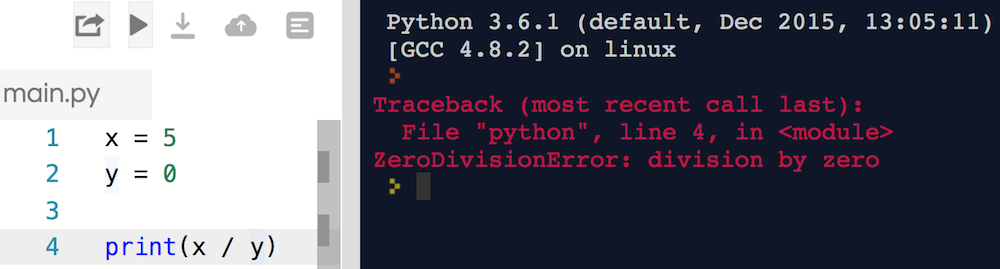
Have you found a shiny red error message before? What do you think has happened here?
Making Errors Into Friends
On the surface, errors are frustrating! However, we'll walk through some common ones. You'll see:
Errors sometimes say exactly what's wrong.
Some errors have very common causes.
Errors may say exactly how to fix the issue.
Python errors are very helpful and have clear messages.
With that in mind - what's the problem with this code?
We Do: IndexError
Let's debug this code together.
Protip: Index errors typically happen when you attempt to access a list index that doesn't exist.
You Do: Fix a NameError
Directions: Fix it!
Hints:
Run the code to get the error.
What kind of error is it? What is the error message?
KeyError
Accessing a key in a dictionary that doesn't exist.
Commonly caused by:
A misspelling.
Mixing uppercase and lowercase.
The error message tells you exactly what key is missing!
AttributeError
More general than KeyError, but the same idea.
Accessing an attribute (e.g., function or property) that doesn't exist
Discussion: SyntaxError
Let's run the code together. What happens? How can we fix it?
Discussion: TypeError
TypeError and its message tell us:
my_num=5+"10"print(my_num)# TypeError: unsupported operand type(s) for +: 'int' and 'str'
What do we learn from this error message? Have you learned a way to fix this?
Fun Fact: Some languages, like JavaScript, let this code run (breaking something!).
IndentationError
May be caused by:
Notenoughindentation
Mismatched indentation
Mixing tabs and spaces!
ValueError
Most commonly caused by trying to convert a bad string into a number.
# This is okay!my_num=int("10")# This throws a ValueErrormy_num=int("Moose")
RuntimeError
The worst error to see!
When no other error type fits.
You need to rely on the error message content.
May be used for custom errors.
Example: RuntimeError is like if I said to you:
Please eat the piano
You can understand what's being asked, but can't actually do that!
Quick Review
There are many types of errors in Python!
Usually, the error has a name or description that says exactly what's wrong.
Think about IndentationError or IndexError - what went wrong?
Sometimes, you'll see RuntimeError. Python throws us this if something is broken but it can't say specifically what - like Please eat the piano. Revisit your code and see what might have happened.
Next Up: A list of common errors, then ways to prevent errors.
List of Common Errors
This chart's for you to refer to later - don't memorize it now!
Error Type
Most Common Cause
AttributeError
Attempting to access a non-existent attribute
KeyError
Attempting to access a non-existent key in a dict
ImportError
A module you tried to import doesn't exist
IndexError
You attempted to access a list element that doesn't exist
IndentationError
Indenting code in an invalid way
IOError
Accessing a file that doesn't exist
NameError
Attempting to use a module you haven't imported/installed
OverflowError
You made a number larger than the maximum size
RuntimeError
The error doesn't fit into any other category
SyntaxError
A typo, such as forgetting a colon
TypeError
Using two different types in an incompatible way
ValueError
When you are trying to convert bad keyboard input to a number
ZeroDivisionError
Dividing By Zero
Discussion: Throwing Errors
Sometimes, we might have code that we expect to throw an error.
# The user might not give us a number!my_num=int(input("Please give me a number:"))
What if the user types a string like "Moose"?
This causes a ValueError - we'll be trying to make an int out of a string "Moose".
We can anticipate and prepare for it!
Try-Except
A Try-Except block is the way we can catch errors in Python. We can catch:
One error (except ValueError:)
Multiple errors (except (ValueError, KeyError):)
Any/every error (except:)
Always try to specify the error, if possible!
Discussion: Switching Gears
Not every programming error is caught by an error message!
Can anyone say what is wrong with this code?
What might happen if you run it?
Do not try to run the below code.
my_num=1whilemy_num<10:print(my_num)my_num+1
Discussion: Another Infinite Loop
It's easy to accidentally make an infinite loop. What's the problem here?
am_hungry=Truefridge_has_food=Truewhileam_hungryorfridge_has_food:print("Opening the fridge!")am_hungry=False
Infinite Infinite Loops!
Most common infinite loops are a result of:
A while loop's condition never becomes False.
Forgetting to increment a counter variable.
Logic inside the loop that restarts the loop.
Bad logic in a while loop's condition (e.g., putting or instead of and)
Be careful to check your end conditions!
If you find your program running endlessly, hit control-c in the terminal window to stop it!
Discussion: Logic Error
Here, we want to find the average of 8 and 10. The answer should be 9, because 8 + 10 == 18, then 18 / 2 == 9
What happened and why?
Quick Review: Common Errors
If you expect an error, use a try/except block:
my_num=Nonewhilemy_numisNone:try:my_num=int(input("Please give me a number:"))exceptValueErroraserr:print("That was not good input, please try again!")print("Error was",err)print("Thanks for typing the number",my_num)
Logic problems are common but won't throw a helpful error. Always check end conditions on your while loops!
Print Statements for Sanity Checks
Pro Tip: If something is wonky and you don't know why, starting printing.
Use print statements on each line to peek at the values.
Remember to remove debugging statements once the problem is solved!
x=8y=10get_average=x+y/2print("get_average is",get_average)# Print out what this equals (it's wrong!)testing_sum=x+y# To figure out why, break it down.print("testing_sum is",testing_sum)# Print out each step.testing_average=testing_average/2print("testing_average is",testing_average)# The individual math test works# We know there must be a problem with the logic in "average"
When your programs become very complex, adding print statements will be a great help.
You Do: Wrapping it Up
Can you fix the code below?
Summary and Q&A
Python has many common built-in errors.
Use try-except syntax to catch an expected error.
Logic issues don't throw errors, so be careful!
Use print statements to walk through your code line-by-line.