
You can not select more than 25 topics
Topics must start with a letter or number, can include dashes ('-') and can be up to 35 characters long.
229 lines
7.6 KiB
229 lines
7.6 KiB
<!--
|
|
---
|
|
title: Pandas Joining
|
|
type: lesson
|
|
duration: "0:45"
|
|
---
|
|
-->
|
|
|
|
##  {.separator}
|
|
|
|
<h1>Pandas Joining</h1>
|
|
|
|
<!--
|
|
|
|
## Overview
|
|
This is an intro to the notebook - use it as an overview to cover the concepts. Budget time accordingly.
|
|
|
|
## Important Notes or Prerequisites
|
|
|
|
- There are **Class Questions** littered throughout the notebook. Use as much/little time on these as you see fit relative to how your class is pacing
|
|
- This lesson includes high level slides and a Notebook. To present this content, it is recommended you begin directly with the Jupyter Notebook. The student slides contain the wrap-up of the big ideas covered in the notebook.
|
|
|
|
|
|
---
|
|
|
|
## Learning Objectives
|
|
*After this lesson, you will be able to:*
|
|
|
|
- Concatenate objects with .append() and .concat()
|
|
- Combinine objects with .join() and .merge()
|
|
- Combinine timeseries objects with .merge_ordered()
|
|
- Traditionally, this functionality is performed in a relational database, such as SQL.
|
|
- With pandas, you'll be able to perform the same operations - in python! The backend is numpy, a powerful linear algebra library which helps keep things speedy
|
|
|
|
## Duration
|
|
45 minutes.
|
|
|
|
---
|
|
|
|
## Suggested Agenda
|
|
|
|
| Time | Activity | Purpose |
|
|
|-------------|----------|---------|
|
|
| 0:00 - 0:03 | Welcome |
|
|
| 0:03 - 0:08 | Concatenate |
|
|
| 0:08 - 0:11 | Append |
|
|
| 0:11 - 0:25 | Joining |
|
|
| 0:25 - 0:30 | Merging |
|
|
| 0:30 - 0:40 | Exercise |
|
|
| 0:40 - 0:45 | Summary |
|
|
|
|
## Materials and Preparation
|
|
- Send out the link to the presentation slides, and help students download the Notebook.
|
|
|
|
## Differentiation and Extensions
|
|
|
|
- If students are excelling in the first half, consider deeper discussions.
|
|
- If students are struggling, hone the conceptual elements of each portion heavily - the **why**. Note that the order of these lessons is in order of importance, so even if the latter half is rushed, students will still be covering the major points.
|
|
|
|
-->
|
|
|
|
---
|
|
|
|
## Learning Objectives
|
|
*After this lesson, you will be able to:*
|
|
|
|
- Concatenate objects with `.append()` and `.concat()`.
|
|
- Combine objects with `.join()` and `.merge()`.
|
|
- Combine timeseries objects with `.merge_ordered()`.
|
|
- Traditionally, this functionality is performed in a relational database, such as SQL.
|
|
- With Pandas, you'll be able to perform the same operations in Python! The backend is numpy, a powerful linear algebra library which helps keep things speedy.
|
|
|
|
---
|
|
|
|
## To the Notebook!
|
|
|
|
We actually will commence this lesson directly in the Jupyter Notebook, `pandas-join.ipynb`, to walk through the what, why, and how all at once.
|
|
|
|
Here we have slides reviewing the key concepts.
|
|
|
|
<aside class="notes">
|
|
|
|
**Teaching Tip**:
|
|
|
|
- This is an intro to the notebook - use it as an overview to cover the concepts. Budget time accordingly.
|
|
|
|
</aside>
|
|
|
|
|
|
---
|
|
|
|
## What is Joining?
|
|
|
|
- Joining is the process of taking a single dataframe and combining it with another dataframe.
|
|
- Traditionally, this would be done with SQL.
|
|
- SQL is database designed and optimized to distribute data across many tables.
|
|
|
|
<aside class="notes">
|
|
|
|
**Teaching Tip**:
|
|
|
|
- Feel free to talk about databases and tables here, maybe even normal forms if you're comfortable
|
|
|
|
</aside>
|
|
|
|
---
|
|
|
|
## Why Join?
|
|
|
|
- Joining is important because:
|
|
- It allows us to reduce the _size_ of a database.
|
|
- It allows us to _increase the speed_ at which data is queried and returned.
|
|
- It allows us to _reduce the redundancy_ of the data stored in the database.
|
|
- Joining is fundamental to proper data architecture, and we'll get to do it in Pandas!
|
|
|
|
<aside class="notes">
|
|
|
|
**Teaching Tip**:
|
|
- We could have made this into a speaker note, but it's helpful to get it out there so everybody's on the same page
|
|
|
|
</aside>
|
|
|
|
---
|
|
|
|
## Why Use Pandas for Joining Then?
|
|
|
|

|
|
|
|
- Pandas is based upon numpy, a linear algebra library.
|
|
- Using it for joins makes sense - the algorithms are optimized and fast.
|
|
- This allows allows us to use 'python only' - avoiding integrations to SQL.
|
|
- This makes data analysis faster as we don't need to switch tools.
|
|
- Longer term, code may be delegated to more specific tools (SQL, Spark, etc.).
|
|
|
|
<aside class="notes">
|
|
|
|
**Teaching Tips**:
|
|
|
|
- There's no silver bullet for tooling; each use case is different.
|
|
- Remind students that pandas run on a machine and thus is limited by the machine.
|
|
- SQL Server is designed (for enterprise cases) to be distributed, have backup plans, etc.
|
|
- Be mindful to not give the students the idea that 'pandas can do everything'.
|
|
- Emphasize that this is good for _prototyping_ and smaller, temporary jobs and analysis.
|
|
|
|
</aside>
|
|
|
|
---
|
|
|
|
## What Does a SQL Join Look Like?
|
|
|
|
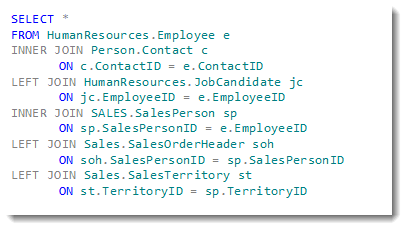
|
|
|
|
- A SQL join looks like the above.
|
|
- We can specify:
|
|
- The tables (dataframes) to be joined to each other.
|
|
- _How_ the columns (keys) are related _to each other_ in the join.
|
|
- We can use this logic (referred to as relational algebra) to:
|
|
- Filter out information.
|
|
- Make one-to-many or even many-to-many joins.
|
|
- We'll be using Pandas, so our syntax will look different than above.
|
|
|
|
<aside class="notes">
|
|
|
|
**Teaching Tips**:
|
|
|
|
- We won't be going overboard with join algebra.
|
|
- Encourage students to study this on their own.
|
|
- Use SqLite3 as a reference; this is free for python and uses largely the same syntax as SQL Server (ANSI SQL)
|
|
|
|
</aside>
|
|
|
|
---
|
|
|
|
## What Does a Pandas Join Look Like?
|
|
|
|
```python
|
|
pd.merge(df1, df2, how='left', left_index=True, right_index=True, suffixes=('_df1', '_df2'))
|
|
```
|
|
|
|
|index|letter_df1|number_df1|letter_df2|number_df2|
|
|
|-----|----------|----------|----------|----------|
|
|
|0 |a |1 |e |5.0 |
|
|
|1 |b |2 |f |6.0 |
|
|
|2 |c |3 |NaN |NaN |
|
|
|3 |d |4 |NaN |NaN |
|
|
|
|
<aside class="notes">
|
|
|
|
**Teaching Tips**:
|
|
|
|
- We'll be covering this exact example during the exercise.
|
|
- Note that we don't have the source tables included here.
|
|
- This is intentional to reduce overall clutter and chatter.
|
|
- Instead, focus on the syntax to give students an idea for what a join looks like.
|
|
|
|
</aside>
|
|
|
|
---
|
|
|
|
## Notes on Differences
|
|
|
|
- SQL uses `JOIN`. Pandas has *two* semi-equivalent functions:
|
|
- `pd.join` - used for joining dataframes _on their indices only_
|
|
- `pd.merge` - used for joining dataframes _on any column you want_
|
|
- Since `pd.merge` is more powerful and generalizes better, we'll focus on `pd.merge`
|
|
- SQL uses `UNION`. Pandas, again, has *two* semi-equivalent functions:
|
|
- `pd.append` - stacks dataframes _on top of_ each other
|
|
- `pd.concat` - stacks dataframes _on top of_ **or** _next to_ each other
|
|
- Since `pd.concat` is more powerful and generalizes better, we'll focus on `pd.concat`
|
|
|
|
<aside class="notes">
|
|
|
|
**Teaching Tips**:
|
|
|
|
- Note that joining operations creates dataframes that _mesh into_ each other (use your hands and fingers to show this operation if you can).
|
|
- Note that concat and append create dataframes that _stack_ on/next to each other (close your fingers and show this operation if you can).
|
|
- You'll probably get questions about the differences between the operations:
|
|
- Note that _mesh into_ is somewhat vague, since you can have 1:m, m:1, 1:1, and m:m join types.
|
|
- Pandas `pd.merge` can handle these as well, and we touch on that briefly in the exercise.
|
|
|
|
</aside>
|
|
|
|
---
|
|
|
|
## Additional Resources
|
|
|
|
- Pandas [documentation](https://pandas.pydata.org/pandas-docs/stable/)
|
|
- DataSchool [30-video series](http://www.dataschool.io/easier-data-analysis-with-pandas/) (by a former GA instructor!)
|