|
|
<!--
|
|
|
---
|
|
|
title: Python Basics: Intro to Python Web Development
|
|
|
type: lesson
|
|
|
duration: “:60”
|
|
|
creator: Chandler Moisen
|
|
|
---
|
|
|
-->
|
|
|
|
|
|
##  {.separator}
|
|
|
|
|
|
<h1>Intro to Web Development With Python</h1>
|
|
|
|
|
|
<!--
|
|
|
|
|
|
|
|
|
## Overview
|
|
|
This lesson starts with an overview of DNS and client-server relationships, then briefly introduces the terms HTML and CSS. Lastly, it gives an overview of front-end versus back-end and frameworks.
|
|
|
|
|
|
## Important Notes or Prerequisites
|
|
|
- This lesson is completely language-agnostic and standalone.
|
|
|
- There aren't any exercises we can do in this lesson, so really encourage discussion at every point.
|
|
|
|
|
|
## Learning Objectives
|
|
|
In this lesson, students will:
|
|
|
- Describe how the web works.
|
|
|
- Explain what we mean by front- and back-end.
|
|
|
- List the types of web developers.
|
|
|
|
|
|
|
|
|
## Duration
|
|
|
30 minutes
|
|
|
|
|
|
## Suggested Agenda
|
|
|
|
|
|
| Time | Activity | Purpose |
|
|
|
| --- | --- | --- |
|
|
|
| 0:00 - 0:02 | Welcome |
|
|
|
| 0:02 - 0:15 | How the Web Works |
|
|
|
| 0:15 - 0:28 | Front-End vs. Back-End |
|
|
|
| 0:28 - 0:30 | Summary |
|
|
|
|
|
|
Materials needed:
|
|
|
- Projector
|
|
|
- Slides
|
|
|
|
|
|
-->
|
|
|
|
|
|
|
|
|
---
|
|
|
|
|
|
## Learning Objectives:
|
|
|
|
|
|
*After this lesson, you will be able to:*
|
|
|
|
|
|
- Describe how the web works.
|
|
|
- Explain what we mean by front-end and back-end.
|
|
|
- List the types of web developers.
|
|
|
|
|
|
---
|
|
|
|
|
|
## Discussion: What's the Web?
|
|
|
|
|
|
How do you think the web works?
|
|
|
|
|
|
Before we go about making a web app, let's start with how the web works at all.
|
|
|
|
|
|
<aside class="notes">
|
|
|
|
|
|
**Teaching Tips:**
|
|
|
|
|
|
- Just get them talking.
|
|
|
- All answers are good ones!
|
|
|
</aside>
|
|
|
|
|
|
---
|
|
|
|
|
|
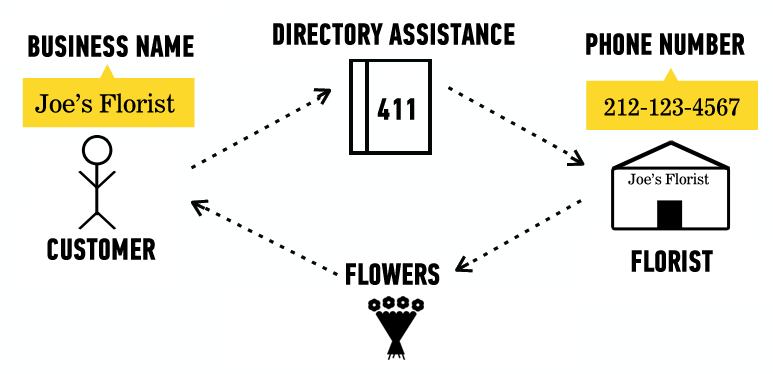
## Finding a Florist
|
|
|
|
|
|
- How does a browser know what page to display?
|
|
|
|
|
|
*Also known as:*
|
|
|
|
|
|
- How do I call my florist? I can just call "Joe's Florist" in my phone contacts.
|
|
|
|
|
|
|
|
|
|
|
|
|
|
|
<aside class="notes">
|
|
|
|
|
|
**Talking Point:**
|
|
|
|
|
|
- Joe's Florist is just the name of the contact. It's not the actual address or phone number. It exists and we can find it, but we have to look it up.
|
|
|
|
|
|
</aside>
|
|
|
|
|
|
---
|
|
|
|
|
|
## IP Addresses
|
|
|
|
|
|
|
|
|
- Website URLs — "Joe's Florist"
|
|
|
- Just names to make our lives easier.
|
|
|
- `https://google.com`
|
|
|
- `https://reddit.com`
|
|
|
|
|
|
- IP addresses — "515-115-5156"
|
|
|
- The actual address to which your browser goes.
|
|
|
- `Google.com` is at `172.217.12.142`.
|
|
|
- `reddit.com` is at `151.101.129.140`.
|
|
|
|
|
|
|
|
|
<aside class="notes">
|
|
|
|
|
|
**Talking Point:**
|
|
|
|
|
|
- The same way, Google.com is just the name of it. It's not the actual address on the internet. It exists and is reachable, but we have to look it up.
|
|
|
|
|
|
</aside>
|
|
|
|
|
|
---
|
|
|
|
|
|
## Client-Server Relationship Review
|
|
|
|
|
|
|
|
|

|
|
|
|
|
|
|
|
|
|
|
|
<aside class="notes">
|
|
|
|
|
|
**Talking Points:**
|
|
|
|
|
|
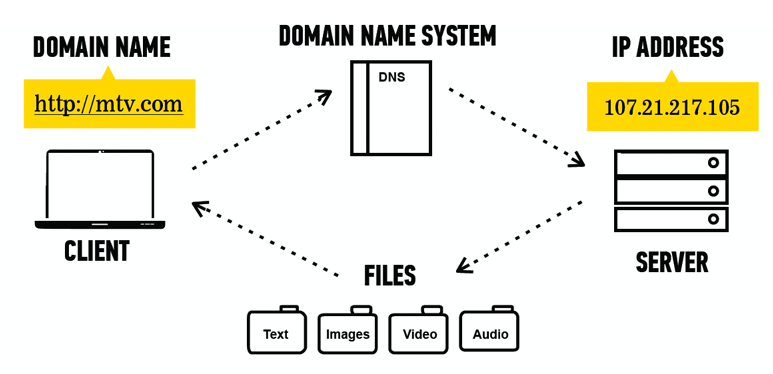
- Computers communicate with one another through the client-server model. The browser (aka, the client) makes a request to the server to view a website, and the server responds by sending the corresponding files back to the client.
|
|
|
- Our computers make an ask of the server, and the server sends back a response. We are going to learn how to make those "asks" with Python and HTML and also how to write programs that guide the "responses" with Python.
|
|
|
</aside>
|
|
|
|
|
|
---
|
|
|
|
|
|
## In Real Terms
|
|
|
|
|
|
|
|
|
- Websites are just files your browser can read.
|
|
|
|
|
|
|
|
|
|
|
|
|
|
|
<aside class="notes">
|
|
|
|
|
|
**Talking Points:**
|
|
|
|
|
|
- Websites are just files your browser can read!
|
|
|
- Different kinds of files can be retrieved from the server, including HTML and CSS files, which the client then reads and renders as a website.
|
|
|
</aside>
|
|
|
|
|
|
---
|
|
|
|
|
|
## What Types of Files?
|
|
|
|
|
|
HTML (`.html`)
|
|
|
|
|
|
- Provides website structure.
|
|
|
|
|
|
CSS (`.css`)
|
|
|
|
|
|
- Adds colors and fonts.
|
|
|
|
|
|
JavaScript (`.js`)
|
|
|
|
|
|
- Makes the website interactive.
|
|
|
|
|
|
Images, text files, etc.
|
|
|
|
|
|
- Displays additional info on the webpage.
|
|
|
|
|
|
|
|
|
<aside class="notes">
|
|
|
|
|
|
**Talking Point:**
|
|
|
|
|
|
- Note that we're going to learn HTML and CSS — don't spend a lot of time here!
|
|
|
|
|
|
</aside>
|
|
|
|
|
|
---
|
|
|
|
|
|
## Quick Review
|
|
|
|
|
|
Where do websites exist?
|
|
|
|
|
|
- IP address: The actual location of a website on the internet.
|
|
|
- `Google.com` is a friendly name for the IP address `172.217.12.142`, just like "Joe's Florist" is a friendly name for the phone number "(515) 115-5156."
|
|
|
|
|
|
How does a website work?
|
|
|
|
|
|
- Websites are actually just a bunch of files — images, text, and website-specific code.
|
|
|
- They're hosted on servers — all the files for Google.com live on Google's servers.
|
|
|
- Your browser is the client: It asks Google for the Google.com files so it can show them to you.
|
|
|
|
|
|
|
|
|
<aside class="notes">
|
|
|
|
|
|
**Teaching Tip:**
|
|
|
|
|
|
- Do a quick check for understanding.
|
|
|
</aside>
|
|
|
|
|
|
---
|
|
|
|
|
|
## Discussion: What Is Web Development?
|
|
|
|
|
|
Does anyone want to guess (or know) what web development comprises?
|
|
|
|
|
|
<aside class="notes">
|
|
|
|
|
|
**Talking Point:**
|
|
|
|
|
|
- Encourage discussion!
|
|
|
</aside>
|
|
|
|
|
|
|
|
|
---
|
|
|
|
|
|
## Web
|
|
|
|
|
|
The work involved with building and maintaining a live website is split into two sides:
|
|
|
|
|
|
**Front-End**
|
|
|
|
|
|
- In a restaurant:
|
|
|
- The dining room.
|
|
|
- In web development:
|
|
|
- What the user sees.
|
|
|
|
|
|
**Back-End**
|
|
|
|
|
|
- In a restaurant:
|
|
|
- The kitchen, loading dock, and offices.
|
|
|
- In web development:
|
|
|
- What makes the website work (e.g., connects to servers).
|
|
|
- Behind-the-scenes code.
|
|
|
|
|
|
<aside class="notes">
|
|
|
|
|
|
**Talking Points:**
|
|
|
|
|
|
- Web development is using programming to build websites that render in a user's browser.
|
|
|
- A website is a collection of code that can be categorized into two types: front-end and back-end.
|
|
|
</aside>
|
|
|
|
|
|
---
|
|
|
|
|
|
## Front-End vs. Back-End: A Visual
|
|
|
|
|
|
|
|
|

|
|
|
|
|
|
|
|
|
<aside class="notes">
|
|
|
|
|
|
**Talking Point:**
|
|
|
|
|
|
- Note that front-end development is also programming, but back-end developers usually don't see the website.
|
|
|
</aside>
|
|
|
|
|
|
---
|
|
|
|
|
|
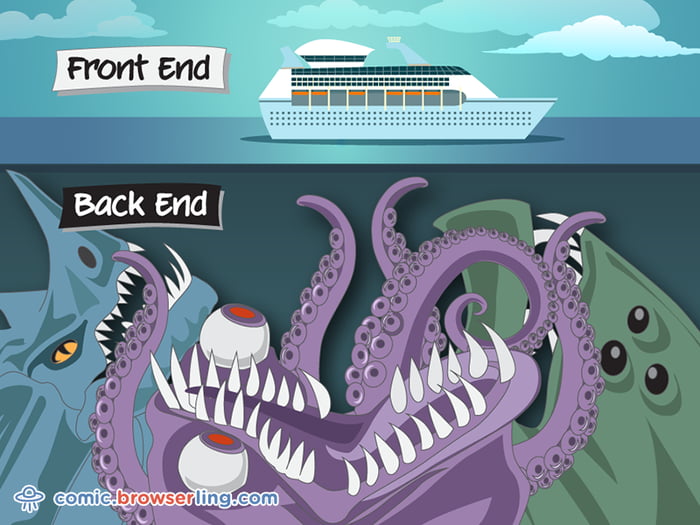
## Front-End vs. Back-End: A Better Visual
|
|
|
|
|
|
|
|
|
|
|
|
|
|
|
|
|
|
<aside class="notes">
|
|
|
|
|
|
**Talking Points:**
|
|
|
|
|
|
- The back-end is seen as much scarier, as it's more programming intensive.
|
|
|
- It's where we work out all the bugs!
|
|
|
</aside>
|
|
|
|
|
|
---
|
|
|
|
|
|
## We Do: Front-End vs. Back-End
|
|
|
|
|
|
|
|
|
Head to the [New York Public Library](https://www.nypl.org/)'s website: `https://www.nypl.org/`.
|
|
|
|
|
|
- What is the happening on the front-end?
|
|
|
- What is happening on the back-end?
|
|
|
|
|
|
|
|
|
<aside class="notes">
|
|
|
|
|
|
**Teaching Tip:**
|
|
|
|
|
|
- Walk through this with the students. Call out as much as you can; encourage discussion (e.g., images, logging in, links, etc.).
|
|
|
</aside>
|
|
|
|
|
|
---
|
|
|
|
|
|
## Types of Web Developers:
|
|
|
|
|
|
Front-End Developer
|
|
|
|
|
|
- Languages used: HTML/CSS/JavaScript.
|
|
|
- Works on what the user sees.
|
|
|
|
|
|
Back-End Developer
|
|
|
|
|
|
- Languages used: Python, PHP, Ruby, or many others.
|
|
|
- Works on making the website work.
|
|
|
|
|
|
Full-Stack Developer
|
|
|
|
|
|
- Does both as well as database work!
|
|
|
|
|
|
|
|
|
<aside class="notes">
|
|
|
|
|
|
**Teaching Tips:**
|
|
|
|
|
|
- We'll learn HTML and CSS in a later presentation; for now, just get the idea across that they're languages used in front-end web development that control how the site looks.
|
|
|
- We won't cover JavaScript, PHP, or Ruby — just point out that they exist. For added context, note that Ruby is a language similar to Python.
|
|
|
</aside>
|
|
|
|
|
|
---
|
|
|
|
|
|
## Quick Recap
|
|
|
|
|
|
Front-end development:
|
|
|
|
|
|
- The visuals.
|
|
|
- How a website looks and how a user interacts with it.
|
|
|
|
|
|
Back-end development:
|
|
|
|
|
|
- The underlying code.
|
|
|
- How the website actually works.
|
|
|
|
|
|
Full-stack development:
|
|
|
|
|
|
- Includes both!
|
|
|
|
|
|
|
|
|
<aside class="notes">
|
|
|
|
|
|
**Teaching Tip:**
|
|
|
|
|
|
- Do a quick check for understanding.
|
|
|
</aside>
|
|
|
|
|
|
---
|
|
|
|
|
|
## Discussion: What Is a Web Framework?
|
|
|
|
|
|
Does anyone want to guess (or know) what defines a web framework?
|
|
|
|
|
|
<aside class="notes">
|
|
|
|
|
|
**Talking Point:**
|
|
|
|
|
|
- Encourage discussion!
|
|
|
</aside>
|
|
|
|
|
|
---
|
|
|
|
|
|
## Web Framework
|
|
|
|
|
|
|
|
|
Web frameworks are used by both front- and back-end developers to make it easier to develop a website or web app.
|
|
|
|
|
|
- Programming libraries:
|
|
|
|
|
|
- Are free for your use.
|
|
|
|
|
|
- They make development far easier because they:
|
|
|
|
|
|
- Provide the client-server relationship piece.
|
|
|
- Add features to make it easier to write a large web app.
|
|
|
|
|
|
- Frameworks are usually language-specific. Popular examples include:
|
|
|
|
|
|
- Flask, Django, React.js, Angular.js
|
|
|
|
|
|
<aside class="notes">
|
|
|
|
|
|
**Teaching Tips:**
|
|
|
|
|
|
- Note how some frameworks have extensions — they're language-specific.
|
|
|
- Flask isn't introduced until the next lesson, but you can drop comments like, "This is what we'll be using Python for — note Flask on the list!"
|
|
|
</aside>
|
|
|
|
|
|
---
|
|
|
|
|
|
|
|
|
## Discussion: Web App vs. Website
|
|
|
|
|
|
Does anyone want to guess (or know) the difference?
|
|
|
|
|
|
|
|
|
<aside class="notes">
|
|
|
|
|
|
**Teaching Tip:**
|
|
|
|
|
|
- Encourage discussion.
|
|
|
</aside>
|
|
|
|
|
|
---
|
|
|
|
|
|
## Web App vs. Website
|
|
|
|
|
|
A website:
|
|
|
|
|
|
- Is typically informational.
|
|
|
- Has little-to-no interactive capabilities.
|
|
|
- e.g., The New York Times or a small company's website.
|
|
|
|
|
|
A web app:
|
|
|
|
|
|
- Is an app hosted on the internet.
|
|
|
- Uses the client-server relationship to render a website.
|
|
|
- Offers the user more features than a static website.
|
|
|
- E.g., a bank's webpage or an auction site.
|
|
|
|
|
|
You can have a hybrid!
|
|
|
|
|
|
- For example, a website can be static until the user logs in.
|
|
|
- Then, it's a full-fledged web app.
|
|
|
|
|
|
|
|
|
<aside class="notes">
|
|
|
|
|
|
**Teaching Tip:**
|
|
|
|
|
|
- Be clear about the terms "web app," "website," and "webpage."
|
|
|
|
|
|
**Talking Points**:
|
|
|
|
|
|
- *Note: This was taken liberally from https://modeeffect.com/key-differences-between-website-web-app/*.
|
|
|
|
|
|
- Websites are typically informational in nature. Think about your favorite blog or news-based site. Its primary purpose is to convey information to the end user, whether it in the form of news, like CNN, or recipes, like you’ll find on Martha Stewart.
|
|
|
|
|
|
- As a general rule, there is little-to-no interaction on the part of the visitor, other than possibly submitting an email address to receive a monthly newsletter or performing a search. So the real question is, how does this apply to you?
|
|
|
|
|
|
- Well, if you’re a local charity that wants to convey information only — e.g., a home page, an About page, contact information, upcoming events, and maybe a description of how you’ve helped your cause — then a website might be all you need.
|
|
|
|
|
|
- You also need to consider that many websites are actually website/web application hybrids. Your startup might provide all kinds of information to visitors, but once they register they could have access to an integrated web application that performs a specific function.
|
|
|
</aside>
|
|
|
|
|
|
|
|
|
---
|
|
|
|
|
|
## Web Development Is Hard
|
|
|
|
|
|
- Don't worry!
|
|
|
- GA has several classes dedicated to it (e.g., part-time Front-End Web Development or JavaScript Development, or the full-time Web Development Immersive).
|
|
|
- There's a lot of information out there!
|
|
|
|
|
|
Right now, we're going to be building web apps with Python!
|
|
|
|
|
|
---
|
|
|
|
|
|
## Summary
|
|
|
|
|
|
What'd we do?
|
|
|
|
|
|
- DNS
|
|
|
- The actual address of a website.
|
|
|
- The Client-Server Relationship
|
|
|
- Server sends website files to the client (your browser).
|
|
|
- Front-End vs. Back-End
|
|
|
- What the user sees versus what makes the website work.
|
|
|
|
|
|
---
|
|
|
|
|
|
## Additional Resources
|
|
|
- [Fundamentals of Web Programming](http://interactivepython.org/runestone/static/webfundamentals/WWW/history.html)
|
|
|
- [Understanding the Difference Between Client-Server and Peer-to-Peer Networks](https://www.techrepublic.com/article/understanding-the-differences-between-client-server-and-peer-to-peer-networks/)
|
|
|
- [Web Applications and the HTTP Protocol](https://www.youtube.com/watch?v=RsQ1tFLwldY)
|
|
|
- [Client-Server](https://www.youtube.com/watch?v=7_LPdttKXPc)
|
