
You can not select more than 25 topics
Topics must start with a letter or number, can include dashes ('-') and can be up to 35 characters long.
289 lines
5.9 KiB
289 lines
5.9 KiB
# Python
|
|
|
|
## Lesson Objectives
|
|
|
|
1. Print a message
|
|
1. Add a comment
|
|
1. Create a variable and assign it a value
|
|
1. Explain the different data types
|
|
1. Perform calculations with variables
|
|
1. Use string operations
|
|
1. Create a list
|
|
1. Access an element of a list
|
|
1. Perform a set of commands depending on a situation
|
|
1. Get user input
|
|
1. Repeatedly perform a set of commands
|
|
1. Use a for loop
|
|
1. Create a class for an object
|
|
1. Have a class inherit from another
|
|
1. Create a factory for objects
|
|
|
|
## Print a message
|
|
|
|
You can print a message to the user
|
|
|
|
```python
|
|
print "hello!"
|
|
```
|
|
|
|
## Add a comment
|
|
|
|
- Comments let you summarize what you're doing
|
|
- They don't get executed
|
|
|
|
```python
|
|
# this will not be executed
|
|
```
|
|
|
|
## Create a variable and assign it a value
|
|
|
|
```python
|
|
a = "hello"
|
|
print a ##print the value of the variable 'a'
|
|
```
|
|
|
|
## Explain the different data types
|
|
|
|
There are lots of different types of data that you can use in python
|
|
|
|
- String (text)
|
|
- Integers (whole numbers)
|
|
- Float (decimal numbers)
|
|
- Booleans (True/False)
|
|
|
|
You can convert one data type to another
|
|
|
|
```python
|
|
a = str(1) #a = "1"
|
|
b = int("5") #b = 5
|
|
c = float(4) #c = 4.0
|
|
d = int(5.7) #d = 5
|
|
```
|
|
|
|
## Perform calculations with variables
|
|
|
|
```python
|
|
a = 1
|
|
b = a + 1 #b = 2
|
|
c = b * 3 #c = 6
|
|
d = c - 1 #d = 5
|
|
e = float(d) / 2 #e = 2.5
|
|
f = d ** 2 #exponent: f = 25
|
|
```
|
|
|
|
## Use string operations
|
|
|
|
```python
|
|
a = "first string"
|
|
b = "second string"
|
|
c = a + " " + b
|
|
```
|
|
|
|
## Create a list
|
|
|
|
You can create lists of things
|
|
|
|
```python
|
|
a = [1, 5, "some string", True, 5.6]
|
|
```
|
|
|
|
You can even have lists of lists
|
|
|
|
```python
|
|
a = [
|
|
[1, 2, 3], #first row
|
|
[4, 5, 6], #second row
|
|
[7, 8, 9], #third row
|
|
[10] #fourth row
|
|
]
|
|
```
|
|
|
|
You can conceptualize a list of lists however you want
|
|
|
|
### ACTIVITY
|
|
|
|
How would you change the previous example so that each inner list is a column?
|
|
|
|
## Access an element of a list
|
|
|
|
Lists have elements stored at numerical indexes, starting at 0
|
|
|
|
```python
|
|
a = [1, 5, "some string", True, 5.6]
|
|
print a[0] #1
|
|
print a[1] #5
|
|
print a[4] #5.6
|
|
```
|
|
|
|
## Perform a set of commands depending on a situation
|
|
|
|
```python
|
|
a = 22
|
|
if a < 10:
|
|
print "a is less than 10"
|
|
elif a == 10:
|
|
print "a is 10"
|
|
else:
|
|
print "a is greater than 10"
|
|
```
|
|
|
|
The conditions can be
|
|
|
|
- `<` less than
|
|
- `>` greater than
|
|
- `<=` less than or equal to
|
|
- `>=` greater than or equal to
|
|
- `==` an exact match
|
|
|
|
You can also compare strings:
|
|
|
|
```python
|
|
a = 'oh hai!'
|
|
if a == 'oh hai!':
|
|
print 'this works'
|
|
```
|
|
|
|
## Get user input
|
|
|
|
You can get user input from the command like so:
|
|
|
|
```python
|
|
user_input = raw_input("Please enter something: ")
|
|
print "you entered: " + user_input
|
|
```
|
|
|
|
### ACTIVITY
|
|
|
|
Write a program that models this flow chart:
|
|
|
|

|
|
|
|
## Repeatedly perform a set of commands
|
|
|
|
```python
|
|
a = 10
|
|
while a < 20:
|
|
print "the value of a is currently: " + str(a)
|
|
a = a + 1
|
|
```
|
|
|
|
### ACTIVITIES
|
|
|
|
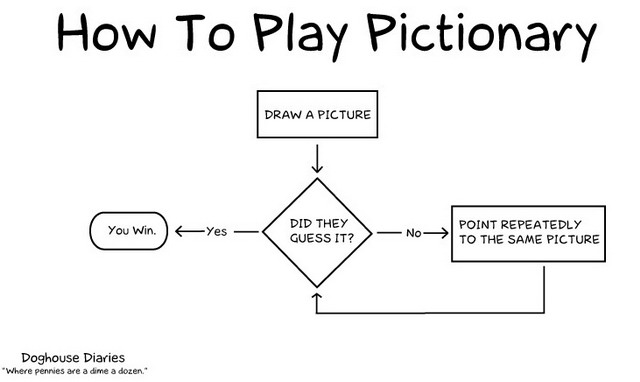
1. Write a program that models this flow chart:
|
|
|
|
|
|
|
|
1. Given the following list [70, 95, 97, 55, 3, 24, 89, 97, 84, 11]
|
|
- Write a program that loops through each value in the list and prints it
|
|
- Write a program that loops through each value in the list and adds them all together
|
|
- Write a program that loops through each value in the list and prints the average
|
|
- Write a program that loops through each value in the list and prints the minimum
|
|
- Write a program that loops through each value in the list and prints the maximum
|
|
1. Combine all the programs from the previous step into one program that asks the user what operation they would like to do
|
|
1. Alter the last program so that it performs the operations for only numbers that are greater than a number specified by the user
|
|
|
|
## Use a for loop
|
|
|
|
The process of looping through an array can be simplified with a `for` loop:
|
|
|
|
```python
|
|
foods = ['hot dogs', 'beer', 'bald eagles']
|
|
for food in foods:
|
|
print(food)
|
|
```
|
|
|
|
### ACTIVITIES
|
|
|
|
Simplify the last set of activities using a `for` loop
|
|
|
|
## Create a class for an object
|
|
|
|
You can use a `class` or blueprint for objects that you'll use
|
|
|
|
```python
|
|
class Person:
|
|
def __init__(self, name, age):
|
|
self.name = name
|
|
self.age = age
|
|
|
|
def greet(self):
|
|
print("Hello, my name is " + self.name + ". My age is " + str(self.age))
|
|
|
|
me = Person("Matt", 36)
|
|
me.greet()
|
|
sally = Person("Sally", 53)
|
|
sally.greet()
|
|
```
|
|
|
|
- `__init__` is a function that gets called when a new object is created.
|
|
- `self` is the object that's created
|
|
|
|
## Have a class inherit from another
|
|
|
|
```python
|
|
class Person:
|
|
def __init__(self, name, age):
|
|
self.name = name
|
|
self.age = age
|
|
|
|
def greet(self):
|
|
print("Hello, my name is " + self.name + ". My age is " + str(self.age))
|
|
|
|
def work(self):
|
|
print("Boring...")
|
|
|
|
class SuperHero(Person):
|
|
def __init__(self, name, age, powers):
|
|
super().__init__(name,age)
|
|
self.powers = powers
|
|
|
|
def greet(self):
|
|
super().greet()
|
|
self.listPowers()
|
|
|
|
def listPowers(self):
|
|
for power in self.powers:
|
|
print(power)
|
|
|
|
def work(self):
|
|
print("To action!")
|
|
|
|
superman = SuperHero('Clark Kent', 200, ['flight', 'strength', 'invulnerability'])
|
|
|
|
superman.greet()
|
|
superman.work()
|
|
```
|
|
|
|
## Create a factory for objects
|
|
|
|
```python
|
|
class Car:
|
|
def __init__(self, maker, model, serial):
|
|
self.maker = maker
|
|
self.model = model
|
|
self.serial = serial
|
|
|
|
class CarFactory:
|
|
def __init__(self, name):
|
|
self.name = name
|
|
self.cars = []
|
|
|
|
def makeCar(self, model):
|
|
self.cars.append(Car(self.name, model, len(self.cars)))
|
|
|
|
def listCars(self):
|
|
for car in self.cars:
|
|
print(car.maker + " " + car.model + ": " + str(car.serial))
|
|
|
|
def findCar(self, serial):
|
|
for car in self.cars:
|
|
if(car.serial == serial):
|
|
return car
|
|
|
|
toyota = CarFactory('Toyota')
|
|
toyota.makeCar('Prius')
|
|
toyota.makeCar('Rav 4')
|
|
toyota.listCars()
|
|
print(toyota.findCar(1).model)
|
|
```
|