
You can not select more than 25 topics
Topics must start with a letter or number, can include dashes ('-') and can be up to 35 characters long.
221 lines
6.1 KiB
221 lines
6.1 KiB

|
|
|
|
# WDI-PANTHALASSA
|
|
|
|
# Episode X: A New Terminal
|
|
|
|
A long time ago in a unix environment far, far away, young Jedi padawans who
|
|
knew only of desktop software were seduced by the dark side of the Force to
|
|
enter… The Terminal.
|
|
|
|
Follow the instructions below using all the console commands introduced in
|
|
Fundamentals, class, or that you find on your own.
|
|
|
|
## Learning objective
|
|
Today we want you to be comfortable traversing your way through a file system using the terminal and keeping markdown notes. <br>
|
|

|
|
|
|
## Setup
|
|
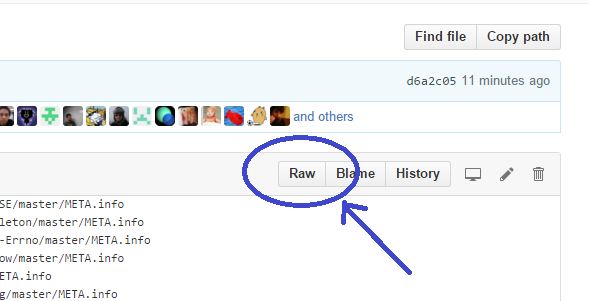
Click the `Raw` button above and near the top right of this document <br>
|
|
|
|
|
|
This will change the nice-looking markdown file into text. Select and copy the text-- you will paste this text into another file soon.
|
|
|
|
## Completion
|
|
Finish all of the parts! In the future we may set reach goals and add bonuses onto the homework, however we decided to go with an easier assignment to help get you acclimated to the course. The main purpose of this assignment is to get you feeling comfortable typing and working inside the terminal.
|
|
|
|
## Set the Scene
|
|
|
|
1. Open the **Terminal app**
|
|
2. On your desktop, make a file called `solutions.md`, and open up the file in your text editor.
|
|
3. Paste the raw markdown into this file. As you work through the assignment you will be filling out this file with the commands you are running.
|
|
|
|
4. Create a new directory on your desktop called "**galaxy_far_far_away**" and enter it.
|
|
|
|
```
|
|
mkdir galaxy_far_far_away
|
|
cd galaxy_far_far_away
|
|
```
|
|
5. Create a directory called "**death_star**", and make the following files inside of it: "**darth_vader.txt**", "**princess_leia.txt**", "**storm_trooper.txt**"
|
|
|
|
```
|
|
mkdir death_star
|
|
cd death_star
|
|
touch darth_vader.txt princess_leia.txt storm_trooper.txt
|
|
```
|
|
|
|
6. In "**galaxy_far_far_away**", make a directory named "**tatooine**" and create the following files in it: "**luke.txt**", "**ben_kenobi.txt**"
|
|
|
|
```
|
|
cd ..
|
|
mkdir tatooine
|
|
cd tatooine
|
|
touch luke.txt ben_kenobi.txt
|
|
```
|
|
|
|
7. Inside of "**tatooine**" make a directory called "**millenium_falcon**", and in it create: "**han_solo.txt**", "**chewbaca.txt**"
|
|
|
|
```
|
|
mkdir millenium_falcon
|
|
cd millenium_falcon
|
|
touch han_solo.txt chewbacca.txt
|
|
```
|
|
|
|
## Part I
|
|
|
|
1. Rename "**ben_kenobi.txt**" to "**obi_wan.txt**".
|
|
|
|
```
|
|
cd ..
|
|
mv ben_kenobi.txt obi_wan.txt
|
|
```
|
|
|
|
2. Copy "**storm_trooper.txt**" from "**death_star**" to "**tatooine**".
|
|
|
|
```
|
|
cd ../death_star
|
|
cp storm_trooper.txt ../tatooine
|
|
```
|
|
|
|
3. Move "**luke.txt**" and "**obi_wan.txt**" to the "**millenium_falcon**".
|
|
|
|
```
|
|
cd ../tatooine
|
|
mv luke.txt millenium_falcon/
|
|
mv obi_wan.txt millenium_falcon/
|
|
```
|
|
|
|
4. Move "**millenium_falcon**" out of "**tatooine**" and into "**galaxy_far_far_away**".
|
|
|
|
```
|
|
cd ..
|
|
mv millenium_falcon ../
|
|
```
|
|
|
|
5. Move "**millenium_falcon**" into "**death_star**".
|
|
|
|
```
|
|
mv millenium_falcon death_star
|
|
```
|
|
|
|
6. Move "**princess_leia.txt**" into the "**millenium_falcon**".
|
|
|
|
```
|
|
mv princess_leia.txt millenium_falcon
|
|
|
|
```
|
|
|
|
7. Delete "**obi_wan.txt**".
|
|
|
|
```
|
|
cd millenium_falcon
|
|
rm obi_wan.txt
|
|
```
|
|
|
|
8. In "**galaxy_far_far_away**", make a directory called "**yavin_4**".
|
|
|
|
```
|
|
cd ../..
|
|
mkdir yavin_4
|
|
```
|
|
|
|
9. Move the "**millenium_falcon**" out of the "**death_star**" and into "**yavin_4**".
|
|
|
|
```
|
|
mv death_star/millenium_falcon yavin_4
|
|
```
|
|
|
|
10. Make a directory in "**yavin_4**" called "**x_wing**".
|
|
|
|
```
|
|
cd yavin_4
|
|
mkdir x_wing
|
|
```
|
|
|
|
11. Move "**princess_leia.txt**" to "**yavin_4**" and "**luke.txt**" to "**x_wing**".
|
|
|
|
```
|
|
mv millenium_falcon/princess_leia.txt .
|
|
mv millenium_falcon/luke.txt x_wing
|
|
```
|
|
|
|
|
|
## Part II
|
|
|
|
1. Move the "**millenium_falcon**" and "**x_wing**" out of "**yavin_4**" and into "**galaxy_far_far_away**".
|
|
|
|
```
|
|
mv millenium_falcon ../
|
|
mv x_wing ../
|
|
```
|
|
|
|
2. In "**death_star**", create directories for "**tie_fighter_1**", "**tie_fighter_2**" and "**tie_fighter_3**".
|
|
|
|
```
|
|
cd ../death_star
|
|
mkdir tie_fighter_1 tie_fighter_2 tie_fighter_3
|
|
|
|
```
|
|
|
|
3. Move "**darth_vader.txt**" into "**tie_fighter_1**".
|
|
|
|
```
|
|
mv darth_vader.txt tie_fighter_1
|
|
```
|
|
|
|
4. Make a copy of "**storm_trooper.txt**" in both "**tie_fighter_2**" and "**tie_fighter_3**".
|
|
|
|
```
|
|
cp storm_trooper.txt tie_fighter_2
|
|
cp storm_trooper.txt tie_fighter_2
|
|
```
|
|
|
|
5. Move all of the "**tie_fighters**" out of the "**death_star**" and into "**galaxy_far_far_away**".
|
|
|
|
```
|
|
mv tie_fighter_1 tie_fighter_2 tie_fighter_3 ../
|
|
```
|
|
|
|
6. Explode "**tie_fighters**" 2 and 3.
|
|
|
|
```
|
|
cd ..
|
|
rm -r tie_fighter_2 tie_fighter_3
|
|
```
|
|
|
|
7. Touch a file in "**x_wing**" called "**the_force.txt**".
|
|
|
|
```
|
|
touch x_wing/the_force.txt
|
|
```
|
|
|
|
8. Destroy the "**death_star**" and anyone inside of it.
|
|
|
|
```
|
|
rm -r death_star
|
|
```
|
|
|
|
9. Return "**x_wing**" and the "**millenium_falcon**" to "**yavin_4**".
|
|
|
|
```
|
|
mv x_wing yavin_4
|
|
mv millenium_falcon yavin_4
|
|
```
|
|
|
|
10. Celebrate.
|
|
|
|
Already feeling comfortable with these commands and want an extra challenge? Try doing the following:
|
|
|
|
* Try applying one command to multiple files at once.
|
|
* Try applying one command to **all** files in a single directory (where necessery)
|
|
* Try applying one command to **all files that match a pattern**.
|
|
* Find and use command line shortcuts.
|
|
* Try using a mix of absolute and relative paths.
|
|
|
|
|
|
## Homework submission
|
|
|
|
Tomorrow we will show you how to get and submit homework using git and github exclusively. But for now, email your completed `solutions.md` to colin.hart@generalassemb.ly, kristyn.bryan@generalassemb.ly, matt.huntington@generalassemb.ly, and thom.page@generalassemb.ly.
|
|
|
|
Please have it submitted by 10am EDT tomorrow morning.
|