
4.2 KiB

WDI-PANTHALASSA
Title: Maps & Multiple Models
Type: Homework
Duration: Two days"
Creator: Thom Page
Course: WDIr-Panthalassa
Competencies: Mongoose subdocuments & embedded references, Google Maps, AJAX
Maps and Multiple Models
-
Subdocuments and referencing between models in Mongoose
-
Program flow
-
Getting server data into static javascript files / Google Maps
-
Breaking RESTful conventions
App
Pages:
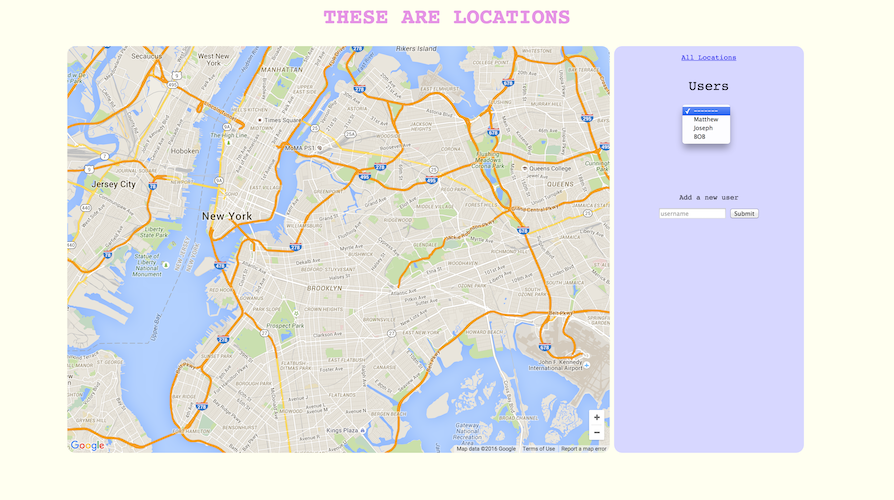
- Users index
- Has a dropdown menu of all users. When the option is changed, the page goes to the user's show page
- Has a form for creating a new user
- redirects to new user's show page
- Has a link to see all locations
- Nothing on the map
- Locations index
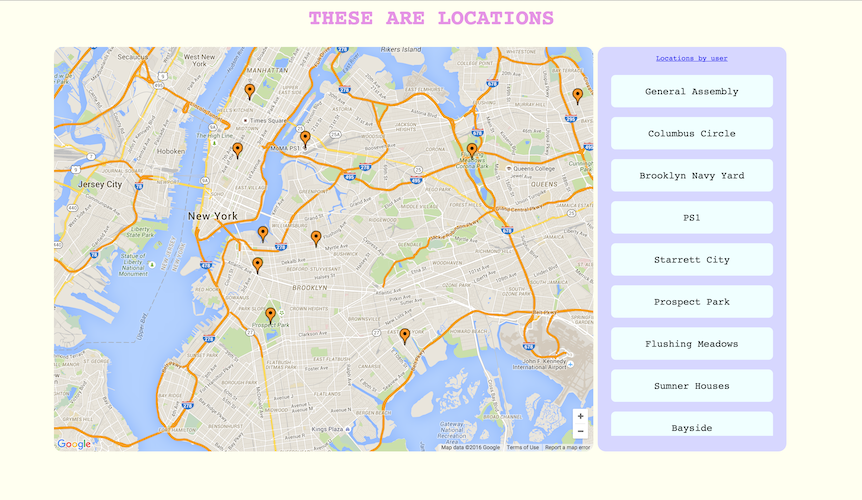
- Has a list in the control panel of all locations from all users
- Displays all locations on a Google Map
- A link to see locations by user (users index)
- Users show
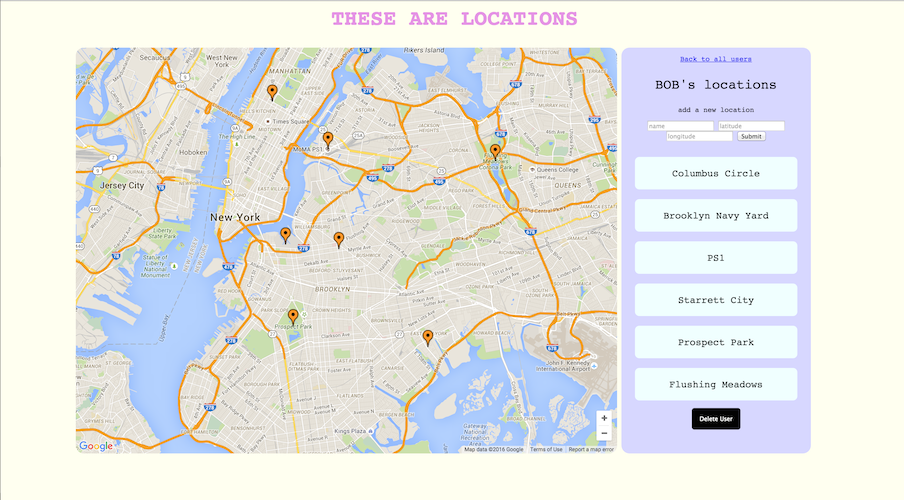
- User's name is there
- Shows just this user's locations
- Has a form to add a new location for this user
- redirect back here to user's show page
- Has a delete button
- deletes user and associated locations. Deleted locations should not show up on the locations index.
Data modeling
A user should have at minimum:
username: String
and a Location should have at minimum:
name: String,
lat: Number,
lng: Number
But what else is needed to specify a relation between these two models in regards to our program flow? Answer: subdocuments, at least.
Data, AJAX, and Static files
The Google Maps stuff is all front-end static JS. However, we want to get data on to the map, because each marker is positioned according to lat and lng values stored in the database.
How can we get server / database data into our static JS files?
In the locationsIndex.js file in the public folder, underneath the Maps setup there is a jQuery ajax call to get the data to put in the Markers. Ajax is a way to pull data from remote urls, and that's all it is. In this case, we're just pulling our own data from our server. The ajax call is looking for JSON, so along with all your regular routes that render views, you will need to make a route that just serves up JSON, and the ajax will pick it up.
You may want to use ajax on your user show page, too. However, you will need to get creative as to how your javascript file will get the user id for the route. There is a potential solution at the bottom of this page.
The most basic ajax command is:
  $.ajax('/route').done(function(data) {
        console.log(data);
    });
.done is a promise that waits for the asynchronous call to be complete before passing the acquired data to the callback.
All it does it ask the route for data. Then, you can do whatever you want with that data within the ajax callback.
BONUS
On the Locations index page, get the usernames to show for each associated location in the control panel.
Seed Locations
You can get latitude and longitude from a (real) Google Map by right clicking (or control+click) on the map and selecting "what's here?". The lat and lng will show up. Click on the lat and lng for a copyable-pastable format.
Some seeds:
name: 'Prospect Park',
lat: 40.660301,
lng: -73.968977
name: 'Columbus Circle',
lat: 40.768280,
lng: -73.982351
name: 'General Assembly',
lat: 40.740047,
lng: -73.990092
name: 'Brooklyn Navy Yard',
lat: 40.699671,
lng: -73.973941
name: 'PS1',
lat: 40.745507,
lng: -73.946899
name: Starrett City,
lat: 40.650274,
lng: -73.883603
name: 'Flushing Meadows',
lat: 40.739762,
lng: -73.840828
name: 'Sumner Houses',
lat: 40.697482,
lng: -73.940075
##### Here there be spoilers
Potential solution for getting user id into static JS AJAX call:
*** Are you sure you don't want to find your own solution? ***
Disclaimer: these are just some of many solutions, you could do it other ways too
Answer
Use window.location.pathname to use the user's id from the url bar.
Another Answer
Display the user id on the webpage. Hide it with css. Use JQuery to grab it.