
4.2 KiB
WORLD BANK LOAN RECORDS FINDER
Angular.js with $http
##APP
You will be provided with working server code that delivers an API of World Bank Loan data in JSON format. Your mission is to build an Angular front-end that makes use of the data.
######The app should display:
- A clickable list of all values associated with the key
regionin the database records. It's a list of all the region names with duplicates excluded. - A dynamic list of all the records associated with a region when the region name is clicked
- The number of records in the database
- A search bar / filter box to narrow down the list of regions
- A working form to add a new record to the database
Image below-- TOP: the number of records is displayed. RIGHT: All region names in the database, duplicates excluded. Search bar / filter box. LEFT: All the records for a given region once the region name is clicked.
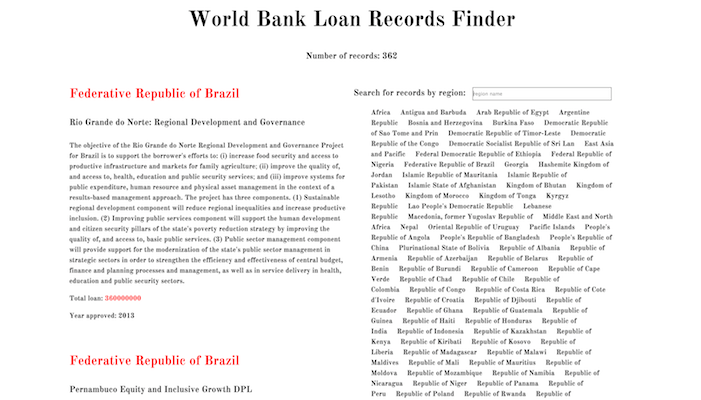
Image below-- RIGHT: A form to submit a new record.
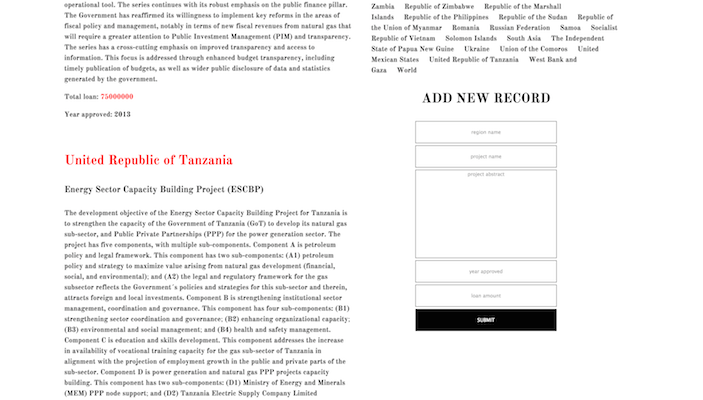
Image below-- RIGHT: Putting input into the search/filter box changes the region list

Image below-- number of records and search/filter box

STARTER CODE
SEED
You have a seed route within a seed controller. You can seed your database with all the World Bank records by going to /seed in your browser once.
WBINFO
You have a controller for serving Wbinfo data. You don't need to change these or anything else in the server. The routes are:
-
/wbinfo/countServes up a count of all records in the database. -
/wbinfo/uniqueRegionsServes up all values for the keyregionexcluding duplicates. -
/wbinfo/byName/:nameWill deliver all records where the region name is the same asreq.params.name -
There is also an index route
/wbinfofor testing to see if all the data is there. -
And
POST /wbinfofor creating a new record.
Use the information served by these routes in your Angular by using $http to get the information.
There is no front-end code given to you, you are building the entirety of the static component of the app in the public folder. Your front-end doesn't have to look anything like the examples given above, just as long as the information from the routes is used and the program flow works.
ANGULAR
DIRECTIVES
ng-appng-controllerng-repeatng-modelng-clickng-submitwithin a form element| filter:
DEPENDENCIES
$http
BONUSES
- List the region names alphabetically in the region list
- Include
deletefunctionality (means adding a server route) - Include
putfunctionality (means adding a server route)
NOTES
SUGGESTED STEPS
- Get the number of records and display it on the page
- Get the region names showing
- Get click functionality on the region names working
- Display records associated with a region
- Get the search box working for fun
- Add in the form for a new record and make sure data is flowing
- Get the form to add a new record and display it on the page
MODEL REFERENCE
######A wbinfo record has five strings
regionprojectabstractprojectnameyearloanamnt
VIDEO FOR IMPLEMENTING A SEARCHBOX (don't look if you don't want spoilers)
Final code around 3:32 - 3:40
https://www.youtube.com/watch?v=YFsduR7mBfY
NOTES ON FORM DATA IF YOU GET STUCK (don't look if you don't want spoilers)
You can have an empty object in your controller like formdata = {} that can accept data from an ng-model, and process that object in a function bound to ng-submit.
<form ng-submit="ctrl.processForm()">
	<input type="text" placeholder="region name" ng-model="ctrl.formdata.region"></br>
	<input type="text" placeholder="project name" ng-model="ctrl.formdata.projectname"></br>
	<textarea type="text" placeholder="project abstract" ng-model="ctrl.formdata.projectabstract"></textarea></br>
	<input type="text" placeholder="year approved" ng-model="ctrl.formdata.year"></br>
	<input type="text" placeholder="loan amount" ng-model="ctrl.formdata.loanamnt"></br>
	<button type="submit">SUBMIT</button>
</form>