
You can not select more than 25 topics
Topics must start with a letter or number, can include dashes ('-') and can be up to 35 characters long.
201 lines
5.2 KiB
201 lines
5.2 KiB
# Intro to Python pt. 2
|
|
|
|
## Lesson Objectives
|
|
|
|
1. Get user input
|
|
1. Repeatedly perform a set of commands
|
|
1. Use a for loop
|
|
1. Define a function
|
|
1. Create a class for an object
|
|
1. Have a class inherit from another
|
|
1. Create a factory for objects
|
|
|
|
|
|
## Get user input
|
|
|
|
You can get user input from the command like so:
|
|
|
|
```python
|
|
user_input = input("Please enter your name: ")
|
|
print("Hello, " + user_input + "!")
|
|
```
|
|
|
|
## Repeatedly perform a set of commands
|
|
|
|
```python
|
|
a = 10
|
|
while a < 20:
|
|
print("the value of a is currently: " + str(a))
|
|
a += 1
|
|
```
|
|
|
|
### ACTIVITY
|
|
|
|
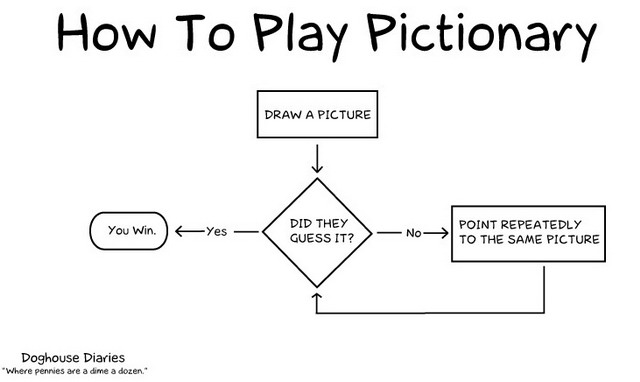
1. Write a program that models this flow chart:
|
|
|
|
|
|
|
|
|
|
## Use a for loop
|
|
|
|
The process of looping through an array can be simplified with a `for` loop:
|
|
|
|
```python
|
|
foods = ['hot dogs', 'beer', 'bald eagles']
|
|
for food in foods:
|
|
print(food)
|
|
```
|
|
|
|
You can loop through a set of numbers using a `range`
|
|
|
|
```python
|
|
for x in range(0, 3):
|
|
print(x)
|
|
```
|
|
|
|
### ACTIVITIES
|
|
|
|
1. Given the following list [70, 95, 97, 55, 3, 24, 89, 97, 84, 11]
|
|
- Write a program that loops through each value in the list and prints it
|
|
- Write a program that loops through each value in the list and adds them all together
|
|
- Write a program that loops through each value in the list and prints the average
|
|
- Write a program that loops through each value in the list and prints the minimum
|
|
- Write a program that loops through each value in the list and prints the maximum
|
|
|
|
1. Combine all the programs from the previous step into one program that asks the user what operation they would like to do
|
|
|
|
1. Alter the last program so that it performs the operations for only numbers that are greater than a number specified by the user
|
|
|
|
## Define a function
|
|
|
|
If you have a routine that you run over and over again, you can define your own function:
|
|
|
|
```python
|
|
def greet():
|
|
print('hi')
|
|
|
|
greet()
|
|
```
|
|
|
|
Functions can take parameters which alter their functionality:
|
|
|
|
```python
|
|
def greet(name):
|
|
print('hi, ' + name)
|
|
|
|
greet('bob')
|
|
```
|
|
|
|
Functions can return values:
|
|
|
|
```python
|
|
def add(value1, value2):
|
|
return value1 + value2
|
|
|
|
print(add(1,3))
|
|
```
|
|
|
|
### ACTIVITIES
|
|
|
|
Create a calculator program that continually asks a user what operations they want to perform, until the user says 'quit'
|
|
|
|
## Create a class for an object
|
|
|
|
You can use a `class` or blueprint for objects that you'll use
|
|
|
|
```python
|
|
class Person:
|
|
def __init__(self, name, age):
|
|
self.name = name
|
|
self.age = age
|
|
|
|
def greet(self):
|
|
print("Hello, my name is " + self.name + ". My age is " + str(self.age))
|
|
|
|
me = Person("Hunter", 29)
|
|
me.greet()
|
|
sally = Person("Sally", 53)
|
|
sally.greet()
|
|
```
|
|
|
|
- `__init__` is a function that gets called when a new object is created. Make sure you use two underscores on either side of the `init` or it will break!
|
|
- `self` is the object that's created. It's required for all methods
|
|
|
|
## Have a class inherit from another
|
|
|
|
```python
|
|
class Person:
|
|
def __init__(self, name, age):
|
|
self.name = name
|
|
self.age = age
|
|
|
|
def greet(self):
|
|
print("Hello, my name is " + self.name + ". My age is " + str(self.age))
|
|
|
|
def work(self):
|
|
print("Boring...")
|
|
|
|
class SuperHero(Person): # tell it to inherit from Person
|
|
def __init__(self, name, age, powers):
|
|
super().__init__(name,age) # call Person's __init__()
|
|
self.powers = powers
|
|
|
|
def greet(self):
|
|
super().greet() # call Person's greet()
|
|
self.listPowers()
|
|
|
|
def listPowers(self):
|
|
for power in self.powers:
|
|
print(power)
|
|
|
|
def work(self): # override Person's work()
|
|
print("To action!")
|
|
|
|
superman = SuperHero('Clark Kent', 200, ['flight', 'strength', 'invulnerability'])
|
|
|
|
superman.greet()
|
|
superman.work()
|
|
```
|
|
|
|
- Here, SuperHero uses the `super` class's `init` method within its own. It then continues on doing its own thing
|
|
- It does something similar with `greet`, going on to invoke `listPowers` (a method unique to the `SuperHero` class) which it defines next
|
|
- It overwrites the `super` class's `work` method
|
|
|
|
## Create a factory for objects
|
|
|
|
```python
|
|
class Car:
|
|
def __init__(self, maker, model, serial):
|
|
self.maker = maker
|
|
self.model = model
|
|
self.serial = serial
|
|
|
|
class CarFactory:
|
|
def __init__(self, name):
|
|
self.name = name
|
|
self.cars = []
|
|
|
|
def makeCar(self, model):
|
|
self.cars.append(Car(self.name, model, len(self.cars)))
|
|
|
|
def listCars(self):
|
|
for car in self.cars:
|
|
print(car.maker + " " + car.model + " serial#: " + str(car.serial))
|
|
|
|
def findCar(self, serial):
|
|
for car in self.cars:
|
|
if(car.serial == serial):
|
|
return car
|
|
|
|
toyota = CarFactory('Toyota')
|
|
toyota.makeCar('Prius')
|
|
toyota.makeCar('Rav 4')
|
|
toyota.listCars()
|
|
print(toyota.findCar(1).model)
|
|
```
|
|
|
|
- The main thing to note here is that we have the `CarFactory` class that, when instantiated, has the ability to instantiate the `Car` class.
|
|
- It keeps track of the cars it's created in its `cars` list property
|
|
- It passes on its own `name` property to the `Car` object's `maker` property
|
|
- It assigns a serial number based on the number of cars in its `cars` list property
|
|
- `listCars` and `findCar` make use of its `cars` property to perform some basic tasks on its inventory |