
You can not select more than 25 topics
Topics must start with a letter or number, can include dashes ('-') and can be up to 35 characters long.
1653 lines
32 KiB
1653 lines
32 KiB
<!--
|
|
title: Styling Flask
|
|
type: lesson
|
|
duration: "01:00"
|
|
creator: Kevin Coyle and Susi Remondi
|
|
-->
|
|
|
|
##  {.separator}
|
|
|
|
<h1>Styling Flask</h1>
|
|
|
|
<!--
|
|
|
|
## Overview
|
|
This lesson teaches the basics of HTML and CSS so that students can begin to create a more robust flavor of a Flask app. It goes through basic HTML and CSS tags with embedded and local practice, then ends with applying a CSS and HTML file to the Flask app.
|
|
|
|
## Important Notes or Prerequisites
|
|
- Students will work off the Flask app they began in the last lesson.
|
|
- This lesson is not designed to make them HTML and CSS experts — it's just enough that they can recognize basic tags.
|
|
|
|
## Learning Objectives
|
|
In this lesson, students will:
|
|
- Write basic HTML.
|
|
- Write basic CSS.
|
|
- Style a Flask app.
|
|
|
|
## Duration
|
|
1:15 (75 minutes)
|
|
|
|
---
|
|
|
|
## Suggested Agenda
|
|
|
|
|
|
| Time | Activity | Purpose |
|
|
| --- | --- | --- |
|
|
| 0:00 - 0:02 | Welcome |
|
|
| 0:02 - 0:45 | HTML and CSS |
|
|
| 0:45 - 1:00 | Styling and Flask |
|
|
| 0:45 - 1:00 | Customize Your Page |
|
|
| 1:13 - 1:15 | Summary |
|
|
|
|
|
|
## Materials and Preparation
|
|
- Send out the link to the presentation slides to students.
|
|
|
|
## Differentiation and Extensions
|
|
- For more advanced students, encourage research into other HTML and CSS tags. See if they can truly customize their app beyond what's been taught.
|
|
|
|
|
|
Materials needed:
|
|
- Projector
|
|
- Slides
|
|
- Python 3
|
|
- Flask
|
|
|
|
-->
|
|
|
|
|
|
---
|
|
|
|
## Learning Objectives
|
|
*After this lesson, you will be able to:*
|
|
|
|
- Write basic HTML.
|
|
- Write basic CSS.
|
|
- Style a Flask app.
|
|
|
|
|
|
---
|
|
|
|
## Customizing Our Flask App
|
|
|
|
|
|
Run your `my_website.py`. How does it look?
|
|
|
|
*Reminder: http://localhost:5000/*
|
|
|
|
How do we add colors? Styles? Formatting?
|
|
|
|
We need HTML and CSS.
|
|
|
|
> **Pro tip**: This is front-end web development!
|
|
|
|
|
|
<aside class="notes">
|
|
|
|
**Talking Points:**
|
|
|
|
- Our `hello world` Flask app is beautiful. But not everyone else knows how to look at it and fully appreciate its beauty.
|
|
- In this lesson, we're going to focus on HTML.
|
|
</aside>
|
|
|
|
---
|
|
|
|
## HTML and CSS:
|
|
|
|
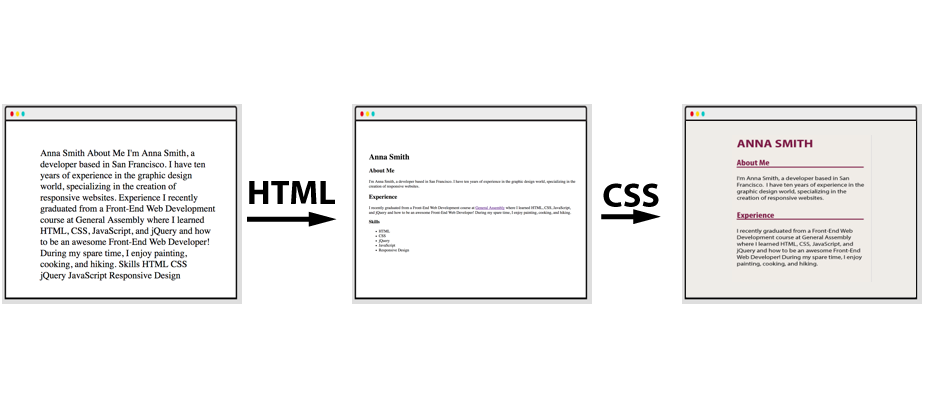
**HTML:** Content, Structure, and Presentation
|
|
|
|
- Paragraphs
|
|
- Headings
|
|
|
|
**CSS:** Style and Design
|
|
|
|
- Colors
|
|
- Fonts
|
|
|
|
|
|
|
|
|
|
|
|
<aside class="notes">
|
|
|
|
**Teaching Tip:**
|
|
|
|
- We're going to learn both of these, but point out the difference.
|
|
</aside>
|
|
|
|
|
|
---
|
|
|
|
## First, HTML
|
|
|
|
HTML means...
|
|
|
|
- Hypertext Markup Language
|
|
- HTML is **not** a programming language!
|
|
- Adding structure to a webpage. What's a heading? What's a paragraph? What's a list?
|
|
|
|
|
|

|
|
|
|
|
|
<aside class="notes">
|
|
|
|
**Teaching Tip:**
|
|
|
|
- We're going to learn both of these, but point out the difference.
|
|
|
|
**Talking Point:**
|
|
|
|
- HTML is a markup language — we mark up text with it. But we can't write programs with it.
|
|
</aside>
|
|
|
|
|
|
---
|
|
|
|
## HTML Elements
|
|
|
|
The fundamental building block of HTML is the element.
|
|
|
|
`<p>Here is a paragraph with p tags. The tags won't appear to the user.</p>`
|
|
|
|
- (Most) elements consist of:
|
|
|
|
- An opening tag (`<p>`).
|
|
- Indicates, "Format this content!"
|
|
- Defines what TYPE of content it is (e.g., paragraph, header).
|
|
|
|
- Content (e.g., text, images, video, or other elements).
|
|
- What the user sees.
|
|
|
|
- A closing tag (`</p>`).
|
|
- Indicates, "The content has ended."
|
|
- Has a `/`.
|
|
|
|
<img src="https://s3.amazonaws.com/ga-instruction/assets/python-fundamentals/html-tags.png" class="right" />
|
|
|
|
Tags are *always* in angle brackets.
|
|
|
|
|
|
|
|
<aside class="notes">
|
|
|
|
**Teaching Tip:**
|
|
|
|
- Make sure this is clear.
|
|
</aside>
|
|
|
|
|
|
---
|
|
|
|
## Types of Tags
|
|
|
|
Different tags apply different formatting.
|
|
|
|
- Paragraphs:
|
|
- These will be regular-sized text.
|
|
|
|

|
|
|
|
- Headings:
|
|
- These will be larger and bold text.
|
|
|
|

|
|
|
|
|
|
<aside class="notes">
|
|
|
|
**Talking Point:**
|
|
|
|
- There is a tag for every piece of content on the website.
|
|
</aside>
|
|
|
|
---
|
|
|
|
## Paragraph Tags
|
|
|
|

|
|
|
|
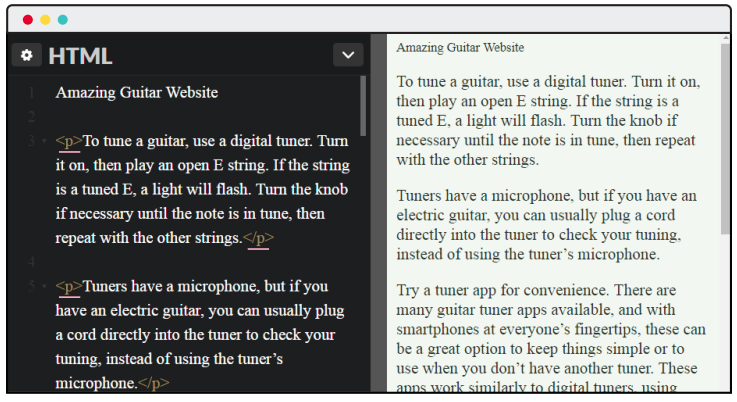
These are possibly the most common tags — all websites have paragraphs!
|
|
|
|
- Used to group related chunks of text.
|
|
- Browsers will apply default styling.
|
|
- The most universal content tag in HTML.
|
|
|
|
<aside class="notes">
|
|
|
|
**Teaching Tip:**
|
|
|
|
- Example on the next page.
|
|
</aside>
|
|
|
|
---
|
|
|
|
## Paragraph Tags
|
|
|
|
|
|
|
|
|
|
|
|
*Note: As "Amazing Guitar Website" doesn't have a `p` tag, it looks different. The browser doesn't yet know how to display it.*
|
|
|
|
<aside class="notes">
|
|
|
|
**Talking Point:**
|
|
|
|
- Note that because "Amazing Guitar Website" doesn't have a tag, it looks different. The browser doesn't think it's a paragraph.
|
|
</aside>
|
|
---
|
|
|
|
## We Do: Paragraph Tags
|
|
|
|
|
|
Add `<p>` and `</p>` around the paragraphs.
|
|
|
|
- You might need to "Change View" to see both the input and output.
|
|
|
|
<p data-height="265" data-theme-id="0" data-slug-hash="PjvLye" data-default-tab="html,result" data-pen-title="HCC - Anna Smith - List Items" data-editable="true" class="codepen">See the Pen <a href="https://codepen.io/SuperTernary/pen/PjvLye/">HCC - Anna Smith - List Items</a> by Super Ternary (<a href="https://codepen.io/SuperTernary">@SuperTernary</a>) on <a href="https://codepen.io">CodePen</a>.</p>
|
|
<script async src="https://static.codepen.io/assets/embed/ei.js"></script>
|
|
|
|
<aside class="notes">
|
|
|
|
**Teaching Tip:**
|
|
|
|
- Do this with students. It's the first CodePen they've seen, so walk around and make sure they can all do it.
|
|
|
|
**CodePen has:**
|
|
```
|
|
Anna Smith
|
|
|
|
About Me
|
|
|
|
I'm Anna Smith, a developer based in San Francisco. I have 10 years of experience in the graphic design world, specializing in the creation of responsive websites.
|
|
|
|
Experience
|
|
|
|
I recently graduated from a Front-End Web Development course at General Assembly, where I learned HTML, CSS, JavaScript, and jQuery and how to be an awesome front-end web developer! During my spare time, I enjoy painting, cooking, and hiking.
|
|
```
|
|
</aside>
|
|
|
|
---
|
|
|
|
## Heading Tags
|
|
|
|

|
|
|
|
|
|
<aside class="notes">
|
|
|
|
**Teaching Tips:**
|
|
|
|
- Example on the next page.
|
|
- Ask what they think headings are.
|
|
</aside>
|
|
|
|
---
|
|
|
|
## Heading Tags
|
|
|
|
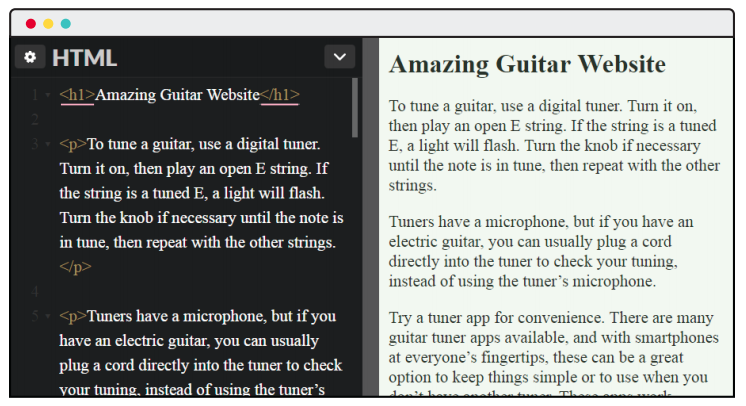
- Used to display text as a title/headline of a webpage or webpage section.
|
|
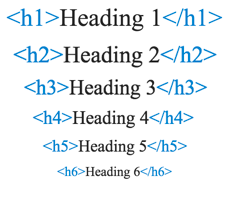
- Tags `<h1>` through `<h6>`.
|
|
- `<h1>` defines the most important title on the page.
|
|
- Note that we didn't do anything — browsers just know headings are bigger!
|
|
|
|
|
|
|
|
|
|
<aside class="notes">
|
|
|
|
**Talking Point:**
|
|
|
|
- These play a role in search engine optimization (SEO); search engines pay special attention to what is in these tags.
|
|
</aside>
|
|
|
|
---
|
|
|
|
## Heading Tag Sizing
|
|
|
|
|
|
|
|
|
|
<aside class="notes">
|
|
|
|
**Teaching Tips**:
|
|
|
|
- Consider opening a CodePen (the previous one works) and demonstrating each of these.
|
|
</aside>
|
|
|
|
|
|
---
|
|
|
|
## You Do: Heading Tags
|
|
|
|
|
|
- Put `<p>` around the paragraphs.
|
|
- Put `<h1>` around `Anna Smith`.
|
|
- Put `<h2>` around `About Me`.
|
|
- Put `<h3>` around `Experience`.
|
|
|
|
<iframe height="400px" width="100%" src="https://codepen.io/SuperTernary/pen/KqLEvb?editors=1000?lite=true" scrolling="no" frameborder="no" allowtransparency="true" allowfullscreen="true" sandbox="allow-forms allow-pointer-lock allow-popups allow-same-origin allow-scripts allow-modals"></iframe>
|
|
|
|
|
|
|
|
<aside class="notes">
|
|
|
|
**Teaching Tip:**
|
|
|
|
- Have students do this. See if they can all do it before doing it for them.
|
|
|
|
|
|
**CodePen has:**
|
|
```
|
|
Anna Smith
|
|
|
|
About Me
|
|
|
|
I'm Anna Smith, a developer based in San Francisco. I have 10 years of experience in the graphic design world, specializing in the creation of responsive websites.
|
|
|
|
Experience
|
|
|
|
I recently graduated from a Front-End Web Development course at General Assembly, where I learned HTML, CSS, JavaScript, and jQuery and how to be an awesome front-end web developer! During my spare time, I enjoy painting, cooking, and hiking.
|
|
```
|
|
</aside>
|
|
|
|
---
|
|
|
|
## Heading Tags Solution
|
|
|
|
<iframe height='400' scrolling='no' title='HCC U1 - Anna Smith - Solution' src='https://codepen.io/sonylnagale/embed/ePjmev/?height=265&theme-id=0&default-tab=html,result&editable=true' frameborder='no' allowtransparency='true' allowfullscreen='true' style='width: 100%;'>See the Pen <a href='https://codepen.io/sonylnagale/pen/ePjmev/'>HCC U1 - Anna Smith - Solution</a> by Sonyl Nagale (<a href='https://codepen.io/sonylnagale'>@sonylnagale</a>) on <a href='https://codepen.io'>CodePen</a>.
|
|
</iframe>
|
|
|
|
---
|
|
|
|
## What About Lists?
|
|
|
|
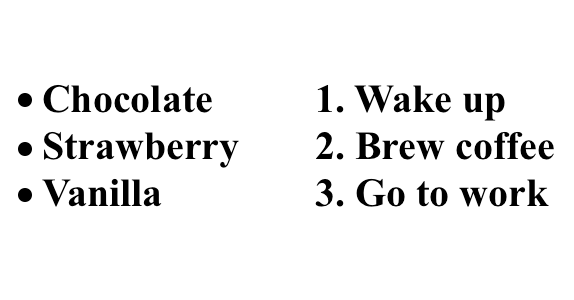
There are two types of lists:
|
|
- Unordered lists.
|
|
- Ordered lists (aka, numbered lists).
|
|
|
|
|
|
|
|
<aside class="notes">
|
|
|
|
**Teaching Tip:**
|
|
|
|
- Ask students if they think these are made the same way.
|
|
|
|
</aside>
|
|
|
|
---
|
|
|
|
## The List Tag
|
|
|
|
- `<ul></ul>` defines an unordered list.
|
|
|
|
- Used together with list item: `<li></li>`.
|
|
|
|
```html
|
|
<ul>
|
|
<li>Chocolate</li>
|
|
<li>Strawberry</li>
|
|
<li>Vanilla</li>
|
|
</ul>
|
|
```
|
|
|
|
- Notice the indent — just like Python!
|
|
|
|
|
|
<aside class="notes">
|
|
|
|
**Teaching Tips:**
|
|
|
|
- Ask students why they think it's indented.
|
|
- Why do they think there are two tags here?
|
|
|
|
</aside>
|
|
|
|
|
|
---
|
|
|
|
## Ordered Lists
|
|
|
|
- `<ol></ol>` defines an ordered list.
|
|
|
|
- List item is the same: `<li></li>`.
|
|
|
|
```html
|
|
<ol>
|
|
<li>Wake up</li>
|
|
<li>Brew coffee</li>
|
|
<li>Go to work</li>
|
|
</ol>
|
|
```
|
|
|
|
|
|
|
|
<aside class="notes">
|
|
|
|
**Teaching Tip:**
|
|
|
|
- Note that `o` is for ordered list and `u` is for unordered list.
|
|
|
|
</aside>
|
|
|
|
---
|
|
|
|
## You Do: Lists
|
|
|
|
- Set "Skills" to be an `h3`.
|
|
- Create an unordered list.
|
|
- Then create an ordered list!
|
|
|
|
<iframe height='300' scrolling='no' title='HCC - Anna Smith - List Items' src='https://codepen.io/sonylnagale/embed/XxBWpr/?height=265&theme-id=0&default-tab=html,result&editable=true' frameborder='no' allowtransparency='true' allowfullscreen='true' style='width: 100%;'>See the Pen <a href='https://codepen.io/sonylnagale/pen/XxBWpr/'>HCC - Anna Smith - List Items</a> by Sonyl Nagale (<a href='https://codepen.io/sonylnagale'>@sonylnagale</a>) on <a href='https://codepen.io'>CodePen</a>.
|
|
</iframe>
|
|
|
|
<aside class="notes">
|
|
|
|
**Teaching Tip:**
|
|
|
|
- Have students do this. See if they can all do it before doing it for them.
|
|
|
|
|
|
**CodePen has:** The same text as earlier.
|
|
|
|
</aside>
|
|
|
|
|
|
---
|
|
|
|
|
|
## Lists Solution
|
|
|
|
<iframe height='265' scrolling='no' title='HCC - Anna Smith - List Items Solution' src='https://codepen.io/sonylnagale/embed/xyzoZG/?height=265&theme-id=0&default-tab=html,resultundefined&editable=true' frameborder='no' allowtransparency='true' allowfullscreen='true' style='width: 100%;'>See the Pen <a href='https://codepen.io/sonylnagale/pen/xyzoZG/'>HCC - Anna Smith - List Items Solution</a> by Sonyl Nagale (<a href='https://codepen.io/sonylnagale'>@sonylnagale</a>) on <a href='https://codepen.io'>CodePen</a>.
|
|
</iframe>
|
|
|
|
---
|
|
|
|
## Quick Review
|
|
|
|
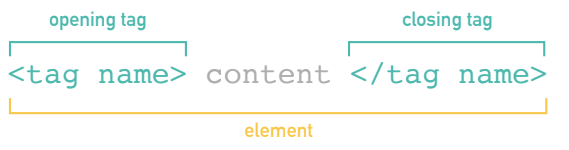
We've talked about HTML tags.
|
|
|
|
- They add structure to a page.
|
|
- Browsers automatically size paragraphs and headings appropriately.
|
|
- Lists are automatically given bullets or numbers.
|
|
|
|
All HTML is formed with tags:
|
|
|
|
|
|
|
|
<aside class="notes">
|
|
|
|
**Teaching Tip:**:
|
|
|
|
- Do a quick check for understanding.
|
|
|
|
</aside>
|
|
|
|
---
|
|
|
|
## We Do: Defining HTML
|
|
|
|
1. Open any webpage.
|
|
2. Right click.
|
|
3. Click "View Page Source."
|
|
|
|
|
|
<aside class="notes">
|
|
|
|
**Teaching Tips:**
|
|
|
|
- Do this with them!
|
|
- Keep the webpage source open on the screen for students to follow down as you dive into the `html`, `header`, and `body` tags.
|
|
|
|
</aside>
|
|
|
|
|
|
---
|
|
|
|
|
|
## HTML Structure: `doctype`
|
|
|
|
```html
|
|
<!DOCTYPE html>
|
|
```
|
|
|
|
- Short for "document type declaration."
|
|
|
|
- ALWAYS the first line of your HTML.
|
|
|
|
- Tells the browser we're using HTML5 (the latest version).
|
|
|
|
*Note: The CodePen did this automatically for us. It did a lot!*
|
|
|
|
<aside class="notes">
|
|
|
|
**Teaching Tip:**
|
|
|
|
- Stress that this has to be there.
|
|
|
|
</aside>
|
|
|
|
|
|
---
|
|
|
|
## HTML Structure: `<html>`
|
|
|
|
`<html>` is the tag for HTML content!
|
|
|
|
- All HTML should be contained inside `<html></html>`.
|
|
- Represents the root of your HTML document.
|
|
|
|
Within our `<html>` tags, we have:
|
|
|
|
- `<head></head>`
|
|
- `<body></body>`
|
|
|
|
```html
|
|
<!DOCTYPE html>
|
|
<html>
|
|
<head>
|
|
</head>
|
|
<body>
|
|
</body>
|
|
</html>
|
|
```
|
|
|
|
<aside class="notes">
|
|
|
|
**Teaching Tip:**
|
|
|
|
- Stress that this has to be there and that this is the structure of every page.
|
|
|
|
</aside>
|
|
|
|
---
|
|
|
|
## HTML Structure: `<head>`
|
|
|
|
- `<head>`: The first tag inside `<html></html>`.
|
|
|
|
- Adds additional, behind-the-scenes content.
|
|
- Is not displayed, but is machine-parsable.
|
|
|
|
```html
|
|
<!DOCTYPE html>
|
|
<html>
|
|
<head>
|
|
< BEHIND THE SCENES HERE! >
|
|
<title>< PAGE TITLE > </title>
|
|
<meta charset="utf-8">
|
|
</head>
|
|
<body>
|
|
</body>
|
|
</html>
|
|
```
|
|
|
|
|
|
<aside class="notes">
|
|
|
|
**Teaching Tip:**
|
|
|
|
- You'll need to explain `charset`. Don't spend a lot of time on this — it really isn't important to them.
|
|
|
|
</aside>
|
|
|
|
---
|
|
|
|
## HTML Structure: `<body>`
|
|
|
|
- `<body>`: The second tag inside `<html></html>`.
|
|
|
|
- Follows `<head></head>`.
|
|
- Contains HTML/content that **will** be displayed to the user.
|
|
- All other HTML will be placed here.
|
|
|
|
|
|
```html
|
|
<!DOCTYPE html>
|
|
<html>
|
|
<head>
|
|
<title>Website Title</title>
|
|
<meta charset="utf-8">
|
|
</head>
|
|
<body>
|
|
<h1>ALL HTML CONTENT GOES HERE!</h1>
|
|
<p>Here's a paragraph with the p tag — this will actually get displayed.</p>
|
|
<h4>Put whatever you want the user to see here!</h4>
|
|
</body>
|
|
</html>
|
|
```
|
|
|
|
|
|
<aside class="notes">
|
|
|
|
**Teaching Tip:**
|
|
|
|
- Note that this is what students will really care about.
|
|
|
|
</aside>
|
|
|
|
---
|
|
|
|
## We Do: Create an HTML Doc
|
|
|
|
- Create a directory called `html_practice`.
|
|
- Create a file called `index.html`.
|
|
|
|
Put this content:
|
|
|
|
```html
|
|
<!DOCTYPE html>
|
|
<html>
|
|
<head>
|
|
<title>Website Title</title>
|
|
<meta charset="utf-8">
|
|
</head>
|
|
<body>
|
|
<h1>ALL HTML CONTENT GOES HERE!</h1>
|
|
</body>
|
|
</html>
|
|
```
|
|
|
|
Double click your file to open it in a browser!
|
|
|
|
|
|
<aside class="notes">
|
|
|
|
**Teaching Tip:**
|
|
|
|
- Check that students have done this and understand.
|
|
|
|
</aside>
|
|
|
|
|
|
---
|
|
|
|
## You Do: Create a Profile
|
|
|
|
Using the tags below, create a profile for yourself in your `index.html`.
|
|
|
|
Include: Name, About Me, and Hobbies.
|
|
|
|
**Put all your HTML and content in between the `<body>` and `</body>` tags.**
|
|
|
|
Common tags you might want to use:
|
|
|
|
- Paragraph: `<p>paragraph</p>`
|
|
- Heading: `<h1>Welcome!</h1>`
|
|
- Lists:
|
|
- Unordered (`<ul>Things I like</ul>`)
|
|
- Ordered (`<ol>1, 2, 3!</ol>`)
|
|
- List items (`<li> </li>`)
|
|
- **Bonus:** Use bold (`<b>bold</b>`).
|
|
|
|
|
|
<aside class="notes">
|
|
|
|
**Teaching Tips:**
|
|
|
|
- Note that students can load this in a browser to see it update.
|
|
- Check that they've done this and understand.
|
|
- They don't need to be HTML experts! They just need to read and write basic tags.
|
|
- Encourage students to experiment with the tags.
|
|
|
|
</aside>
|
|
|
|
---
|
|
|
|
## Example Solution
|
|
|
|
```html
|
|
<!DOCTYPE html>
|
|
<html>
|
|
<head>
|
|
<title>About Me!</title>
|
|
<meta charset="utf-8">
|
|
</head>
|
|
<body>
|
|
<h1>Welcome!</h1>
|
|
<p><b>I'm Sonyl and welcome to my profile!</b></p>
|
|
|
|
<p>Things I Like:</p>
|
|
<ul>
|
|
<li>Animals</li>
|
|
<li>Food</li>
|
|
<li>Sleep</li>
|
|
</ul>
|
|
|
|
<p>My Daily Routine:</p>
|
|
<ol>
|
|
<li>Wake up</li>
|
|
<li>Drink coffee</li>
|
|
<li>Write great code!</li>
|
|
<li>Go to sleep</li>
|
|
</ol>
|
|
</body>
|
|
</html>
|
|
```
|
|
|
|
---
|
|
|
|
## Quick Recap
|
|
|
|
An HTML file looks like this:
|
|
|
|
|
|
```html
|
|
<!DOCTYPE html>
|
|
<html>
|
|
<head>
|
|
<title>Website Title</title>
|
|
<meta charset="utf-8">
|
|
</head>
|
|
<body>
|
|
< Everything the user sees goes here. >
|
|
</body>
|
|
</html>
|
|
```
|
|
|
|
This is the file your browser gets for any webpage you visit, like Google.com!
|
|
|
|
|
|
<aside class="notes">
|
|
|
|
**Teaching Tips**:
|
|
|
|
- Do a quick check for understanding.
|
|
- Encourage students to look up any tags they need to — this isn't an HTML and CSS course. We're giving them enough to style their Flask app, and they can look further into the topics later.
|
|
|
|
</aside>
|
|
|
|
---
|
|
|
|
## Some Tags Need Attributes: Links
|
|
|
|
- What about… [a hyperlink that we want to click and go to another URL?](#)
|
|
|
|

|
|
|
|
- We need to tell the browser where the hyperlink should go.
|
|
|
|
```html
|
|
<a href="Where does this link go?">Clickable text</a>
|
|
<a href="https://google.com">Click here for Google.</a>
|
|
```
|
|
|
|
**We Do:** Add a link to Google in your HTML. Reload!
|
|
|
|
|
|
<aside class="notes">
|
|
|
|
**Teaching Tip:**
|
|
|
|
- Do this with the students. Be sure they understand.
|
|
|
|
</aside>
|
|
|
|
|
|
---
|
|
|
|
## Some Tags Need Attributes: Images
|
|
|
|
- `<img>`: A picture!
|
|
- But what picture? We need to tell the browser. The image needs a source: `src`.
|
|
|
|
```html
|
|
<img src='https://media.giphy.com/media/sWrDT2OqxJ3Fu/giphy.gif'>
|
|
```
|
|
|
|
- Images are special — they have no closing tag!
|
|
|
|
**We Do:** Add this image in your HTML. Reload!
|
|
|
|
|
|
<aside class="notes">
|
|
|
|
**Teaching Tip:**
|
|
|
|
- Do this with the students. Be sure they understand.
|
|
|
|
</aside>
|
|
|
|
|
|
---
|
|
|
|
## Quick Recap
|
|
|
|
Some tags need more information: Where is the link going? What is the image? Give the browser whatever it needs to know.
|
|
|
|
|
|
Don't memorize these!
|
|
|
|
- There are hundreds of tags.
|
|
- You can always:
|
|
- Ask a friend.
|
|
- Ask me!
|
|
- Google "HTML" + what you want to do.
|
|
- E.g., "HTML image"
|
|
|
|
Up next: CSS!
|
|
|
|
<aside class="notes">
|
|
|
|
**Teaching Tip:**
|
|
|
|
- Do a quick check for understanding.
|
|
|
|
</aside>
|
|
|
|
---
|
|
|
|
## Styling: CSS
|
|
|
|
Let's switch gears. We have a structured website.
|
|
|
|
How do we style it?
|
|
|
|
|
|

|
|
|
|
|
|
<aside class="notes">
|
|
|
|
**Teaching Tip:**
|
|
|
|
- Do a quick check for readiness to move on.
|
|
|
|
</aside>
|
|
|
|
|
|
---
|
|
|
|
## CSS
|
|
|
|
CSS means…
|
|
- Cascading Style Sheets.
|
|
- Styling your HTML (e.g., colors, fonts, text sizes).
|
|
|
|
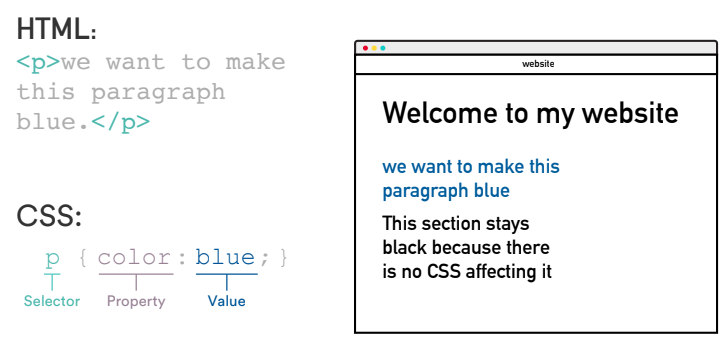
CSS tags match HTML tags.
|
|
|
|
- This rule turns everything with a paragraph tag (`<p>`) blue.
|
|
|
|
|
|
|
|
|
|
<aside class="notes">
|
|
|
|
**Teaching Tip:**
|
|
|
|
- Walk through the syntax here.
|
|
|
|
</aside>
|
|
|
|
|
|
---
|
|
|
|
## CSS Color Property
|
|
|
|
You can set text color with `color`:
|
|
|
|
```css
|
|
p {
|
|
color: red;
|
|
}
|
|
```
|
|
|
|
Color values can be specified using:
|
|
|
|
- Color keyword (e.g., `red`).
|
|
- Hex code (e.g., `#FF0000`).
|
|
- The common way to set colors!
|
|
- Color-pickers online give you the code.
|
|
|
|
|
|
<aside class="notes">
|
|
|
|
**Teaching Tips:**
|
|
|
|
- Again, walk through the syntax.
|
|
- Note that we are not going in detail about colors or CSS options. This is just so students know this exists.
|
|
|
|
</aside>
|
|
|
|
|
|
|
|
---
|
|
|
|
## We Do: CSS Color
|
|
|
|
In the CSS window, add:
|
|
```css
|
|
p {
|
|
color: blue;
|
|
}
|
|
```
|
|
|
|
<iframe height="400px" width="100%" src="https://codepen.io/SuperTernary/pen/KqLEvb?editors=1000?lite=true" scrolling="no" frameborder="no" allowtransparency="true" allowfullscreen="true" sandbox="allow-forms allow-pointer-lock allow-popups allow-same-origin allow-scripts allow-modals"></iframe>
|
|
|
|
|
|
<aside class="notes">
|
|
|
|
**Teaching Tip:**
|
|
|
|
- Do this with the students. Make sure they do it.
|
|
|
|
**CodePen note:**
|
|
```
|
|
<h1>Anna Smith</h1>
|
|
|
|
<h2>About Me</h2>
|
|
|
|
<p>I'm Anna Smith, a developer based in San Francisco. I have 10 years of experience in the graphic design world, specializing in the creation of responsive websites.</p>
|
|
|
|
<h2>Experience</h2>
|
|
|
|
<p>I recently graduated from a Front-End Web Development course at General Assembly, where I learned HTML, CSS, JavaScript, and jQuery and how to be an awesome front-end web developer! During my spare time, I enjoy painting, cooking, and hiking.</p>
|
|
|
|
<h3>Skills</h3>
|
|
|
|
<ul>
|
|
<li>HTML</li>
|
|
<li>CSS</li>
|
|
<li>jQuery</li>
|
|
<li>JavaScript</li>
|
|
<li>Responsive design</li>
|
|
</ul>
|
|
```
|
|
|
|
</aside>
|
|
|
|
---
|
|
|
|
## CSS: Syntax (CTN)
|
|
|
|
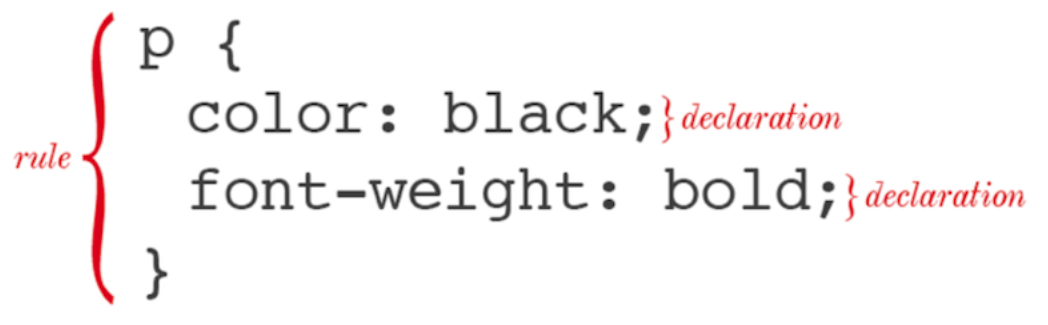
CSS font size:
|
|
|
|
- Sets the size of the font.
|
|
- We'll use pixel values (e.g., `12px`, `16px`).
|
|
|
|
Fun facts:
|
|
|
|
- One selector can have multiple declarations.
|
|
- It's common for each declaration to have its own line.
|
|
|
|
|
|
|
|
|
|
<aside class="notes">
|
|
|
|
**Teaching Tip:**
|
|
|
|
- Walk through the syntax here.
|
|
|
|
</aside>
|
|
|
|
|
|
---
|
|
|
|
## You Do: CSS
|
|
|
|
|
|
In the CSS window, add:
|
|
```css
|
|
p {
|
|
color: blue;
|
|
font-size: 12px;
|
|
}
|
|
```
|
|
|
|
<iframe height='265' scrolling='no' title='HCC U1 - Anna Smith - Starter CSS' src='https://codepen.io/sonylnagale/embed/jeXwaB/?height=265&theme-id=0&default-tab=html,resultundefined&editable=true' frameborder='no' allowtransparency='true' allowfullscreen='true' style='width: 100%;'>See the Pen <a href='https://codepen.io/sonylnagale/pen/jeXwaB/'>HCC U1 - Anna Smith - Starter CSS</a> by Sonyl Nagale (<a href='https://codepen.io/sonylnagale'>@sonylnagale</a>) on <a href='https://codepen.io'>CodePen</a>.
|
|
</iframe>
|
|
|
|
<aside class="notes">
|
|
|
|
**Teaching Tip:**
|
|
|
|
- Show students after they've all done it.
|
|
|
|
**CodePen note:**
|
|
```
|
|
<h1>Anna Smith</h1>
|
|
|
|
<h2>About Me</h2>
|
|
|
|
<p>I'm Anna Smith, a developer based in San Francisco. I have 10 years of experience in the graphic design world, specializing in the creation of responsive websites.</p>
|
|
|
|
<h2>Experience</h2>
|
|
|
|
<p>I recently graduated from a Front-End Web Development course at General Assembly, where I learned HTML, CSS, JavaScript, and jQuery and how to be an awesome front-end web developer! During my spare time, I enjoy painting, cooking, and hiking.</p>
|
|
|
|
<h3>Skills</h3>
|
|
|
|
<ul>
|
|
<li>HTML</li>
|
|
<li>CSS</li>
|
|
<li>jQuery</li>
|
|
<li>JavaScript</li>
|
|
<li>Responsive design</li>
|
|
</ul>
|
|
```
|
|
|
|
</aside>
|
|
|
|
---
|
|
|
|
## Quick Review
|
|
|
|
We can now style elements. We can style any element with a tag!
|
|
|
|
```css
|
|
p {
|
|
color: blue;
|
|
font-size: 12px;
|
|
}
|
|
body {
|
|
color: yellow;
|
|
}
|
|
```
|
|
|
|
<aside class="notes">
|
|
|
|
**Teaching Tip:**
|
|
|
|
- Do a quick check for understanding.
|
|
|
|
</aside>
|
|
|
|
|
|
---
|
|
|
|
## Adding CSS to HTML
|
|
|
|
We have CSS. We need to tell the HTML about it! CodePen's been doing this for us.
|
|
|
|
- Like `<title>`, placed within `<head>` — it's something for the HTML to see, but not the user.
|
|
|
|
```html
|
|
<!DOCTYPE html>
|
|
<html>
|
|
<head>
|
|
<title>Super Awesome Website</title>
|
|
<link rel="stylesheet" type="text/css" href="style.css">
|
|
</head>
|
|
<body>
|
|
```
|
|
- `rel`
|
|
- Specifies the relationship between the current document and the linked document.
|
|
- `type`
|
|
- Specifies the media type of the linked document.
|
|
- `href`
|
|
- Specifies the location of the linked document.
|
|
|
|
<aside class="notes">
|
|
|
|
**Teaching Tip:**
|
|
|
|
- Check for understanding.
|
|
|
|
</aside>
|
|
|
|
---
|
|
|
|
## We Do: HTML With CSS
|
|
|
|
Let's do this.
|
|
|
|
- In the directory with your `index.html`, create `styles.css`.
|
|
- In it, put:
|
|
```css
|
|
p {
|
|
color: blue;
|
|
font-size: 12px;
|
|
}
|
|
body {
|
|
background: yellow;
|
|
}
|
|
```
|
|
|
|
- Save and reload!
|
|
|
|
|
|
<aside class="notes">
|
|
|
|
**Teaching Tip:**
|
|
|
|
- Do this with them. Be sure they understand.
|
|
|
|
</aside>
|
|
|
|
|
|
---
|
|
|
|
## Quick Recap: HTML and CSS
|
|
|
|
HTML structures the page; CSS styles it. The CSS tags match the HTML tags.
|
|
|
|
We put CSS in a separate file and link it to the HTML.
|
|
|
|
```css
|
|
p {
|
|
color: blue;
|
|
}
|
|
```
|
|
|
|
```html
|
|
<!DOCTYPE html>
|
|
<html>
|
|
<head>
|
|
<title>Super Awesome Website</title>
|
|
<link rel="stylesheet" type="text/css" href="style.css">
|
|
</head>
|
|
<body>
|
|
<p>Here's a paragraph the user will see — it will be blue!</p>
|
|
</body>
|
|
</html>
|
|
```
|
|
|
|
This is a crash course. It's a huge topic! We just need the basics.
|
|
|
|
**Up next**: How do we do this with Flask?
|
|
|
|
|
|
<aside class="notes">
|
|
|
|
**Teaching Tip:**
|
|
|
|
- Do a quick check for understanding.
|
|
|
|
</aside>
|
|
|
|
---
|
|
|
|
## We Do: Adding HTML and CSS to Flask
|
|
|
|
Run your `my_website.py` — how does it look right now? Probably not the best…
|
|
|
|
*Reminder: http://localhost:5000/*
|
|
|
|
```python
|
|
from flask import Flask
|
|
app = Flask(__name__)
|
|
|
|
@app.route('/')
|
|
def hello_world():
|
|
return 'Hello, World!'
|
|
|
|
if __name__ == '__main__':
|
|
app.run(debug=True)
|
|
```
|
|
|
|
Flask automatically makes the page structure for us — the `html`, `head`, `body`, `doctype`, etc.
|
|
|
|
**Discussion**: Where does that "return" go? Where could we put our HTML?
|
|
|
|
<aside class="notes">
|
|
|
|
**Teaching Tip:**
|
|
|
|
- Run through this code again to remind students what it does.
|
|
</aside>
|
|
|
|
---
|
|
|
|
## We Do: Add Some HTML
|
|
|
|
Flask can have in-line styling and HTML right in the return!
|
|
|
|
- **Inside** the quotes. The `return` is what goes inside the `body` tag of the HTML.
|
|
|
|
Try this:
|
|
|
|
- Add italic tags around "Hello".
|
|
- Make the whole string an `h1`.
|
|
|
|
```python
|
|
def hello_world():
|
|
# Here,
|
|
# Add
|
|
return '<h1><i>Hello</i>, World!<h1>'
|
|
```
|
|
|
|
What if we have a LOT of HTML?
|
|
|
|
<aside class="notes">
|
|
|
|
**Teaching Tips:**
|
|
|
|
- Do this with the students. Show them the results! Make sure they understand how the webpage is generated.
|
|
- Note to them that as they save the Python file, the app will automatically reload (though it's a bit slow). They don't have to continuously start and stop from the command line.
|
|
- Encourage discussion on each slide to try and get them to guess the next one.
|
|
</aside>
|
|
|
|
---
|
|
|
|
## We Do: Add a LOT of HTML
|
|
|
|
Copy this code over:
|
|
|
|
```python
|
|
def hello_world():
|
|
line1 = "<h1><b>Hello</b> World!</h1>"
|
|
line2 = "<p>If music be the food of love, play on!</p>"
|
|
line3 = "<img src='https://media.giphy.com/media/sWrDT2OqxJ3Fu/giphy.gif'>"
|
|
total = line1 + line2 + line3
|
|
return total
|
|
```
|
|
|
|
Do you think chaining lists is sustainable for a bigger webpage?
|
|
|
|
<aside class="notes">
|
|
|
|
**Teaching Tip:**
|
|
|
|
- Do this with the students. Show them the results! Make sure they understand how the webpage is generated.
|
|
</aside>
|
|
|
|
---
|
|
|
|
## Quick Recap:
|
|
|
|
Flask automatically makes a basic webpage for us. The HTML looks like this:
|
|
|
|
```html
|
|
<!DOCTYPE html>
|
|
<html>
|
|
<head>
|
|
<title>Super Flask Website</title>
|
|
</head>
|
|
<body>
|
|
< What we return in Flask goes here! >
|
|
</body>
|
|
</html>
|
|
```
|
|
|
|
Flask does that automatically — we just need to write the Python code for the `body`.
|
|
|
|
**Up next**: But what if we have a *ton* of code?
|
|
|
|
|
|
<aside class="notes">
|
|
|
|
**Teaching Tip:**
|
|
|
|
- Do a quick check for understanding.
|
|
</aside>
|
|
|
|
---
|
|
|
|
## We Do: External HTML File
|
|
|
|
Create a folder called `templates`.
|
|
|
|
- Flask always looks in a `templates` directory for HTML files.
|
|
|
|
Create a file called `index.html` with some HTML:
|
|
|
|
```html
|
|
<!doctype html>
|
|
<html>
|
|
<head>
|
|
<meta charset="utf-8">
|
|
<title>Movie Search</title>
|
|
</head>
|
|
<body>
|
|
<p>Howdy!</p>
|
|
</body>
|
|
</html>
|
|
```
|
|
|
|
|
|
<aside class="notes">
|
|
|
|
**Teaching Tips:**
|
|
|
|
- Do this with the students.
|
|
- It's just normal HTML!
|
|
- Try not to mention templates — those aren't for a few presentations.
|
|
</aside>
|
|
|
|
|
|
---
|
|
|
|
## We Do: Tell Flask the HTML Exists!
|
|
|
|
How do we import an HTML file?
|
|
|
|
- `render.template`.
|
|
|
|
At the top of your file, add:
|
|
```python
|
|
from flask import Flask, render_template
|
|
```
|
|
|
|
In the `.py`, change your return to `return render_template("index.html")`.
|
|
|
|
- Save the lines you have! Just change the return.
|
|
|
|
Try it!
|
|
|
|
|
|
<aside class="notes">
|
|
|
|
**Teaching Tip:**
|
|
|
|
- Do this with the students. Show them! Check that they understand.
|
|
|
|
**Possible Current Status of Code**:
|
|
```python
|
|
from flask import Flask, render_template
|
|
app = Flask(__name__)
|
|
|
|
@app.route('/')
|
|
def hello_world():
|
|
line1 = "<h1><b>Hello</b> World!</h1>"
|
|
line2 = "<p>If music be the food of love, play on!</p>"
|
|
line3 = "<img src='https://media.giphy.com/media/sWrDT2OqxJ3Fu/giphy.gif'>"
|
|
total = line1 + line2 + line3
|
|
return render_template("index.html")
|
|
if __name__ == '__main__':
|
|
app.run(debug=True)
|
|
```
|
|
|
|
</aside>
|
|
|
|
---
|
|
|
|
## We Do: Expanding the HTML
|
|
|
|
Now all our lines can go in the HTML:
|
|
```html
|
|
<body>
|
|
<h1><b>Hello</b> World!</h1>
|
|
|
|
<p>If music be the food of love, play on!</p>
|
|
|
|
<img src='https://media.giphy.com/media/sWrDT2OqxJ3Fu/giphy.gif'>
|
|
</body>
|
|
```
|
|
|
|
Try it!
|
|
|
|
|
|
<aside class="notes">
|
|
|
|
**Teaching Tip:**
|
|
|
|
- Do this with the students. Show them! Check that they understand.
|
|
</aside>
|
|
|
|
---
|
|
|
|
## Quick Recap:
|
|
|
|
Flask automatically generates the webpage HTML and puts your HTML in the `body` tag — whatever you put in your `return` statement.
|
|
|
|
If your HTML gets to be too long to put in just a function without being confusing, you can make the HTML file yourself and tell Flask to load that.
|
|
|
|
<aside class="notes">
|
|
|
|
**Teaching Tip:**
|
|
|
|
- Do a quick check for understanding.
|
|
</aside>
|
|
|
|
---
|
|
|
|
## We Do: Adding CSS
|
|
|
|
`templates` folder:
|
|
|
|
- Where Flask looks for HTML files.
|
|
|
|
`static` folder:
|
|
|
|
- Where Flask looks for CSS files.
|
|
|
|
---
|
|
|
|
## We Do: Adding CSS
|
|
|
|
Create a `static` folder with a file, `style.css`.
|
|
|
|
Your directory should look like:
|
|
|
|
```
|
|
project_folder
|
|
│
|
|
│ │ my_website.py
|
|
│ │
|
|
│ │
|
|
│ └───templates
|
|
│ │ └─── index.html
|
|
│ │
|
|
│ │
|
|
│ └───static
|
|
│ └───style.css
|
|
```
|
|
|
|
|
|
<aside class="notes">
|
|
|
|
**Teaching Tip:**
|
|
|
|
- Do this with the students; make sure they've done it.
|
|
</aside>
|
|
|
|
---
|
|
|
|
## We Do: Background Color
|
|
|
|
Add this to `style.css`:
|
|
|
|
```css
|
|
body{
|
|
background: #FEDCBA;
|
|
font-family: "Times New Roman", serif.
|
|
}
|
|
|
|
h1 {
|
|
color: #012345;
|
|
}
|
|
```
|
|
|
|
What does it do? Reload your page!
|
|
|
|
What do you think happened?
|
|
|
|
|
|
<aside class="notes">
|
|
|
|
**Teaching Tips**:
|
|
|
|
- Do this with them.
|
|
- See if they can guess why it didn't appear.
|
|
</aside>
|
|
|
|
---
|
|
|
|
## We Do: Importing the CSS
|
|
|
|
We have:
|
|
|
|
- HTML.
|
|
- CSS.
|
|
|
|
Flask knows about:
|
|
|
|
- The HTML.
|
|
|
|
What knows about the CSS?
|
|
|
|
What *should* know about the CSS? How can we do that?
|
|
|
|
|
|
<aside class="notes">
|
|
|
|
**Teaching Tip:**
|
|
|
|
- Encourage a discussion.
|
|
</aside>
|
|
|
|
---
|
|
|
|
## We Do: Putting CSS in the HTML
|
|
|
|
CSS styles HTML docs. We know that!
|
|
|
|
- As we saw earlier, the HTML doc needs to have the CSS link!
|
|
|
|
- In the HTML head, we need to have:
|
|
|
|
```html
|
|
<link rel="stylesheet" href="{{ url_for('static', filename='style.css')}}">
|
|
```
|
|
|
|
The curly braces `{{ }}` call Flask!
|
|
|
|
- "Flask, find `style.css` in `static`."
|
|
|
|
**We Do**: Modify your `index.html`'s `<head>`. Reload your page!
|
|
|
|
<aside class="notes">
|
|
|
|
**Teaching Tips:**
|
|
|
|
- Explain the curly braces!
|
|
- Do this with the students. Make sure they can do it.
|
|
</aside>
|
|
|
|
---
|
|
|
|
## Quick Recap
|
|
|
|
HTML structures pages. We can make a separate HTML file that Flask calls to load, in a `templates` folder.
|
|
|
|
CSS styles pages. We can make a separate CSS file in a `static` folder.
|
|
|
|
We have to tell the HTML file about the CSS file.
|
|
|
|
Flask calls the HTML file, which calls the CSS file.
|
|
|
|
|
|
<aside class="notes">
|
|
|
|
**Teaching Tip:**
|
|
|
|
- Do a quick check for understanding.
|
|
</aside>
|
|
|
|
|
|
---
|
|
|
|
## You Do: Customize Your Page
|
|
|
|
Modify your HTML and CSS files. Here are some ideas:
|
|
|
|
- Try changing the colors in your CSS file.
|
|
- Use `text-align` to `center` the content.
|
|
- Use `text-decoration` to `underline` the `h1`.
|
|
- Use other HTML tags! Can you make a hyperlink using `<a href="<url>">Click here </a>`?
|
|
- Can you add a list using `<ul><li></li></ul>`?
|
|
|
|
|
|
<aside class="notes">
|
|
|
|
5-10 MINUTES
|
|
|
|
**Teaching Tips:**
|
|
|
|
- Give students time to do it; walk around the room.
|
|
- See if anyone wants to share.
|
|
</aside>
|
|
|
|
|
|
---
|
|
|
|
## Example HTML
|
|
|
|
```html
|
|
<!doctype html>
|
|
<html>
|
|
<head>
|
|
<meta charset="utf-8">
|
|
<title>Movie Search</title>
|
|
<link rel="stylesheet" href="{{ url_for('static', filename='style.css')}}">
|
|
</head>
|
|
<body>
|
|
<h1><b>Hello</b> World!</h1>
|
|
|
|
<p><a href="http://www.shakespeare-online.com/plays/twn_1_1.html">If music be the food of love, play on!</a></p>
|
|
|
|
<ul>
|
|
<li>Give me excess of it, that, surfeiting,</li>
|
|
<li>The appetite may sicken, and so die.</li>
|
|
<li>That strain again! it had a dying fall:</li>
|
|
<li>O, it came o'er my ear like the sweet south,</li>
|
|
<li>That breathes upon a bank of violets,</li>
|
|
<li>Stealing and giving odour! Enough; no more:</li>
|
|
<li>'Tis not so sweet now as it was before.</li>
|
|
<li>O spirit of love! how quick and fresh art thou,</li>
|
|
<li>That, notwithstanding thy capacity</li>
|
|
<li>Receiveth as the sea, nought enters there,</li>
|
|
<li>Of what validity and pitch soe'er,</li>
|
|
<li>But falls into abatement and low price,</li>
|
|
<li>Even in a minute: so full of shapes is fancy</li>
|
|
<li>That it alone is high fantastical.</li>
|
|
</ul>
|
|
|
|
<img src='https://media.giphy.com/media/sWrDT2OqxJ3Fu/giphy.gif'>
|
|
</body>
|
|
</html>
|
|
```
|
|
|
|
---
|
|
|
|
## Example CSS
|
|
|
|
```css
|
|
body {
|
|
background: #FEDCBA;
|
|
font-family: "Times New Roman", serif.
|
|
}
|
|
|
|
h1 {
|
|
color: #012345;
|
|
text-decoration: underline;
|
|
text-align: center;
|
|
}
|
|
|
|
```
|
|
|
|
---
|
|
|
|
## Summary
|
|
|
|
- HTML:
|
|
- Structures pages with headings, paragraphs, lists, etc.
|
|
- CSS:
|
|
- Styles pages! E.g., colors, bold, underline, font size.
|
|
|
|
- Adding HTML and CSS to Flask:
|
|
- Use the `template` and the `static` folders.
|
|
|
|
|
|
<aside class="notes">
|
|
|
|
**Teaching Tip:**
|
|
|
|
- Check for understanding; explain next steps.
|
|
</aside>
|
|
|
|
|
|
---
|
|
|
|
## Additional Reading
|
|
|
|
- [MDN Docs on CSS](https://developer.mozilla.org/en-US/docs/Web/CSS/)
|
|
- [MDN Docs on HTML](https://developer.mozilla.org/en-US/docs/Web/HTML)
|
|
- [HTMLDog](http://www.htmldog.com/)
|
|
- [A Tutorial That Gets Into CSS Styling](https://code.tutsplus.com/tutorials/an-introduction-to-pythons-flask-framework--net-28822)
|
|
- [A Bullet List of HTML5 and CSS3 History](http://www.wdtonline.com/wdtMagazine/MemberWorks/WiserWays/csshtml.htm)
|