
You can not select more than 25 topics
Topics must start with a letter or number, can include dashes ('-') and can be up to 35 characters long.
6.3 KiB
6.3 KiB

Pandas Datetime
Learning Objectives
After this lesson, you will be able to:
- Handle timeseries data in Pandas
- Convert dates and times into a Timestamp object using
to_datetime - Specify input and output format arguments
- Extract components, such as year and day, from a
Timestampobject - Create
DatetimeIndexobjects, and understand their advantages - Implement
groupbystatements for specific segmented analysis - Use apply functions to clean data with Pandas
To the Notebook!
We will actually commence this lesson directly in the Jupyter Notebook, pandas-datetime.ipynb, to walk through the what, why, and how all at once.
Here we have slides reviewing the key concepts.
How Do We Handle Timeseries Data (Dates and Times)?
To handle timeseries data, we must:
- Import the data (usually as a string)
- Convert the data into a
Timestampobject - Handle missing values (sometimes)
- Understand how to slice and handle this
Timestampobject
Pro tip: Timeseries information is very common in the financial industry (fintech/trading, etc).
A Note on Delivery
- This unit's lessons will occur in jupyter notebooks
- The slides will be an introduction to the lesson (no code, just overview)
- Then, we'll open a notebook and start coding!
Why use Timeseries Data?
Timestamp objects in pandas allow us to conduct analysis on chronological data.
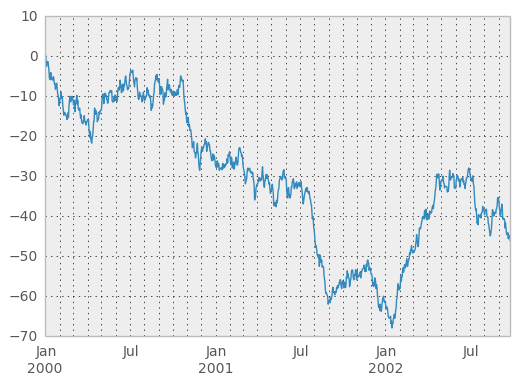
- What's the X axis unit of this chart?
- What's the ordering of the data?
Key Pandas Function for Converting to Timestamp Objects:
Signature: pd.to_datetime(arg, errors='raise', dayfirst=False, yearfirst=False, utc=None, box=True, format=None, exact=True, unit=None, infer_datetime_format=False, origin='unix', cache=False)
Docstring:
Convert argument to datetime.
- Read in the dataset using
pd.read_csv() - Use
pd.to_datetime(df['myColumn']) - The returned
pd.Seriesobject will be converted to a Timestamp object!
Things to Look Out For
to_datetime allows us to convert from string values to datetime values.
- Most of the time, it works very nicely
- At the end of the day, it's just a string parser
- Keep this in mind - always check the output column for
NaTvalues- These are values that
pd.to_datetimeisn't able to convert - Make sure you have elegant, automated ways of handling/flagging these scenarios
- One example may be a separate column flag, and a backfill/forwardfill strategy
- These are values that
Why Does This Matter?

- Storing datetime information in a database (dataframe) as a string:
- is very space inefficient
- doesn't allow us to easily extract information from it (see 3NF image above)
- doesn't allow us to use linear algebra library (numpy!) advantages
- Note: Timestamp (datetime) pandas objects are numpy objects!
Additional Resources
- Pandas documentation
- DataSchool 30-video series (by a former GA instructor!)