
You can not select more than 25 topics
Topics must start with a letter or number, can include dashes ('-') and can be up to 35 characters long.
830 lines
24 KiB
830 lines
24 KiB
<!--
|
|
title: Debugging Principles and Techniques
|
|
type: lesson
|
|
duration: "00:40"
|
|
creator: Brandi Butler
|
|
-->
|
|
|
|
##  {.separator}
|
|
|
|
<h1>Debugging Principles and Techniques</h1>
|
|
|
|
<!--
|
|
|
|
|
|
## Overview
|
|
This lesson is meant to give students the skills needed to debug their own code. There is a mix of demo, You Do, and We Do to keep it fresh while running through many common errors. We throw a lot of errors at them very quickly - the idea is to get them comfortable recognizing errors and solving them, not to memorize them.
|
|
|
|
Then, it guides students in how to use `Try`-`Except` blocks when errors are expected/unavoidable. Last, some time is spent teaching students how to handle situations that are problematic, but don't usually throw errors specifically, including endless loops, off-by-one errors, and logical errors.
|
|
|
|
|
|
#### Helpful Table of Errors
|
|
|
|
| Error Type | Most Common Cause |
|
|
| -------------- | ------------------------------------------------------|
|
|
| AttributeError | Attempting to access a non-existent attribute |
|
|
| KeyError | Attempting to access a non-existent key in a dict |
|
|
| ImportError | A module you tried to import doesn't exist |
|
|
| IndexError | You attempted to access a list element that doesn't exist |
|
|
| IndentationError | Indenting code in an invalid way |
|
|
| IOError | Accessing a file that doesn't exist |
|
|
| NameError | Attempting to use a module you haven't imported/installed |
|
|
| OverflowError | You made a number larger than the maximum size |
|
|
| RuntimeError | The error doesn't fit into any other category |
|
|
| SyntaxError | A typo, such as forgetting a colon |
|
|
| TypeError | Using two different types in an incompatible way |
|
|
| ValueError | When you are trying to convert bad keyboard input to a number |
|
|
| ZeroDivisionError | Dividing By Zero |
|
|
|
|
## Learning Objectives
|
|
In this lesson, students will:
|
|
|
|
* Troubleshoot common types of errors.
|
|
* Implement basic exception mitigation.
|
|
* Troubleshoot logic errors.
|
|
|
|
## Duration
|
|
40 minutes
|
|
|
|
## Suggested Agenda
|
|
|
|
| Time | Activity |
|
|
| --- | --- |
|
|
| 0:00 - 0:03 | Welcome |
|
|
| 0:04 - 0:16 | Recognizing Errors |
|
|
| 0:17 - 0:23 | Exception Handling |
|
|
| 0:24 - 0:37 | Untyped Errors |
|
|
| 0:38 - 0:40 | Summary |
|
|
|
|
|
|
## In Class: Materials
|
|
- Projector
|
|
- Internet connection
|
|
- Python3
|
|
-->
|
|
|
|
|
|
---
|
|
|
|
## Lesson Objectives
|
|
|
|
*After this lesson, you will be able to...*
|
|
|
|
* Troubleshoot common types of errors.
|
|
* Implement basic exception mitigation.
|
|
* Troubleshoot logic errors.
|
|
|
|
<aside class="notes">
|
|
|
|
**Talking Points**:
|
|
|
|
- Reassure them that this won't be awful: it is not really about their problem solving skills so much at this point as it is about getting them to notice the error message and decode what it is saying.
|
|
|
|
</aside>
|
|
|
|
---
|
|
|
|
## Discussion: Error Messages
|
|
|
|
|
|
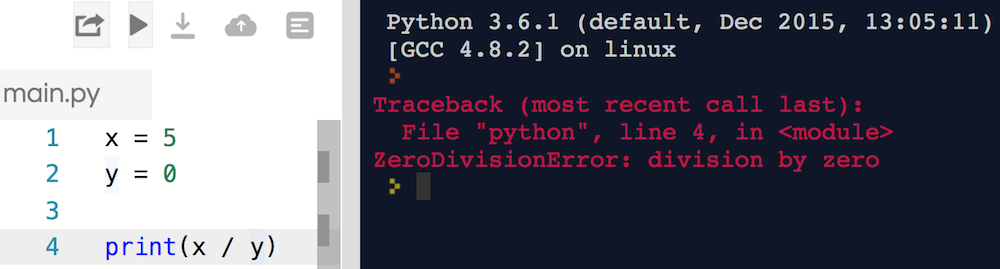
Have you found a shiny red error message before? What do you think has happened here?
|
|
|
|
|
|
|
|
<aside class="notes">
|
|
**Teaching Tips**:
|
|
|
|
- Start a discussion here. What's going on here? What other errors have the students encountered?
|
|
|
|
**Talking Points**:
|
|
|
|
- "How many of you have run your code in a repl.it only to have a bunch of red text pop-up instead of your expected output?"
|
|
- "What do you think is going on here in this image? How could it be fixed?"
|
|
</aside>
|
|
|
|
---
|
|
|
|
## Making Errors Into Friends
|
|
|
|
On the surface, errors are frustrating! However, we'll walk through some common ones. You'll see:
|
|
|
|
- Errors sometimes say exactly what's wrong.
|
|
- Some errors have very common causes.
|
|
- Errors may say exactly how to fix the issue.
|
|
- Python errors are very helpful and have clear messages.
|
|
|
|
With that in mind - what's the problem with this code?
|
|
|
|

|
|
|
|
|
|
<aside class="notes">
|
|
**Teaching Tips**:
|
|
|
|
- We introduce ZeroDivisionError first to start discussion, as just about everyone knows that you can't divide by 0. Ask if the students think Python's error message did a good job of informing us of what the issue was.
|
|
|
|
**Talking Points**:
|
|
|
|
- "Python errors sometimes tell you exactly what to change about your code. For example, we see `ZeroDivisionError: divide by zero`, which is a really clear way to describe the issue."
|
|
- "Compared to other programming languages, Python errors are really nice! Think of them as helpful hints to help you make the best code possible!"
|
|
</aside>
|
|
|
|
|
|
---
|
|
|
|
## We Do: IndexError
|
|
|
|
|
|
Let's debug this code together.
|
|
|
|
<iframe height="400px" width="100%" src="https://repl.it/@GAcoding/python-programming-index-error?lite=true" scrolling="no" frameborder="no" allowtransparency="true" allowfullscreen="true" sandbox="allow-forms allow-pointer-lock allow-popups allow-same-origin allow-scripts allow-modals"></iframe>
|
|
|
|
**Protip**: Index errors typically happen when you attempt to access a list index that doesn't exist.
|
|
|
|
<aside class="notes">
|
|
|
|
**Teaching Tips**:
|
|
|
|
- This is a demo, not an exercise!
|
|
- Teach the students how to read the line number where the error occurred. Remind them that the error often happens on the line *above* the line that threw the error.
|
|
- Make sure that students come up with the solution themselves, but ask leading questions. For example, "Obviously this code isn't working, but by looking at it, can you tell what my intention was? Which element do you think I was trying to access?"
|
|
|
|
**Talking Points**:
|
|
- "Remember that lists are indexed starting at zero!" (maybe show a reminder)
|
|
|
|
**Repl.it Note**: This replit has
|
|
```python
|
|
race_runners = ["Yuna", "Bill", "Hyun"]
|
|
|
|
first_place = race_runners[1]
|
|
second_place = race_runners[2]
|
|
third_place = race_runners[3]
|
|
|
|
print("The winners are:", first_place, second_place, third_place)
|
|
```
|
|
|
|
</aside>
|
|
|
|
---
|
|
|
|
## You Do: Fix a NameError
|
|
|
|
Directions: Fix it!
|
|
|
|
*Hints*:
|
|
- Run the code to get the error.
|
|
- What kind of error is it? What is the error message?
|
|
|
|
<iframe height="400px" width="100%" src="https://repl.it/@GAcoding/python-programming-error-var-name?lite=true" scrolling="no" frameborder="no" allowtransparency="true" allowfullscreen="true" sandbox="allow-forms allow-pointer-lock allow-popups allow-same-origin allow-scripts allow-modals"></iframe>
|
|
|
|
|
|
<aside class="notes">
|
|
|
|
**Teaching Tips**:
|
|
|
|
- Give them just a minute or two; then go over it. This is a new error, but it's an easy one.
|
|
|
|
**Talking Points**:
|
|
- "Let's go back to an error we encountered earlier today!"
|
|
- We most commonly get a `NameError` if we use a variable:
|
|
* Without defining it.
|
|
* *Before* defining it
|
|
|
|
**Repl.it Note**: This replit has
|
|
```python
|
|
# Get a number between 2 and 8.
|
|
my_nums = 5
|
|
|
|
# Print the number
|
|
print(my_num)
|
|
```
|
|
</aside>
|
|
|
|
---
|
|
|
|
## KeyError
|
|
|
|
Accessing a key in a dictionary that doesn't exist.
|
|
|
|
Commonly caused by:
|
|
- A misspelling.
|
|
- Mixing uppercase and lowercase.
|
|
|
|
The error message tells you exactly what key is missing!
|
|
|
|
<iframe height="400px" width="100%" src="https://repl.it/@GAcoding/python-programming-error-key?lite=true" scrolling="no" frameborder="no" allowtransparency="true" allowfullscreen="true" sandbox="allow-forms allow-pointer-lock allow-popups allow-same-origin allow-scripts allow-modals"></iframe>
|
|
|
|
|
|
<aside class="notes">
|
|
Teaching tip:
|
|
|
|
- The repl.it is for you to demo this, not for an exercise.
|
|
- Ask students what they think most commonly causes KeyErrors. Good answers might include case sensitivity in the key names, a typo in the key name, or simply not remembering what keys are available.
|
|
|
|
**Talking Points**:
|
|
|
|
- "KeyError happens when you try to use a key in a dictionary that doesn't exist"
|
|
- "The error message tells you exactly what key threw the error"
|
|
|
|
**Repl.it Note:** It's long; you might want to open it in a new tab. The replit has:
|
|
```python
|
|
my_favorites = {
|
|
"Food": "Lobster Rolls",
|
|
"Song": "Bohemian Rhapsody",
|
|
"Flower": "Iris",
|
|
"Band": "Tom Petty & the Heartbreakers",
|
|
"Color": "Green",
|
|
"Movie": "The Princess Bride",
|
|
"Programming Language": "Python"
|
|
}
|
|
|
|
# This is okay!
|
|
print("My favorite color is", my_favorites["Color"])
|
|
|
|
# This is NOT okay! (Case sensitivity!)
|
|
print("My favorite color is", my_favorites["color"])
|
|
|
|
# This is NOT okay! (Key doesn't exist)
|
|
print("My favorite restaurant is", my_favorites["Restaurant"])
|
|
```
|
|
</aside>
|
|
|
|
---
|
|
|
|
## AttributeError
|
|
|
|
* More general than `KeyError`, but the same idea.
|
|
* Accessing an attribute (e.g., function or property) that doesn't exist
|
|
|
|
<iframe height="400px" width="100%" src="https://repl.it/@GAcoding/python-programming-error-attribute?lite=true" scrolling="no" frameborder="no" allowtransparency="true" allowfullscreen="true" sandbox="allow-forms allow-pointer-lock allow-popups allow-same-origin allow-scripts allow-modals"></iframe>
|
|
|
|
|
|
<aside class="notes">
|
|
Teaching tip:
|
|
|
|
- The repl.it is for you to demo this, not for an exercise.
|
|
|
|
**Talking Points**:
|
|
- "AttributeError is more general than KeyError (which only applies to dict keys), but the same general idea."
|
|
|
|
**Repl.it Note**: The replit has:
|
|
```python
|
|
class Dog():
|
|
def __init__(self, name):
|
|
self.name = name
|
|
|
|
def bark(self):
|
|
print("Bark!")
|
|
|
|
# Declare a new dog instance
|
|
my_dog = Dog("Fido")
|
|
|
|
# Call the bark method
|
|
my_dog.bark() # OK!
|
|
|
|
# Call the run method
|
|
my_dog.run() # AttributeError!
|
|
```
|
|
</aside>
|
|
|
|
|
|
---
|
|
|
|
## Discussion: SyntaxError
|
|
|
|
Let's run the code together. What happens? How can we fix it?
|
|
|
|
<iframe height="400px" width="100%" src="https://repl.it/@GAcoding/python-programming-error-syntax?lite=true" scrolling="no" frameborder="no" allowtransparency="true" allowfullscreen="true" sandbox="allow-forms allow-pointer-lock allow-popups allow-same-origin allow-scripts allow-modals"></iframe>
|
|
|
|
<aside class="notes">
|
|
**Teaching Tips**:
|
|
|
|
- See if they can pick up the answer.
|
|
- Python is different (and better) than other languages in this regard, but it's important to emphasize that = and == are for different purposes!
|
|
|
|
**Talking Points**:
|
|
- "In any other language, (take JavaScript for example), if you accidentally use a single equals when you mean to use a double equals, the variable would be reassigned while inside that if statement and your 13 year old would be having a beer! Luckily the designers of Python knew this and made the choice to throw an error!"
|
|
|
|
**Repl.it Note**: The replit is
|
|
```python
|
|
my_age = 13
|
|
|
|
if my_age = 18:
|
|
print("I may vote.")
|
|
else:
|
|
print("I may not vote.")
|
|
```
|
|
</aside>
|
|
|
|
---
|
|
|
|
## Discussion: TypeError
|
|
|
|
`TypeError` and its message tell us:
|
|
|
|
```python
|
|
my_num = 5 + "10"
|
|
print(my_num)
|
|
# TypeError: unsupported operand type(s) for +: 'int' and 'str'
|
|
```
|
|
|
|
What do we learn from this error message? Have you learned a way to fix this?
|
|
|
|
**Fun Fact**: Some languages, like JavaScript, let this code run (breaking something!).
|
|
|
|
|
|
<aside class="notes">
|
|
|
|
**Talking Points**:
|
|
|
|
* We're trying to combine different types in a way that doesn't make sense
|
|
* The error was caused when using the `+` operator
|
|
* The error was caused by two incompatible types: `string` and `integer`.
|
|
|
|
**Teaching Tips**:
|
|
|
|
- They learned how to do type conversion in the last lesson, so you could point out that they can cast 10 as an int and then this will work.
|
|
|
|
</aside>
|
|
|
|
---
|
|
|
|
## IndentationError
|
|
|
|
May be caused by:
|
|
|
|
* Notenoughindentation
|
|
* Mismatched indentation
|
|
* Mixing tabs and spaces!
|
|
|
|
<iframe height="400px" width="100%" src="https://repl.it/@GAcoding/python-programming-error-identation?lite=true" scrolling="no" frameborder="no" allowtransparency="true" allowfullscreen="true" sandbox="allow-forms allow-pointer-lock allow-popups allow-same-origin allow-scripts allow-modals"></iframe>
|
|
|
|
|
|
<aside class="notes">
|
|
|
|
**Teaching Tips**:
|
|
|
|
- This isn't an exercise - just code to help you demo.
|
|
- This is so common for Python beginners, so it is important to get practice recognizing this!
|
|
- Have students come up with some examples of what might cause an error like this. Answers might include mixing tabs and spaces or indenting too much/too little.
|
|
|
|
|
|
**Talking Points**:
|
|
- "IndentationError comes up for any indentation errors, whether it's too little or just mismatching in some way"
|
|
|
|
**Repl.it Note:** this replit has
|
|
```python
|
|
my_age = 13
|
|
|
|
if my_age == 16:
|
|
print("I may drive.")
|
|
else:
|
|
print("I may not drive.")
|
|
```
|
|
</aside>
|
|
|
|
---
|
|
|
|
## ValueError
|
|
|
|
Most commonly caused by trying to convert a bad string into a number.
|
|
|
|
```python
|
|
# This is okay!
|
|
my_num = int("10")
|
|
|
|
# This throws a ValueError
|
|
my_num = int("Moose")
|
|
```
|
|
|
|
<aside class="notes">
|
|
**Teaching Tips**:
|
|
|
|
- This is pretty straightforward, but pull up a repl.it if you think you need to.
|
|
</aside>
|
|
|
|
---
|
|
|
|
## RuntimeError
|
|
|
|
The worst error to see!
|
|
|
|
* When no other error type fits.
|
|
* You need to rely on the error message content.
|
|
* May be used for custom errors.
|
|
|
|
**Example**: `RuntimeError` is like if I said to you:
|
|
|
|
```
|
|
Please eat the piano
|
|
```
|
|
|
|
You can understand what's being asked, but can't actually do that!
|
|
|
|
|
|
<aside class="notes">
|
|
**Talking Points**:
|
|
|
|
- "Unfortunately this is an error that comes up when no other error type fits the situation. You will need to rely heavily on the content of the error message rather than getting much of a hint from the type alone"
|
|
</aside>
|
|
|
|
|
|
---
|
|
|
|
## Quick Review
|
|
|
|
There are many types of errors in Python!
|
|
|
|
Usually, the error has a name or description that says exactly what's wrong.
|
|
|
|
Think about `IndentationError` or `IndexError` - what went wrong?
|
|
|
|
Sometimes, you'll see `RuntimeError`. Python throws us this if something is broken but it can't say specifically what - like `Please eat the piano`. Revisit your code and see what might have happened.
|
|
|
|
**Next Up:** A list of common errors, then ways to prevent errors.
|
|
|
|
<aside class="notes">
|
|
**Teaching Tips**:
|
|
|
|
- This is a quick check for understanding.
|
|
- See if they can tell you what those two errors mean.
|
|
|
|
|
|
</aside>
|
|
|
|
---
|
|
|
|
## List of Common Errors
|
|
|
|
This chart's for you to refer to later - don't memorize it now!
|
|
|
|
| Error Type | Most Common Cause |
|
|
| --- | ---|
|
|
| `AttributeError` | Attempting to access a non-existent attribute |
|
|
| `KeyError` | Attempting to access a non-existent key in a dict |
|
|
| `ImportError` | A module you tried to import doesn't exist |
|
|
| `IndexError` | You attempted to access a list element that doesn't exist |
|
|
| `IndentationError` | Indenting code in an invalid way |
|
|
| `IOError` | Accessing a file that doesn't exist |
|
|
| `NameError` | Attempting to use a module you haven't imported/installed |
|
|
| `OverflowError` | You made a number larger than the maximum size |
|
|
| `RuntimeError` | The error doesn't fit into any other category |
|
|
| `SyntaxError` | A typo, such as forgetting a colon |
|
|
| `TypeError` | Using two different types in an incompatible way |
|
|
| `ValueError` | When you are trying to convert bad keyboard input to a number |
|
|
| `ZeroDivisionError` | Dividing By Zero |
|
|
|
|
|
|
<aside class="notes">
|
|
Teaching Tip:
|
|
|
|
- Note that students haven't learned all these yet - like modules or accessing files. Don't go down this list in detail - just stress they can refer back to it.
|
|
- Pause and take questions before switching gears.
|
|
|
|
**Talking Points**:
|
|
|
|
- "Here is an alphabetically ordered list of the most common errors you may encounter when writing Python that you can refer back to."
|
|
</aside>
|
|
|
|
---
|
|
|
|
## Discussion: Throwing Errors
|
|
|
|
Sometimes, we might have code that we expect to throw an error.
|
|
|
|
```python
|
|
# The user might not give us a number!
|
|
my_num = int(input("Please give me a number:"))
|
|
```
|
|
|
|
What if the user types a string like "Moose"?
|
|
|
|
- This causes a `ValueError` - we'll be trying to make an int out of a string "Moose".
|
|
- We can anticipate and prepare for it!
|
|
|
|
<aside class="notes">
|
|
|
|
**Teaching Tips**:
|
|
|
|
- Start by making sure they understand what the code does. They've seen `input` a few times, but won't officially learn it for three more lessons; they just learned type casting.
|
|
|
|
**Talking Points**:
|
|
|
|
- "Sometimes you may expect certain code to throw an error, and you may want to handle that situation with a smooth error message as opposed to having your whole program blow up with red text."
|
|
</aside>
|
|
|
|
---
|
|
|
|
## Try-Except
|
|
|
|
A `Try`-`Except` block is the way we can catch errors in Python. We can catch:
|
|
|
|
- One error (`except ValueError:`)
|
|
- Multiple errors (`except (ValueError, KeyError):`)
|
|
- Any/every error (`except:`)
|
|
|
|
Always try to specify the error, if possible!
|
|
|
|
|
|
<iframe height="400px" width="100%" src="https://repl.it/@GAcoding/python-programming-try-except?lite=true" scrolling="no" frameborder="no" allowtransparency="true" allowfullscreen="true" sandbox="allow-forms allow-pointer-lock allow-popups allow-same-origin allow-scripts allow-modals"></iframe>
|
|
|
|
<aside class="notes">
|
|
**Teaching Tips**:
|
|
|
|
- Try / except is new; do this with them. Make this a teaching slide, not an exercise.
|
|
- Demonstrate some example output - strings, ints, floats, etc.
|
|
|
|
**Talking Points**:
|
|
|
|
- Call out that we specifically say "ValueError", and `err` is just a random keyword. Change it to demo. Add other error catches; take out the ValueError specifically.
|
|
- "A Try-Except block is the way we can catch errors in Python."
|
|
- "We can catch one error (as we see in the code), we can catch multiple errors, or we can just catch any/every error by leaving it blank."
|
|
- "You can catch every possible error by leaving the specified error blank, however, this is generally not a great practice because it says very little about how you were thinking."
|
|
|
|
**Replit Note:** The repl.it has
|
|
```python
|
|
my_num = None
|
|
|
|
while my_num is None:
|
|
try:
|
|
my_num = int(input("Please give me a number:"))
|
|
except ValueError as err:
|
|
print("That was not good input, please try again!")
|
|
print("Error was", err)
|
|
|
|
print("Thanks for typing the number", my_num)
|
|
```
|
|
</aside>
|
|
|
|
---
|
|
|
|
## Discussion: Switching Gears
|
|
|
|
Not every programming error is caught by an error message!
|
|
|
|
* Can anyone say what is wrong with this code?
|
|
* What might happen if you run it?
|
|
|
|
**Do not try to run the below code**.
|
|
|
|
```python
|
|
my_num = 1
|
|
|
|
while my_num < 10:
|
|
print(my_num)
|
|
my_num + 1
|
|
```
|
|
|
|
<aside class="notes">
|
|
|
|
**Teaching Tips**:
|
|
|
|
- See if anyone can tell you the problem (it's an infinite loop).
|
|
- Emphasize that an itty-bitty typo - just one character in this case - caused an enormous problem!
|
|
|
|
**Talking Points**:
|
|
|
|
- "Errors and error messages are really helpful when we've got bad syntax or are trying to access something that doesn't exist. However, not every possible programming error is able to be caught by error messages like this."
|
|
- "For example, consider the code here"
|
|
- "Can you tell what the original intention of the code was? What went wrong? Why did the code go into an infinite loop? How can we fix this code?"
|
|
- "There are many errors like this where there is nothing syntactically wrong with the code, but an error in the logic, or a typo that changes the meaning of the code as we saw with the infinite loop."
|
|
</aside>
|
|
|
|
---
|
|
|
|
## Discussion: Another Infinite Loop
|
|
|
|
It's easy to accidentally make an infinite loop. What's the problem here?
|
|
|
|
```python
|
|
am_hungry = True
|
|
fridge_has_food = True
|
|
|
|
while am_hungry or fridge_has_food:
|
|
print("Opening the fridge!")
|
|
am_hungry = False
|
|
```
|
|
|
|
|
|
<aside class="notes">
|
|
**Teaching Tips**:
|
|
|
|
- See if they can figure this out and tell you.
|
|
|
|
**Talking Points**:
|
|
|
|
- "Let's go through another common cause of infinite looping."
|
|
- "Putting 'or' when you mean 'and' is a common cause of pain!"
|
|
</aside>
|
|
|
|
---
|
|
|
|
## Infinite Infinite Loops!
|
|
|
|
Most common infinite loops are a result of:
|
|
|
|
* A `while` loop's condition never becomes `False`.
|
|
* Forgetting to increment a counter variable.
|
|
* Logic inside the loop that restarts the loop.
|
|
* Bad logic in a `while` loop's condition (e.g., putting `or` instead of `and`)
|
|
|
|
Be careful to check your end conditions!
|
|
|
|
If you find your program running endlessly, hit `control-c` in the terminal window to stop it!
|
|
|
|
|
|
<aside class="notes">
|
|
|
|
**Teaching Tips**:
|
|
|
|
- Stress that these are common, and they really have to watch out for it. Show control-c so that they're all clear on what it does. You can use this code:
|
|
|
|
```python
|
|
am_hungry = True
|
|
fridge_has_food = True
|
|
|
|
while am_hungry or fridge_has_food:
|
|
print("Opening the fridge!")
|
|
am_hungry = False
|
|
```
|
|
|
|
**Talking Points**:
|
|
- "There are many, many ways to accidentally create an infinite loop!"
|
|
</aside>
|
|
|
|
|
|
---
|
|
|
|
## Discussion: Logic Error
|
|
|
|
|
|
Here, we want to find the average of `8` and `10`. The answer should be `9`, because `8 + 10 == 18`, then `18 / 2 == 9`
|
|
|
|
What happened and why?
|
|
|
|
<iframe height="400px" width="100%" src="https://repl.it/@GAcoding/python-programming-error-pemdas?lite=true" scrolling="no" frameborder="no" allowtransparency="true" allowfullscreen="true" sandbox="allow-forms allow-pointer-lock allow-popups allow-same-origin allow-scripts allow-modals"></iframe>
|
|
|
|
|
|
<aside class="notes">
|
|
|
|
**Teaching Tips**:
|
|
|
|
- Again, this is a teaching slide, not an exercise. Can they find the error?
|
|
- When they do, write PEMDAS on the board and discuss the order of operations:
|
|
|
|
```
|
|
Parentheses
|
|
Exponents
|
|
Multiplication
|
|
Division
|
|
Addition
|
|
Subtraction
|
|
```
|
|
|
|
|
|
**Replit Note:** The code is:
|
|
```python
|
|
x = 8
|
|
y = 10
|
|
average = x + y / 2
|
|
print(average)
|
|
```
|
|
</aside>
|
|
|
|
---
|
|
|
|
## Quick Review: Common Errors
|
|
|
|
- If you expect an error, use a try/except block:
|
|
|
|
```python
|
|
my_num = None
|
|
|
|
while my_num is None:
|
|
try:
|
|
my_num = int(input("Please give me a number:"))
|
|
except ValueError as err:
|
|
print("That was not good input, please try again!")
|
|
print("Error was", err)
|
|
|
|
print("Thanks for typing the number", my_num)
|
|
```
|
|
|
|
- Logic problems are common but won't throw a helpful error. Always check end conditions on your `while` loops!
|
|
|
|
|
|
<aside class="notes">
|
|
|
|
**Teaching Tips**:
|
|
|
|
- Do a quick check for understanding.
|
|
|
|
</aside>
|
|
|
|
---
|
|
|
|
## Print Statements for Sanity Checks
|
|
|
|
**Pro Tip**: If something is wonky and you don't know why, starting `print`ing.
|
|
|
|
* Use `print` statements on each line to peek at the values.
|
|
* Remember to remove debugging statements once the problem is solved!
|
|
|
|
```python
|
|
x = 8
|
|
y = 10
|
|
get_average = x + y / 2
|
|
print("get_average is", get_average) # Print out what this equals (it's wrong!)
|
|
testing_sum = x + y # To figure out why, break it down.
|
|
print("testing_sum is", testing_sum) # Print out each step.
|
|
testing_average = testing_average / 2
|
|
print("testing_average is", testing_average) # The individual math test works
|
|
# We know there must be a problem with the logic in "average"
|
|
```
|
|
|
|
When your programs become very complex, adding `print` statements will be a great help.
|
|
|
|
<aside class="notes">
|
|
**Teaching Tips**:
|
|
|
|
- Walk through the code and the print statements with the class.
|
|
- Ask them to diagnose what happened
|
|
|
|
**Talking Points**:
|
|
|
|
- "Something went wrong in that last bit of code! You may have already figured out what it is in this example, but in a more complex example, you might not know!"
|
|
- After: "Why do you think splitting up the statement solved the problem?"
|
|
|
|
</aside>
|
|
|
|
|
|
---
|
|
|
|
## You Do: Wrapping it Up
|
|
|
|
|
|
Can you fix the code below?
|
|
|
|
<iframe height="400px" width="100%" src="https://repl.it/@GAcoding/python-programming-error-quiz?lite=true" scrolling="no" frameborder="no" allowtransparency="true" allowfullscreen="true" sandbox="allow-forms allow-pointer-lock allow-popups allow-same-origin allow-scripts allow-modals"></iframe>
|
|
|
|
|
|
<aside class="notes">
|
|
|
|
5 minutes.
|
|
|
|
**Teaching Tips**:
|
|
|
|
- It's quite long; they probably want to open the repl.it in a new window. Remind them how to do that.
|
|
- After 5 minutes or so (pending time), go over it with them.
|
|
|
|
**Repl.it Note::** The code is:
|
|
|
|
```python
|
|
new_phone = Phone(5214)
|
|
|
|
class Phone:
|
|
def __init__(self, phone_number):
|
|
self.number = phone_number
|
|
|
|
def call(self, other_number):
|
|
print("Calling from" self.number, "to", other_number)
|
|
|
|
def text(self, other_number, msg):
|
|
print("Sending text from", self.number, "to", other_number
|
|
print(msg)
|
|
|
|
test_phone = Phone()
|
|
test_phone.call(515)
|
|
test_phone.text(int("text 141"), "Hi!")"
|
|
```
|
|
|
|
</aside>
|
|
|
|
---
|
|
|
|
## Summary and Q&A
|
|
|
|
* Python has many common built-in errors.
|
|
* Use `try`-`except` syntax to catch an expected error.
|
|
* Logic issues don't throw errors, so be careful!
|
|
* Use `print` statements to walk through your code line-by-line.
|
|
|
|
<aside class="notes">
|
|
|
|
**Teaching Tips**:
|
|
|
|
- Check for understanding and wrap up.
|
|
|
|
</aside>
|
|
|
|
---
|
|
|
|
## Additional Resources
|
|
|
|
* [List of Built-In Errors](https://www.tutorialspoint.com/python/standard_exceptions.htm)
|
|
* [Error Flowchart PDF](https://www.dropbox.com/s/cqsxfws52gulkyx/drawing.pdf)
|
|
* [Try-Except Documentation](http://www.pythonforbeginners.com/error-handling/python-try-and-except)
|
|
- [A deep dive into try/except clauses](https://jeffknupp.com/blog/2013/02/06/write-cleaner-python-use-exceptions/)
|
|
- To get advanced, add [logging](https://fangpenlin.com/posts/2012/08/26/good-logging-practice-in-python/) to your code.
|
|
- To get very advanced, include [unit tests](http://www.diveintopython.net/unit_testing/index.html); the [pytest module](http://pythontesting.net/framework/pytest/pytest-introduction/) is great.
|