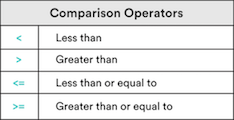
Use comparison and equality operators to evaluate and compare statements.
Use if/elif/else conditionals to control program flow.
Discussion: What Do You Notice?
Consider the following pseudocode for "French toast à la GA."
1) Dip the bread in eggs.
2) Cook the bread for 3 minutes on each side.
Now, consider this:
1) Dip the bread in eggs.
2) If the bread is thicker, dip the bread again until it's soaked through.
3) Cook the bread for 3 minutes.
4) Check if the bread is brown on the bottom. If not, keep cooking the bread.
5) Flip the bread, and repeat steps 3 and 4.
What do you notice?
Saying "Yes" or "No"
- **If** the bread is thicker…
- **If** the bread is brown…
Goal: Programs need to make choices.
To do that, programs need to be able to say, "Is this bread thick? Yes or no?"
Question: How does a computer say "yes" or "no"?
Boolean Values: The Foundation of Programming
"Yes" in computer is True.
"No" in computer is False.
This is the case in every programming language — it's specific to computers themselves.
These are called Boolean values.
Is the bread sliced?
True.
Is the bread brown?
False.
Is 2 larger than 6?
False.
Is 6 larger than 2?
True.
Comparison and Logic in Programming
Now we can say "yes" or "no," but how do we ask the question?
The first way is with comparison operators.
How does a computer decide True or False?
Comparison Types Practice
Check out these comparison operators. Why do you think the last one is False?
Equality Operators: Equality (==)
Accept any two types of data as inputs.
Will only evaluate to True if both sides are completely identical in data type and value.
Equality Operators: Inequality (!=):
Will accept any two types of data as inputs.
The reverse of the equality operator.
Comparison Operators: Knowledge Check
What do you think the following will equal?
8 > 8
8 >= 8
8 <= 15
7 != "7"
6 == 7
6 != 7
"Truthy" and "Falsey"
Something that's True is always true… right?
Yes, I totally cleaned my room. Just don't look under the bed…
Sometimes, we need "truthy" and "falsey." They're not explicitly True or False, but implicitly behave in the same way.
Sometimes, True and False really mean, "Is there anything there?"
"Hello, World!"# A non-empty string: Truthy / True.13# A non-zero number: Truthy / True.""# An empty string: Falsey / False.0# The number 0: Falsey / False.
The Logical Operators: or and and
What if we need to check multiple things that must all be True?
To make a peanut butter and jelly sandwich, we need peanut butter, and jelly, and bread.
Or check multiple things and only one needs to be True?
To make a fruit salad, we only need oranges, or apples, or strawberries.
When comparing, a computer always returns a Boolean value: True or False.
We compare with operators like <, <=, >, >=, ==, and !=.
We can also use the logical operators and and or.
Pro tip: Using only one equal (=) always assigns the variable!
Up next: Conditionals.
Conditionals: if
Do you remember this?
- **If** the bread is thicker…
- **If** the bread is brown…
How can we put that in a program?
ifthebreadisthick# print("Dunk the bread longer!")# No matter what:print("Finished dunking the bread")
if Syntax
ifcondition:# Run these lines if condition is True.# These lines are indented.# Unindented things always happen.
We Do: It's Too Hot In Here
Remember, in a We Do, you follow along!
Our goal: A temperature program that lets us know when it is too hot. We'll be using the Kelvin scale for our temperature.
On your computer, open Atom and create a new file; save it as control_flow.md.
Set up a temperature variable.
Type this; don't just copy! The more practice you have typing it, the easier it will be to remember.
temperature=285print("It's too hot!")
We Do: Add an if Statement
That's not hot! Let's add an if statement:
temperature=285iftemperature>299:print("It's too hot!")
What about a higher temperature? Like 308?
We Do: The else Statement
What about printing a message for when it isn't too hot?
ifcondition:# Do somethingelse:# Do something else
The else block is executed only if the if condition evaluates to False.
Let's try it:
temperature=308iftemperature>299:# If true, run this code block.print("It's too hot!")else:# Otherwise, run this code block.print("It's just right!")
Discussion: Other Cases
What if it's too cold? We need more conditions.
iftemperature>299:# If it is too hot, run this code block.print("It's too hot!")# We want: Else if temperature < 40.# We want: Print that it's too cold .else:# Otherwise, run this code block.print("It's just right!")
What do you think we need?
We Do: The elif Statement
That's where the elif ("else if") statement works its magic.
temperature=288iftemperature>299:print("It's too hot!")eliftemperature<277:print("It's too cold!")else:print("It's just right!")
We Do: Adding More elif
We can have as many elif as we'd like, but only one else.
Let's change this up — remember, type this out for practice.
temperature=308iftemperature>299:print("It's too hot!")eliftemperature<=299andtemperature>288:print("It's just right!")eliftemperature<=288andtemperature>277:print("It's pretty cold!")else:print("It's freezing!")
Thought Exercise
What do you think the following code will print? Why?
Pair with a new partner. Decide who will drive and who will navigate.
Open a new file in Atom; save it as check_even.py.
In it, write a program that prints whether a number is even or odd.
Do you remember how to determine that?
We can use the modulus operator (%) to check the remainder.
Here is some code to get you started:
number=10remainder=number%2# For an even number, print "It's even!"# For an odd number, print "It's odd!"
Partner Exercise: and and or
Switch driver and navigator.
In a file (it can be the same one), write a program that compares two variables and prints out statements accordingly. Start here and follow this:
x=8y=0a="Hello!"b=""# Check if x and b are both True. If they are, print "Both of these are true."# Check if y or a is False. If one is, print "One of these is false."# Check if either x or y is False. If one is, print out "One is false."# Then, only if either x or y is False, check if x is greater than y. If it is, print out "x is greater than y."
Summary: Boolean Values and Operators
We've started control flow — changing what our program does based on a decision. We used:
Boolean values
True and False.
The corresponding "truthy" and "falsey".
Conditional operators
Comparison: <, >, <=, and >=.
Equality: == and !=.
Logical operators: all and or
or evaluates to True if any of the comparisons are True.
and evaluates to True only if all of the comparisons are True.
Summary and Q&A
Then, we went into if and else:
"If your toast is thick, dip the bread for longer, else do not."
if: Use only as the first conditional operator.
elif: Adds multiple comparisons to your if blocks.
else: Use only at the end of your code block, for if the previous conditional tests are False.